


Barebone Glossary Table of contents AGP The AGP (Accelerated Graphics Port) slot on the computer motherboard is designed specifically for AGP graphics cards. AGP 8X can provide 16 times the bandwidth of the common 32-bit PCI slot. AGP is currently being phased out in favor of PCI Express on PC systems. The bus often refers to a data pathway (sometimes called the power pathway) which transfers data (or power) between computer components inside a computer system or between different computers. For example, there is a front side bus to connect the CPU to the chipset, and there is the PCI bus to connect the chipset to PCI devices. In motherboards, the "codec" (Compressor-Decompressor or Coder-Decoder) or "audio codec" refers to the combined audio AD/DA (analog to digital/digital to analog) converter, which is a required hardware for most onboard audio solutions. The CPU socket or slot is the interface of both the processor and the motherboard. The processor's socket type must match the motherboard's CPU socket to be installed properly. For example, an LGA775 processor must be installed on an LGA775 motherboard.
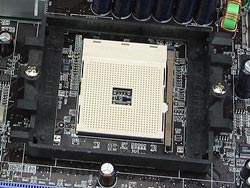
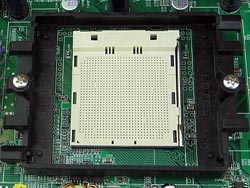
Current AMD Socket 754 processors include the Sempron series and older model Athlon 64 processors. AMD K8 desktop processors such as the Athlon 64, Athlon 64 FX, and Athlon 64 X2 all utilize the Socket 939 socket. And here are the major socket types for contemporary Intel motherboards:
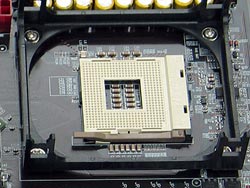
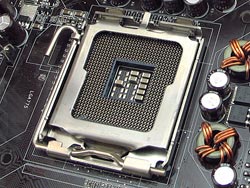
With the exception of certain Pentium 4 & Celeron D models still utilizing the Socket 478, most Intel processor products like the Celeron D, Pentium 4, Pentium D, and Pentium Extreme Edition are currently on the LGA775 socket. DDR DDR (Double Data Rate) SDRAM sends and receives data twice as often as common SDRAM. This is achieved by transferring data on both the rising edge and the falling edge of a clock cycle. Second generation DDR memory provides greater bandwidth and other new features such as On-Chip Termination (OCT). 4 bits of data are moved from the memory array to the I/O buffers (per data line) each core cycle. This can be described as 4-bit prefetch, as opposed to the single-bit fetch in SDRAM and 2-bit prefetch with DDR SDRAM. The most common type of memory module is the DIMM (Dual In-Line Memory Module), which is capable of transferring 64 bits of data per cycle. The memory cells of DRAM (Dynamic Random Access Memory) memory modules require constant refreshing because they utilize both transistors and capacitors. Capacitors lose the values they store as time elapses without refreshing. In the memory system, this describes a motherboard/memory controller with two 64-bit wide channels. When memory is used in dual channel mode, the bandwidth doubles - for instance, dual channel DDR400 provides 6400MB/s (or 6.4GB/s) bandwidth as opposed to 3200MB/s for single channel DDR400. This 15-pin VGA output port finds widespread usage and is responsible for connection to CRT monitors and LCD monitors that support analog input. Digital signals must go through RAMDAC conversion before being sent through the D-Sub port as it is capable of only analog input. DVI (Digital Video Interface) is a display/monitor interface standard. There are three types of DVI: DVI-I (digital and analog), DVI-D (digital only) and DVI-A (analog only). Many current display devices use DVI to receive video signals, such as LCD monitors and projectors. For compatibility with these display devices, most video cards today equip the DVI port as a standard output port. In computing, form factor is an industry term for the size, shape and format of computer motherboards, power supplies, cases, add-in cards and so on. The ATX and BTX form factors are the most prevalent form factors today. Also known by the trademarked names of FireWire and i.LINK, IEEE 1394 is a standard for high-speed transfer of digital information. It is one of the most popular standards for connecting computers and other digital devices to various components and peripherals, such as external hard disk drives, scanners and digital video camcorders. I/O (Input / Output) often refers to the connection or interface between your computer system and other internal or peripheral hardware devices. A LAN (Local-Area Network) is a computer network that connects PCs, workstations or other LANs and networks to enable data and device access and sharing. It is used to cover a small local area such as a home, office or small group of buildings. Current LANs are most likely to be Ethernet (wired) or Wi-Fi (wireless) based. PATA, IDE/EIDE ATA is the acronym for Advanced Technology Attachment, and it has become an industry standard hard drive interface for 15 years. ATA uses a 16-bit parallel connection to make the link between storage devices and motherboards, and is also called PATA (Parallel ATA) to distinguish it from the newer SATA standard. In additional, ATA is also known as IDE or EIDE (Enhanced Integrated Drive Electronics). Currently the two most popular standards for ATA hard drives are the ATA-6 (which is also known as Ultra ATA 100 or Ultra DMA 100) and ATA 133. The maximum bandwidth for the former is 100MB/s, and 133 MB/s for the latter. The PCI (Peripheral Component Interconnect) bus is a computer bus type used to connect computer peripherals. Most PCI buses in a PC system work at 33MHz with a 32bit bit-width. This allows it to deliver a bandwidth of 133MB/s. PCI Express is the latest computer bus following PCI and AGP. PCI Express can come in several physical configurations to offer a variety of maximum bandwidths. For example, the fastest PCI Express x16 configuration is used mainly for graphics card application and provides up to 8GB/s (bi-directional) bandwidth, or 4 times the bandwidth of AGP 8X. At the other end of the spectrum, PCI Express x1 is typically used for other types of peripherals and offers up to 500MB/s (bi-directional) bandwidth. The Personal System/2 or PS/2 was the designation for IBM's second generation of personal computers. The PS/2 keyboard and mouse ports were introduced with it. PS/2 ports connect the keyboard and mouse to a computer and are usually color-coded on today's systems - purple for keyboards and green for mice. Most desktop motherboards still provide PS/2 ports, but an increasing number of keyboards and mice are using USB ports. SATA (Serial ATA) is an interface standard for connecting hard drives to computer systems, and is based on serial signaling technology. The advantages over PATA include longer, thinner cables for more efficient airflow within a computer chassis, fewer pin conductors for reduced electromagnetic interference, and lower signal voltage to minimize noise margin. The bandwidth of SATA is also far improved over today's PATA - the SATA 1.0 can reach a maximum of 1.5Gb/s (150MB/s), while the latest SATA 2.5 standard can support up to 3Gb/s (300MB/s). As a result of so many advantages, the SATA interface is gradually replacing PATA as the mainstream hard drive interface in the personal storage market. The USB (Universal Serial Bus) port is a popular I/O interface used for connecting computers and peripherals or other devices. It is capable of supporting up to 127 daisy-chained peripheral devices simultaneously. The latest USB 2.0 specification can deliver 480Mbps data transfer bandwidth. |


Who We Are
Who We Serve
Customer Service
B2B Marketplace
Newegg Logistics

© 2000-2026 Newegg Business Inc. All rights reserved.
Policy & Agreement | Privacy Policy | CA Transparency in Supply Chains Act | Cookie Preferences