• $26.99
  • Free 30-day Returns
  • Ships from China.

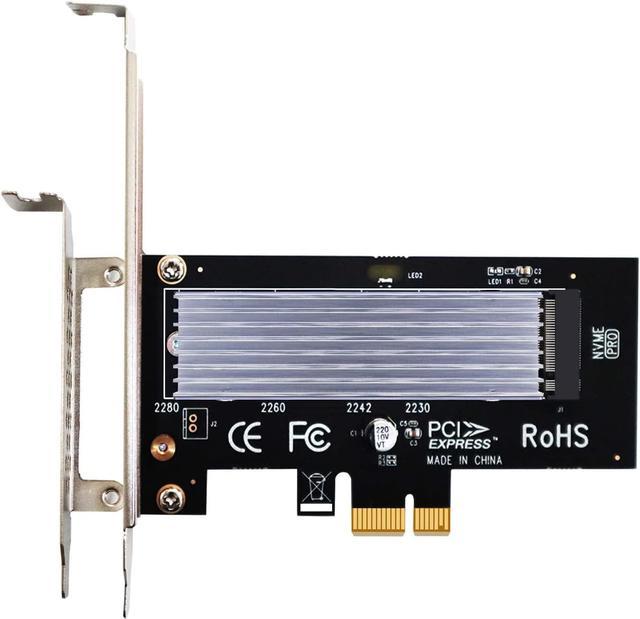
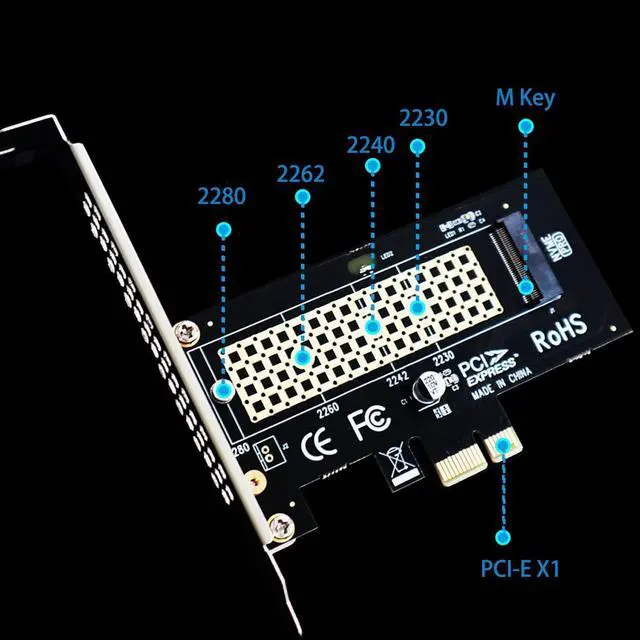
    M.2 PCIe X1 Adapter with M.2 Heatsink for M.2 PCIe 4.0/3.0 SSD (NVMe/AHCI Key M), PCIe X1/X4/X8/X16 Lane Installation, but Only PCIe X1 Bandwidth (PA09-X1-HS)

    • Item #: 9SIV36AKE31830
    • Mfr. Part #: ID-UHPPX66
    • Will not occupy a PCIe X16 graphics card lane, can install on PCIe X1 lane, then you will get an extra M.2 PCIe slot for your motherboard.
    • The disadvantage is only PCIe X1 bandwidth, not PCIe X4 bandwidth.
    • Compatible with PCIe 4.0/3.0/2.0 M.2 PCIe SSD, such as Samsung 980, Pro WD Black SN850, Sabrent Rocket 4 Plus, Sabrent Rocket Q4, Crucial P5 Plus, Samsung 980/ 970 PRO/ 970 EVO Plus/ 970 EVO, etc.
    • Support OS booting from PCIe SSD: Need to reinstall OS, and setup BIOS/UEFI booting from this M.2 PCIe SSD. (Noted: Some motherboards too old to setup OS booting from M.2 PCIe SSD. Additionally, Windows 7 may not support OS booting from M.2 PCIe SSD. In this case M.2 PCIe SSD can be used as storage disk)
    • M.2 PCIe SSD as Storage Disk, widely OS compatibility: Plug and play in Windows 11/10/8/Linux/Mac OS. (Noted: Windows 7 do not have native NVMe driver, so can not support M.2 PCIe SSD). Brand new M.2 PCIe SSD need to be Initialized and formated before PC recognize it.
    • Come with M.2 heatsink
    +
    +
    Overview
    Specs
    Reviews
    M.2 PCI-E X1 Adapter

    If your motherboard only has a free PCI-E X1 slot and you want to install an M.2 PCI-E SSD, PA09-X1-HS can work!

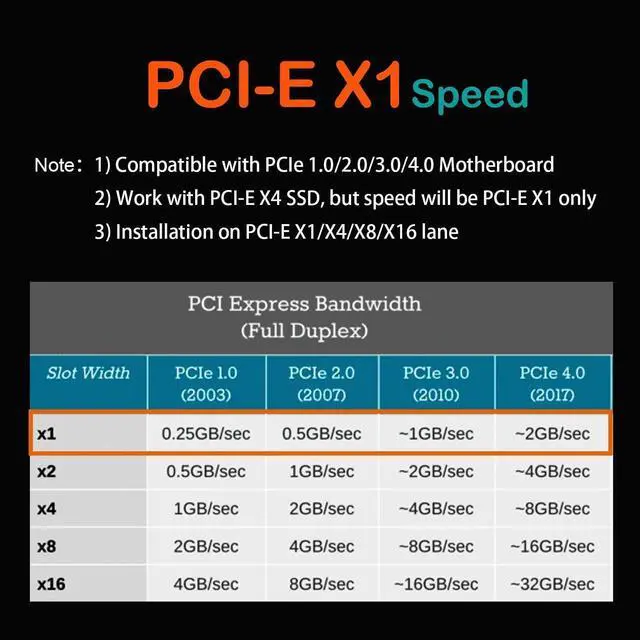
    Unlike PCI-E X4 adapter, PCI-E X1 adapter can work on PCI-E X1 lane, which can also work on PCI-E X4/X8/X16

    But the disadvantage is that the maximum speed is PCI-E X1


    Advantage and Disadvantage

    Advantage: Work with PCI-E X1/X4/X8/X16 lane

    Disadvantage: PCI-E X1 bandwidth


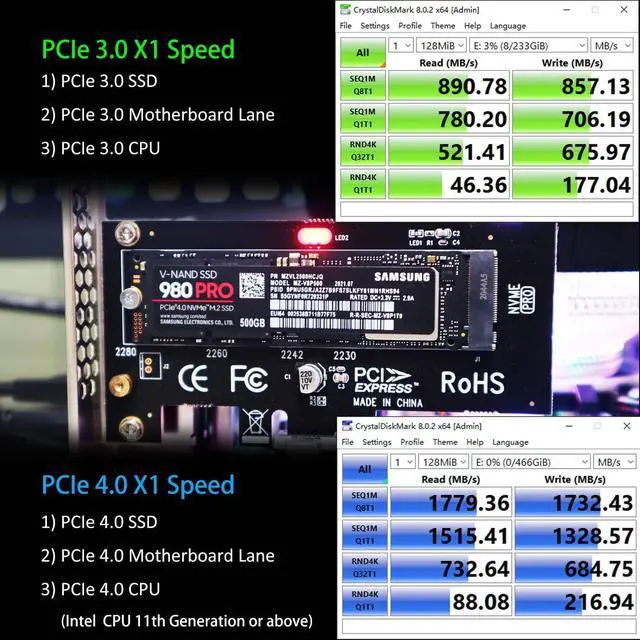
    PCI-E X1 Testing Speed

    With PCI-E 4.0 hardware condition (M.2 PCI-E SSD and motherboard and CPU all supports PCI-E 4.0):

    ~ 2GB/s for PCI-E 4.0 X1

    With PCI-E 3.0 hardware condition (M.2 PCI-E SSD and motherboard and CPU all supports PCI-E 3.0):

    ~ 1GB/s for PCI-E 3.0 X1

    With PCI-E 2.0 hardware condition (M.2 PCI-E SSD and motherboard and CPU all supports PCI-E 2.0):

    ~ 0.5 GB/s for PCI-E 2.0 X1


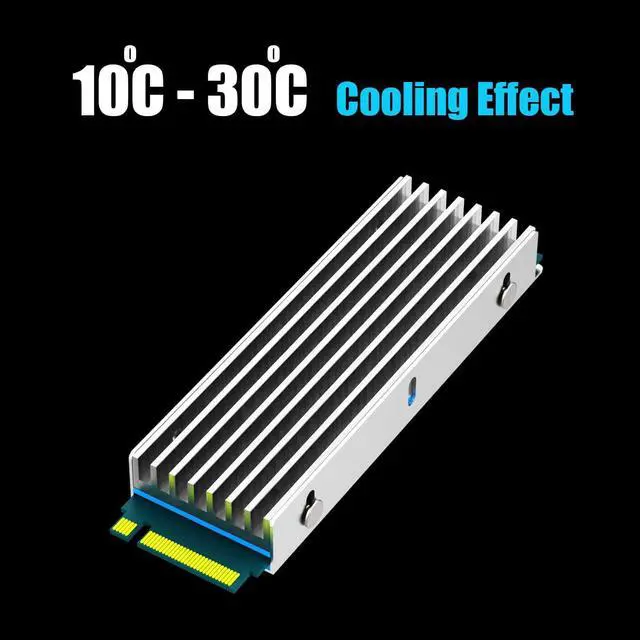
    M.2 Heatsink

    M.2 heatsink and M.2 screws for 2280 M.2 PCIe NVMe SSD, 0.24inch(6mm) Thick Aluminum Body, fit Desktop PC installation.

    Fit for all kinds of M.2 2280 SSD, including M.2 PCIe 4.0 SSD, PCIe 3.0 SSD, and PS5 M.2 PCIe SSD, such as WD Black SN850, Sabrent Rocket 4 Plus, Sabrent Rocket 4, Samsung 980 Pro, Samsung 970 Pro, Silicon Power US70, and etc.

    10°C- 30°C cooling effect to cool down high-speed M.2 PCIe SSD. Your NVMe SSD will not overheat due to prolonged operation, thus shortening the life of the valuable SSD.


    Installation

    Tear off the transparent protective film of the thermal pad;

    Place the first thermal pad on the stainless steel cover;

    Place the M.2 PCIe NVMe SSD on the thermal pad;

    Place the second thermal pad on the M.2 PCIe NVMe SSD;

    Place the heatsink on the second thermal pad;

    Securing the heatsink with 4 screws.

    Warranty & Returns

    Warranty, Returns, And Additional Information

    Warranty

    • Please contact the Seller directly for warranty information. Warranty information may also be found on the Manufacturer's website.
    • CONTACT

    Return Policies

    Manufacturer Contact Info

    LOADING...