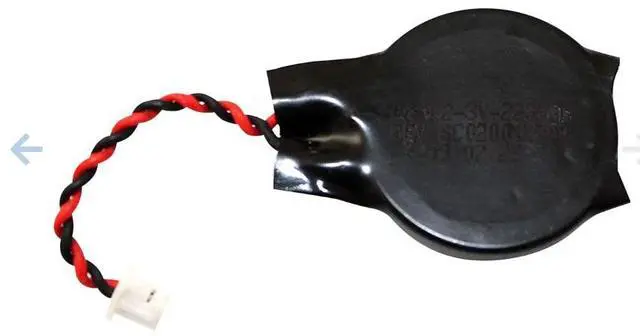
L17255-001 CMOS BIOS Battery 3-Pack Replacement for HP EliteBook 850 G3 G5 G6 G8 Series
PLEASE CONFIRM COMPATIBILITY BEFORE ORDERING
This 3-pack of CMOS batteries is designed as a direct replacement for HP EliteBook 850 series laptops experiencing BIOS-related errors or system time retention issues. Each battery replaces the original OEM part number L17255-001 with identical specifications and connector layout. This multi-pack gives you three batteries use one now and keep two as spares for future maintenance.
Overview
If your HP EliteBook displays error messages like Systems battery error, System CMOS checksum bad, or Real-Time Clock Error during startup, the CMOS battery has likely failed. This replacement battery restores proper BIOS functionality, preserves system configuration, and maintains accurate system time even when the main battery is removed or depleted.
Technical
Specifications
Specification Detail
Part Number L17255-001
Battery Type RTC / CMOS BIOS Backup Battery
Battery Chemistry CR2032 Lithium
Voltage 3V
Capacity 220 mAh
Connector 2-Wire, 2-Pin
Shape Button cell
Service Life Up to 10 years
Condition Brand New Aftermarket Replacement
Warranty 1 Year
Compatible Laptop Models
HP EliteBook 800 Series
EliteBook 840 G5, G6
EliteBook 850 G3, G5, G6, G7, G8
EliteBook 855 G7, G8
EliteBook 745 G5, G6
EliteBook 755 G5
EliteBook 846 G5
HP ZBook Series
ZBook 15u G5
Note: This battery is also compatible with other HP business laptops using the L17255-001 CMOS battery. Please check your original battery part number to confirm compatibility.
Common Error Codes Fixed
Systems battery error
System CMOS checksum bad
System Timer error
Real-Time Clock Error
Date and time resetting after shutdown
BIOS settings not being saved
Installation Notes
Power down completely Shut down the laptop and disconnect the AC adapter before installation
Remove the bottom cover Follow your models service manual for proper disassembly
Disconnect the main battery For safety, disconnect the main laptop battery cable from the system board
Remove the SSD Remove the solid-state drive to access the RTC battery area
Disconnect the old battery Disconnect the RTC battery cable from the system board
Remove the old battery Use a flat tool to pry the battery from the holder
Install the new battery Connect the new L17255-001 battery to the 2-pin connector and secure it in the holder
Reassemble and test Reconnect the main battery, reassemble the laptop, power on, and check for error messages
Professional installation is recommended if you are not experienced with laptop disassembly. Please refer to the HP Hardware Maintenance Manual for your specific model.
Whats Included
3 x L17255-001 CMOS BIOS Battery (3V, 2-Wire, 2-Pin)
Why Choose This 3-Pack
Guaranteed to work Direct replacement for OEM L17255-001
No memory effect Reliable performance over extended use
High capacity 220 mAh for long-lasting BIOS backup power
Fixes common errors Eliminates CMOS-related system errors
Easy installation Simple 2-pin connector for plug-and-play replacement
Affordable alternative Cost-effective solution compared to motherboard replacement
3 batteries included One for immediate use, two for future needs