


Meet Your Seller




2x2 HDMI KVM Matrix Switch 2 in 2 Out, Dual Monitor HDMI + USB-C 4K @60Hz KVM Switch 2 Monitors 2 Computers, with Keyboard, Mouse Output and 2 USB 3.0 Ports, PC Monitor Keyboard Mouse Switcher
- Item #: 9SIVTKKM9R9131
- Mfr. Part #: OZK1#Q2355_B
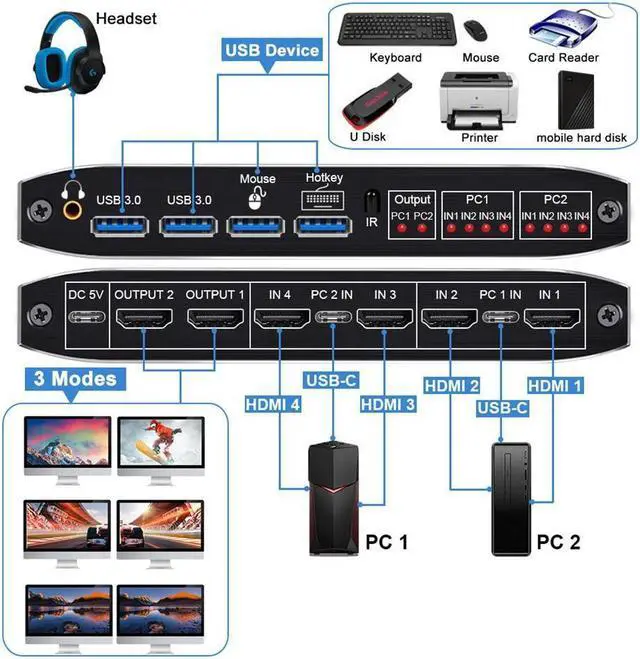
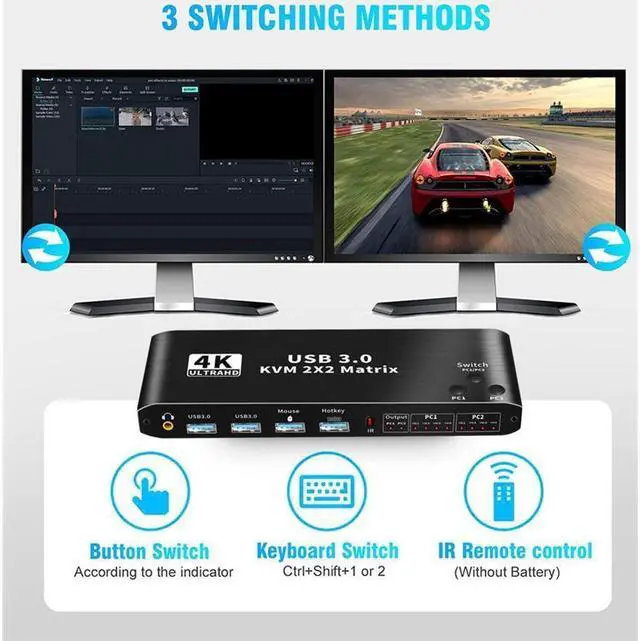
- [HDMI 2.0b and HDCP 2.3] 4K@60Hz 1080@120/144Hz HDMI KVM USB 3.0 Matrix 2 in 2 out dual monitor,support RGB 8:8:8(7.1CH Dolby Atmos),support mirror, extended and crisscross mode,support One-button switch, Hot key control and IR remote control.
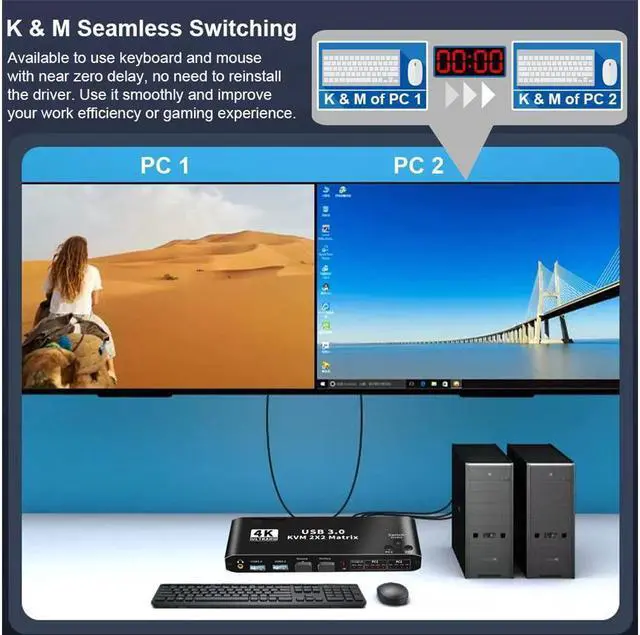
- [HDMI KVM USB Matrix dual monitor]: KVM Matrix allows control 2 computer with one set of controls (keyboard and mouse) and two display screen. Realizes 2 in and 2 out free selection synchronous switching. You can centrally control and manage hosts laptop or game console without having to move from one workstation to another.
- [UHD 4K Visual Enjoyment]: The kvm Switch Matrix supports HDMI2.0b and standard HDCP 2.3. Support max resolution up to 4K@60Hz,1080@144Hz, also support 1080P@120Hz or lower resolution, makes image display more exquisite and realistic.
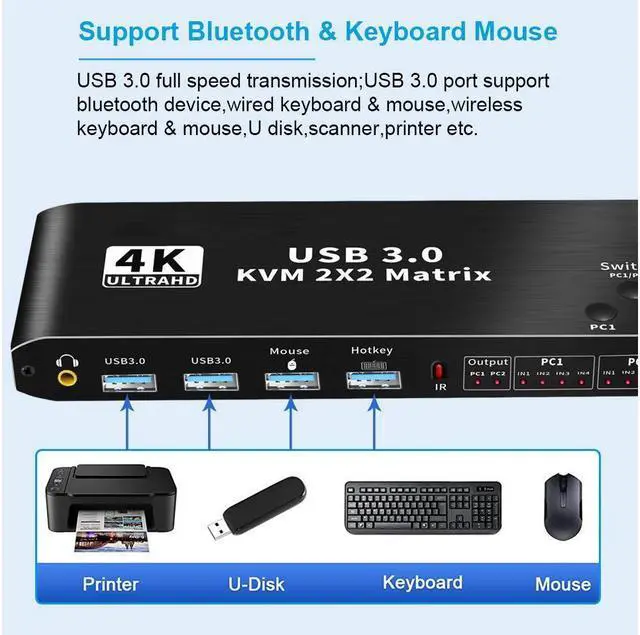
- [Dual HDMI KVM Switch with USB 3.0 Port]- Supports Connecting your USB 3.0 port device such as Scanner/USB driver/3D Printer/Monitor Camera
+
+
Overview
Specs
Reviews
4K HDMI USB KVM Matrix allows you to share one USB keyboard, USB mouse, and two HDMI monitor to control 2 computers, laptops, game consoles.
It is designed for multitask with two computers at your necessary, increasing productivity in the office or at home; You can switch between 2 computers using a manual switch located on the top of the KVM unit.
Product Type: HDMI USB 3.0 KVM Matrix (2 in 2 out)
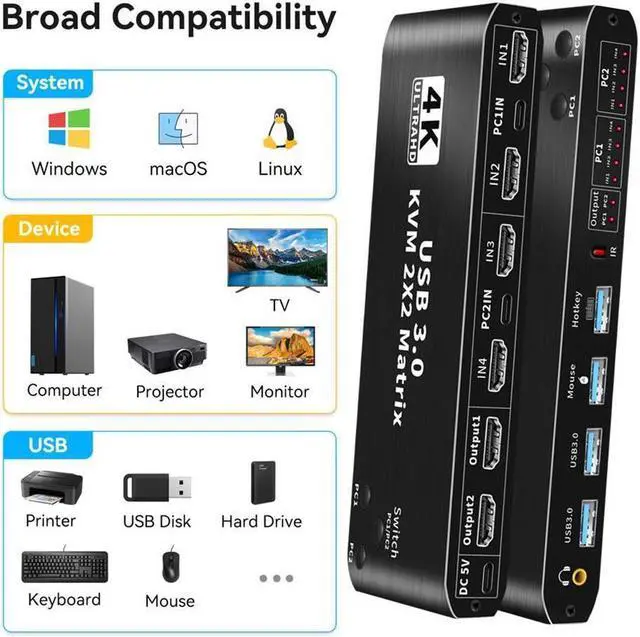
Input Port: HDMI 2.0 x 4, USB-C x2, USB 3.0 x 4
Output Port: 2 x HDMI 2.0, 1 x L/R audio
Dimensions: 176x51x21mm
Material: Aluminum Alloy shellanti-rust, anti-corrosion, anti-interference, fast transmission, surtace oxidation
Features
Support HDMI 2.0 b HDCP 2.3
compliant with DVI to HDMI, DP to HDMI
Resolution: Support 1080P/1080@144Hz, 3840x2160p, 4K/60Hz resolution, adaptive screen resolution
Support system: Windows XP, Windows7, Windows10, Apple MAC, Linux, Unix and other operating systems
Supports high current hard disk devices
Extended / Mirror mode Switching Method:
Press the "Switch(PC 1 / PC 2)" button on the KVM switch panel to switch between the two source devices;
use hotkey switch(Ctrl+Shift+ 1 / 2 to PC1 / PC2 or Ctrl + Ctrl), Ctrl+Shift+ K to turn ON/OFF hotkey;
Crisscross/Matrix Mode Switching Method:
1. Press the "PC 1" Button, OUTPUT 1 is selected by " PC 1", Each time press "PC 1" button, it will switch to HDMI IN 1 / 2 / 3 / 4;
Press the "PC 2" Button, OUTPUT 2 is selected by " PC 2", Each time press "PC 2" button, it will switch to HDMI IN 1 / 2 / 3 / 4
2. Press the "PC 1" Button, OUTPUT 1 is selected by " PC 1", Use IR remote control to press " 1" "2" "3""4"button, it will switch to HDMI IN 1 / 2 / 3 / 4;
Press the "PC 2" Button, OUTPUT 2 is selected by " PC 2", Use IR remote control to press " 1" "2" "3""4"button, it will switch to HDMI IN 1 / 2 / 3 / 4.
Highly integrated digital chip combination, plug and play
Package contents
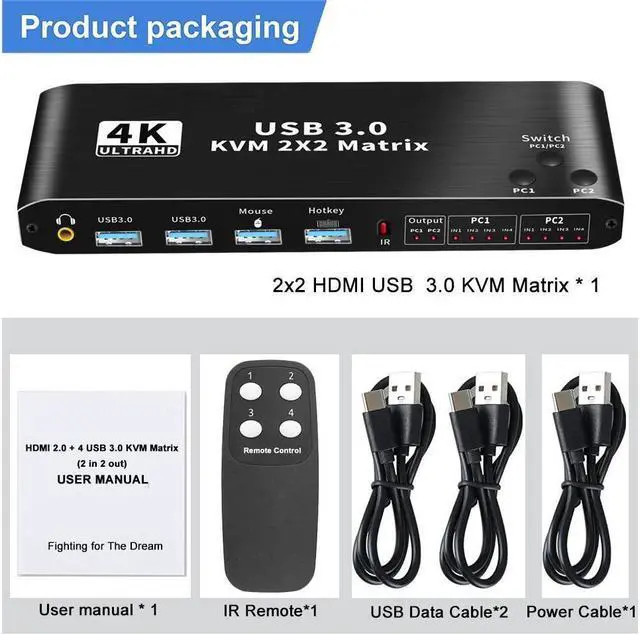
1 x HDMI KVM USB Matrix
2 x USB data cable
1 x USB power cable
1 x IR Remote Control (Without AAA battery)
1 x User Manual
It is designed for multitask with two computers at your necessary, increasing productivity in the office or at home; You can switch between 2 computers using a manual switch located on the top of the KVM unit.
Specifications
:Product Type: HDMI USB 3.0 KVM Matrix (2 in 2 out)
Input Port: HDMI 2.0 x 4, USB-C x2, USB 3.0 x 4
Output Port: 2 x HDMI 2.0, 1 x L/R audio
Dimensions: 176x51x21mm
Material: Aluminum Alloy shellanti-rust, anti-corrosion, anti-interference, fast transmission, surtace oxidation
Features
Support HDMI 2.0 b HDCP 2.3
compliant with DVI to HDMI, DP to HDMI
Resolution: Support 1080P/1080@144Hz, 3840x2160p, 4K/60Hz resolution, adaptive screen resolution
Support system: Windows XP, Windows7, Windows10, Apple MAC, Linux, Unix and other operating systems
Supports high current hard disk devices
Extended / Mirror mode Switching Method:
Press the "Switch(PC 1 / PC 2)" button on the KVM switch panel to switch between the two source devices;
use hotkey switch(Ctrl+Shift+ 1 / 2 to PC1 / PC2 or Ctrl + Ctrl), Ctrl+Shift+ K to turn ON/OFF hotkey;
Crisscross/Matrix Mode Switching Method:
1. Press the "PC 1" Button, OUTPUT 1 is selected by " PC 1", Each time press "PC 1" button, it will switch to HDMI IN 1 / 2 / 3 / 4;
Press the "PC 2" Button, OUTPUT 2 is selected by " PC 2", Each time press "PC 2" button, it will switch to HDMI IN 1 / 2 / 3 / 4
2. Press the "PC 1" Button, OUTPUT 1 is selected by " PC 1", Use IR remote control to press " 1" "2" "3""4"button, it will switch to HDMI IN 1 / 2 / 3 / 4;
Press the "PC 2" Button, OUTPUT 2 is selected by " PC 2", Use IR remote control to press " 1" "2" "3""4"button, it will switch to HDMI IN 1 / 2 / 3 / 4.
Highly integrated digital chip combination, plug and play
Package contents
1 x HDMI KVM USB Matrix
2 x USB data cable
1 x USB power cable
1 x IR Remote Control (Without AAA battery)
1 x User Manual
Warranty & Returns
Warranty, Returns, And Additional Information
Warranty
- Please contact the Seller directly for warranty information. Warranty information may also be found on the Manufacturer's website.
- CONTACT
Return Policies
- Return for refund within: 30 days
- Return for replacement within: 60 days
- This item is covered by Glovibe Tech Return Policy
Manufacturer Contact Info
- For a directory of all our manufacturers, please click below.
- Manufacturers Directory
LOADING...