Product description 16 Port IP KVM VGA 8 Port IP KVM VGA 8 port IP KVM over CAT6 16 port LCD KVM VGA 16 port LCD KVM HDMI 16 port LCD KVM VGA Add to Cart Add to Cart Add to Cart Add to Cart Add to Cart Add to Cart Customer Reviews 3.0 out of 5 stars 1 4.0 out of 5 stars 2 5.0 out of 5 stars 1 4.0 out of 5 stars 2 Price $ 899.00 $899. 00 $1, 299.00 $1, 299. 00 $1, 859.00 $1, 859. 00 $ 799.00 $799.
00 $ 999.00 $999. 00 $ 899.00 $899. 00 LCD X 17'' 17'' 17'' 17.3 '' 19'' Input VGA x16 VGA x8 USB HDMI/VGA to cat5e x16 VGA x16 HDMI x16 VGA x16 Resolution 1920*1440 1280 x 1024 1280 x 1024 1280 x 1024 1080P 1280 x 1024 KVM Cables included 16 VGA KVM cables 8 VGA KVM cables NO, pls search
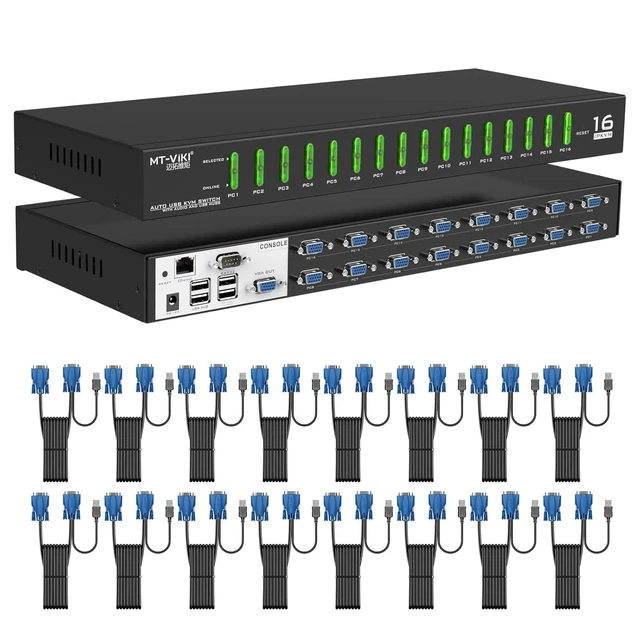
ASIN: B0C4KT3JZ2/B0C4KVKQ12 16 VGA KVM cables 16 HDMI KVM cables 16 VGA KVM cables Switch Mode Button+ Hotkey +OSD+IP control Button+ Hotkey +OSD+IP control OSD Menu, HOTKEY, Push button, IP control. OSD Menu, HOTKEY, Push button Button+ Hotkey +OSD push button + Hotkey + OSD MT-9116UP, this 16 Port rack mount KVM over IP offers cost-effective and secure, local and remote administration of up to 16 servers computer over a LAN or IP address. Features Professional VGA KVM cables included, x 16 packs Remote control over
IP: The convenient and quick remote control function make you work more efficiently and regardless of the distance This 16 port IP KVM switch delivers BIOS level control, full boot processes interaction and control over a TCP/IP connection as if you are on site Resolution up to 1920*1440@60Hz. When switching between computers/servers with different resolutions, the image can be adjusted automatically. 1U standard rack mount installation, metal structure. Support DOS, Win95/ 98/ 98SE/ 2000/ ME/ XP, WinNT, Netware, Unix, Linux.
Four ways for switching: buttons, hotkeys, OSD menu, IP, also support auto switching by preset time 16 Port KVM Switch over IP for Remote Access *If you are in the office next to the data center, you can directly connect the KVM with cat5 network cable (up to 150 meters), and control multiple computers. We call it LAN control here (both client software and Java browser are optional). *If you are not in the data center, on a business trip, or far away, you can control KVM by IP. We recommend using our Windows system software client, which is very convenient and concise. Package of this Rack mount IP KVM Console 1 x IP KVM console 16-ports 16x KVM cables ( 1.5 m/5ft x 8, 1.8 m/6ft x 4, 2.5 m/8ft x 4) ) 1 x CD to install KVM control client 1 x DC 12V power adapter 1 x User manua 1 set Rack Ears We are the professional audio and video manufacturer and provide you with the best service. There are two video showing in this Link about 'how to connect this ip kvm console via LAN or WAN'



 All Categories