INTRODUCTION:
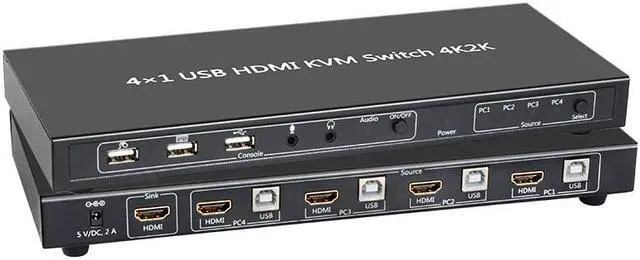
The 4×1 USB HDMI KVM Switch 4K2K shares one HDMI display between four HDMI sources.
FEATURES:
Share an HDTV or display, USB keyboard & mouse, and microphone between 4 USB/HDMI computers and devices
Provides an additional USB 2.0 sharing port with over-current detection and protection
Switch between devices via front push button or hotkey
Supports 4K@30Hz and PC's UXGA 1920×1200 resolutions
Supports Digital Audio formats
HDMI1.4 & HDCP compliant
Video bandwidth: up to 3Gb/s
Metal housing for better RF shielding
PRODUCT OVERVIEW:
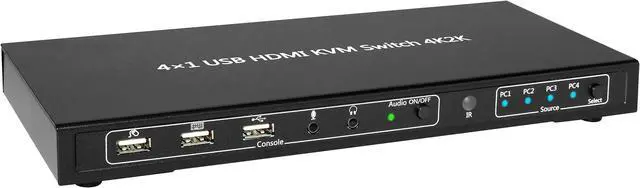
USB Mouse Port: Connect to USB mouse devices
USB Keyboard Port: Connect to USB keyboard devices
USB Ports: Connect to other USB devices
MIC: Connect to microphone
Audio out: Connect to earphone
Audio LED: Audio ON/OFF Indication
Audio Switch: Switch to enable/disable the MIC/Audio out function
Port LED: Indicate which HDMI source is selected
Port Select: Switch between the HDMI sources
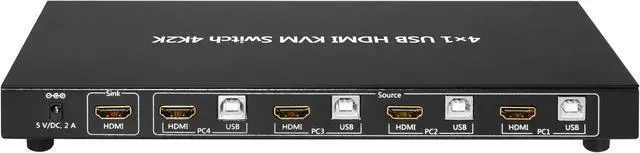
Power Jack: Connect to the included power adapter
HDMI Output: Connect to HDMI Display
HDMI Input: Connect to source device's HDMI
USB Port: Connect to PC's USB port
CONNECTION AND OPERATION:
1. Power off all devices you plan to connect to the 4×1 USB HDMI KVM Switch 4K2K.
2. Connect a monitor/display to HDMI OUTPUT of the switch by an HDMI cable.
3. Connect a USB keyboard and a USB mouse to USB keyboard and Mouse Ports of the switch.
4. Connect the computer's HDMI connector to the switch's INPUT 1 connector using the HDMI cable.
5. Connect the computer's USB port to the switch's PC1 connector (USB Type B) using the included USB cable.