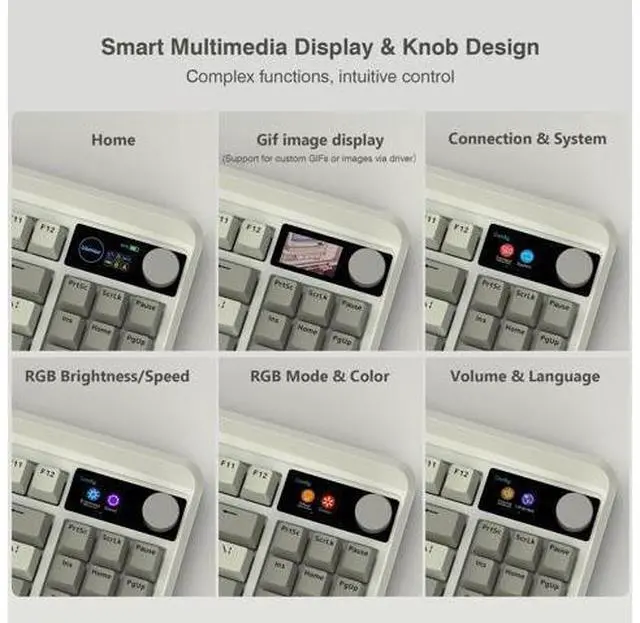
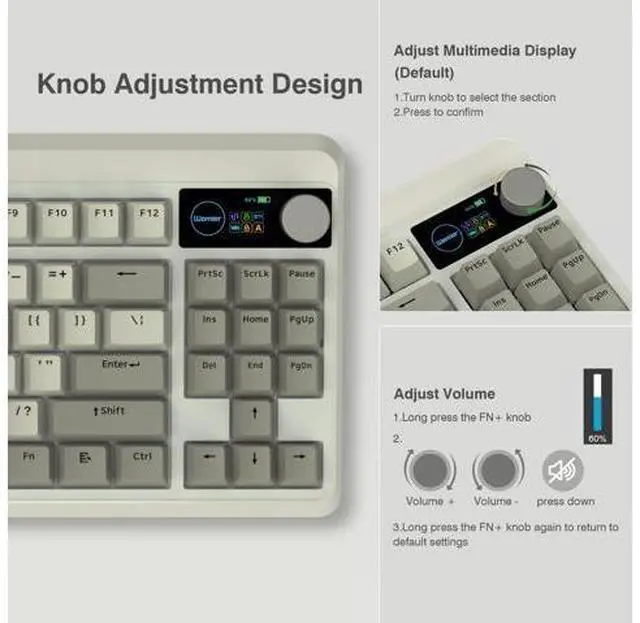
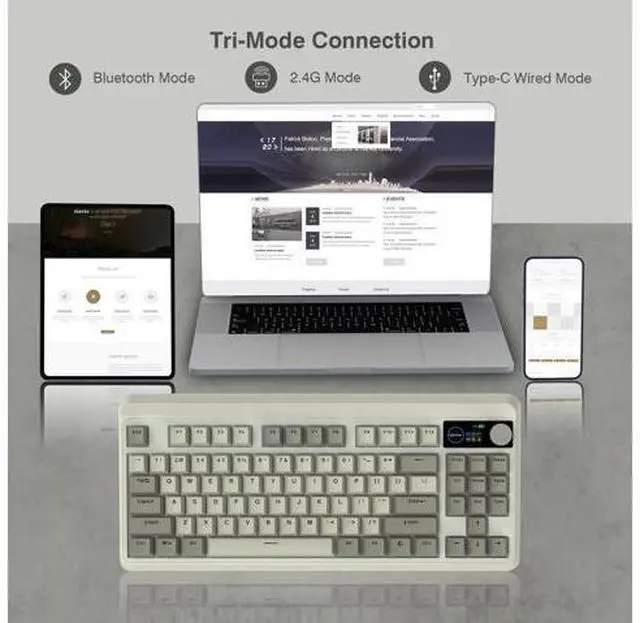
How to use and switch 2.4G hz & BT mode? 2.4G hz mode: Step1. Switch Power On. Step2. Insert the wireless dongle to a USB port on the PC. Step3. Turn the knob to the 2.4G icon, short press the knob to select 2.4G hz mode.
BT mode: Step 1. Switch Power On. Step 2. Turn the knob to select the connection mode and press the knob to confirm it. Step 3. Turn the knob to the BT1 icon, long press the knob to enter BT1 pairing mode, and the display shows "BT1 Pairing". Step 4 Turn on the bluetooth of computer/phone, then connect the device. Previous page Next page 1 Tri-Mode Connection 2 3-Layer Dampening 3 RGB Backlight 4 Pro Driver 5 Outemu White Switch Long Battery Life Built in a 3000 mAh rechargeable battery, last up to 7 days normal use (count 8hrs per day). Adjustable keyboard angles Comes with 1 adjustable keyboard feet which can give you the comfort angle you need for marathon gaming sessions. Womier Mechanical Gaming Keyboard Womier WK75 Womier WK75 Womier WK61 PRO Redragon K742 Redragon K742 Redragon K742 Redragon K742 Customer Reviews Price Layout 75% Layout 75% Layout 60% Layout 98% Layout 98% Layout 98% Layout 98% Layout Connection 2.4G /Bluetooth/Type-C wired 2.4G /Bluetooth/Type-C wired 2.4G /Bluetooth/Type-C wired 2.4G /Bluetooth/Type-C wired 2.4G /Bluetooth/Type-C wired 2.4G /Bluetooth/Type-C wired 2.4G /Bluetooth/Type-C wired Switch Type Hot Swappable Hot Swappable Hot Swappable Hot Swappable Hot Swappable Hot Swappable Hot Swappable Keyboard Switches Linear Switch Linear Switch Linear Switch Linear Switch Linear Switch Linear Switch Linear Switch Backlit RGB RGB RGB RGB RGB RGB RGB DIY Software??????? Previous page About COSTOM Founded in 2018, a sub-brand of Womier, a professional manufacturer integrating design, production and sales of custom keyboards and related peripherals.
We are committed to providing each customer with better service. We focuses on providing our customers with a better user experience. We will bring more customizable theme peripherals products, letting you have fun in mechanical keyboards! What's New M87 Pro Series New TKL Mechanical Keyboards Hot SK65 Mechanical Keyboard Best-seller Keycaps New PBT Keycaps Custom Keycaps Best-seller Keycaps Outlets Deal Carol Sea Theme Peripherals Outlets Deals New Gaming Mouse WK87 Mechanical Keyboard SK65 Aluminum Keyboard M87 Wired Keyboard Mouse Combo G705 Gaming Mouse Custom Keycaps Custom Keycaps Next page How to use and switch 2.4G hz & BT mode? 2.4G hz mode: Step1. Switch Power On. Step2. Insert the wireless dongle to a USB port on the PC. Step3. Turn the knob to the 2.4G icon, short press the knob to select 2.4G hz mode.
BT mode: Step 1. Switch Power On. Step 2. Turn the knob to select the connection mode and press the knob to confirm it. Step 3. Turn the knob to the BT1 icon, long press the knob to enter BT1 pairing mode, and the display shows "BT1 Pairing". Step 4 Turn on the bluetooth of computer/phone, then connect the device. 2 Tri-Mode Connection 3 3-Layer Dampening 4 RGB Backlight 5 Pro Driver 6 Outemu White Switch Long Battery Life Built in a 3000 mAh rechargeable battery, last up to 7 days normal use (count 8hrs per day). Adjustable keyboard angles Comes with 1 adjustable keyboard feet which can give you the comfort angle you need for marathon gaming sessions. Womier Mechanical Gaming Keyboard Womier WK75 Womier WK75 Womier WK61 PRO Redragon K742 Redragon K742 Redragon K742 Redragon K742 Customer Reviews Customer Reviews Customer Reviews Customer Reviews Customer Reviews Customer Reviews Customer Reviews Price Price Price Price Price Price Price Layout Layout Layout Layout Layout Layout Layout 75% Layout 75% Layout 60% Layout 98% Layout 98% Layout 98% Layout 98% Layout Connection Connection Connection Connection Connection Connection Connection 2.4G /Bluetooth/Type-C wired 2.4G /Bluetooth/Type-C wired 2.4G /Bluetooth/Type-C wired 2.4G /Bluetooth/Type-C wired 2.4G /Bluetooth/Type-C wired 2.4G /.
..