WiFi 6 AX200 Module UP To 2974Mbps with Bluetooth 5.1 for Laptop and Desktop | Not Compatible with NGFF CNVIO or CNVIO2 slot
Lighting Fast Speed
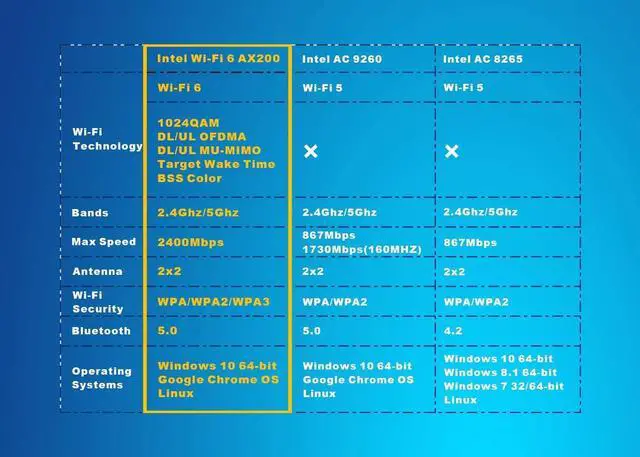
The Wi-Fi 6 AX200 adapter is designed to support the upcoming 11ax standard, supports 2x2 Wi-Fi 6 technology, including UL and DL OFDMA and 1024QAM, delivering data rates upto 2.4Gbps.
The AX200 module can provide Gigabit wireless speed and dramatically improve your connected experience at home, work, or on the go.
Bluetooth 5.1
Bluetooth 5 provides 4x range over Bluetooth 4.2 using the same Tx power, enabling coverage throughout the home. Bluetooth 5 also double data rates speed for faster transmissions thereby reducing the overall power consumption.
Additionally, Bluetooth 5 adds new enhanced data broadcasting enabling seamless services such as location-based services and simpler pairing for Bluetooth devices.
Compatibility
This AX200 module full supports the latest Microsoft Windows 10 64bit OS, as well as Linux.
Support the new 802.11ax standard with its unique features such as OFDMA, 1024QAM, Target Wake Time, 160MHz channels and spatial reuse. Compatible with all the wireless routers and any 11ac or 11n devices.
Compatible with all Intel base CPU, some AMD CPU may have comaptibility issue.
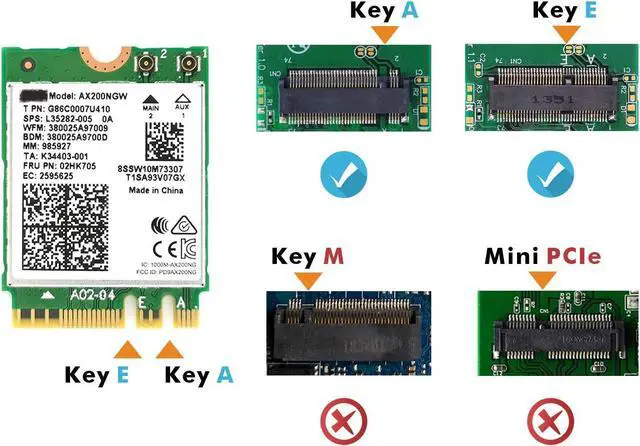
Standard NGFF M.2 Key A or E Slot
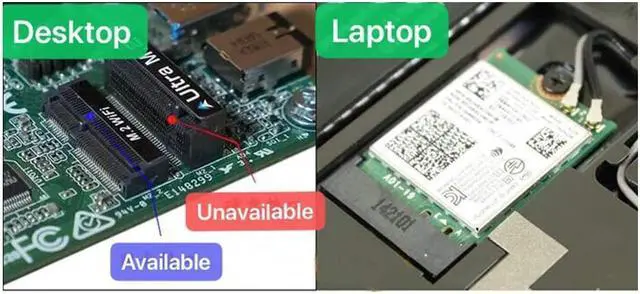
Compatible with any Laptop or Desktop with standard NGFF M.2 Key A or Key E slot. All the Laptops with AC9260, AC8265, AC7265 Wi-Fi module can be replaced with this AX200 module.
Not Compatible with NGFF CNVIO or CNVIO2 slot. Some laptops use AC9560 or AC9642 with NGFF CNVIO, can't be replaced.
Not Compatible with Mini PCIE slot. Some old laptops use AC7260 with Mini PCIe connector, can't be replaced.
Some Laptop‘s hardares are locked by default, need to update the BIOS, it is better to do it under the help of Laptop manufacture.
Easy Setup
It is very easy to replace the Wi-Fi module:
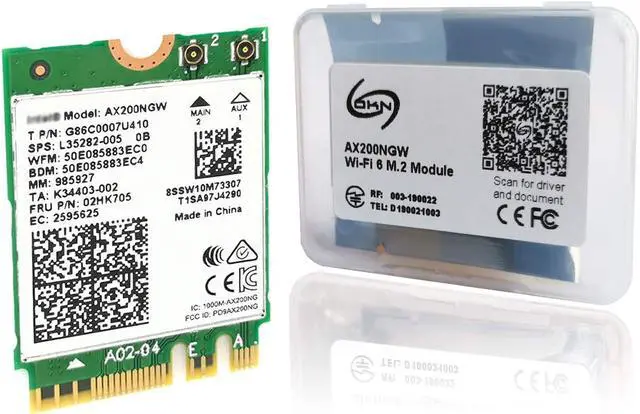
1. Download the latest driver by scanning the QR code on the box.
2. Power off the Laptop, unscreww the screws holding in the bottom of the case, find the old M.2 Wi-Fi card, replace the new card.
3.Install the driver, enjoy the new light fast Internet.
Driver
Download the latest driver by scanning the QR code on the box



 All Categories