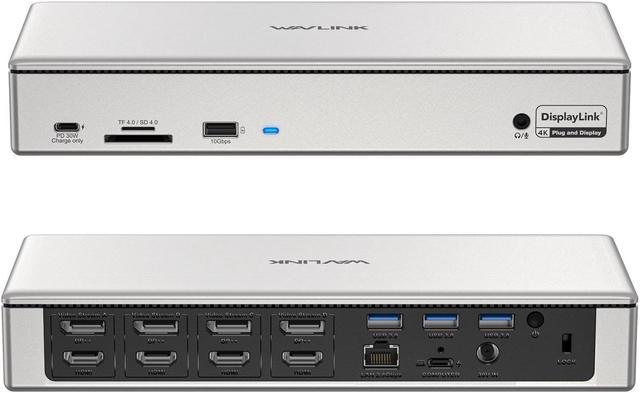
. WAVLINK Quad 5K 4K Enterprise-Level DisplayLink Docking Station
--The ultimate solution for large enterprises and designers seeking to expand their workspace with smooth and efficient multitasking.
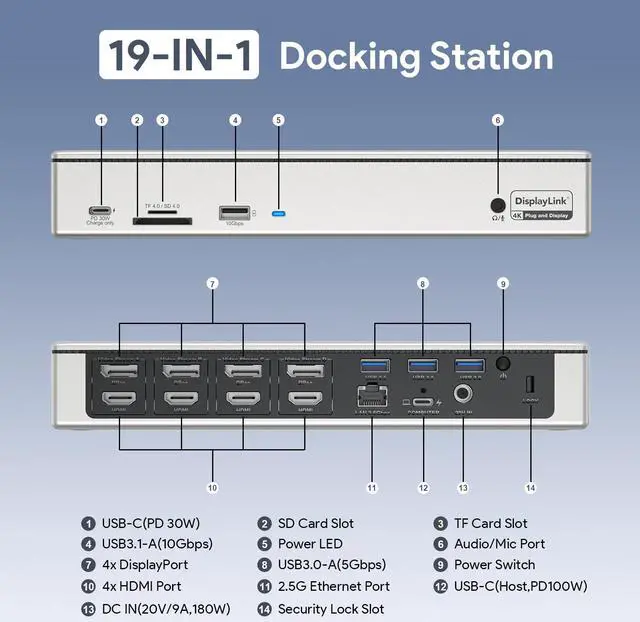
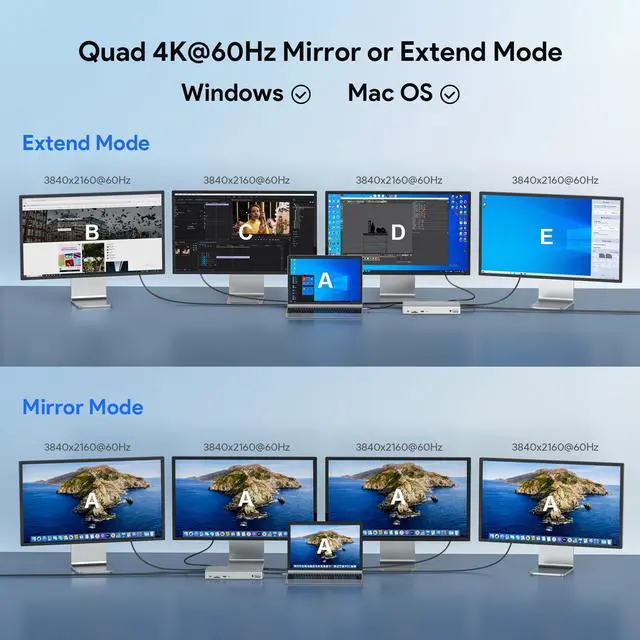
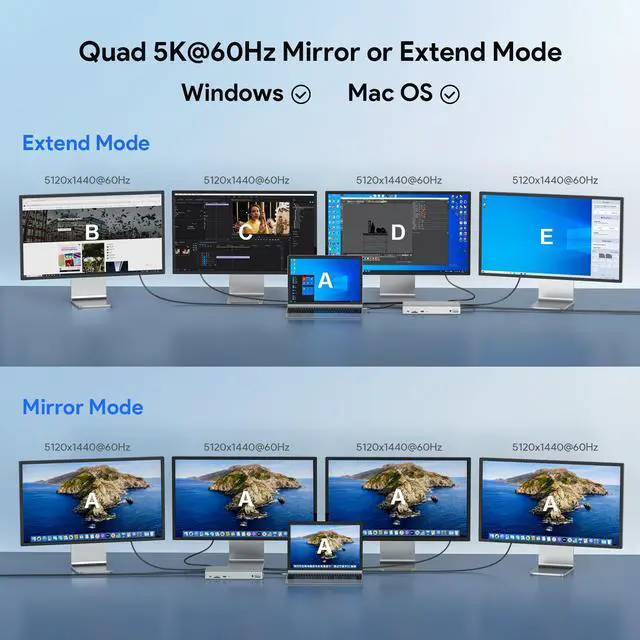
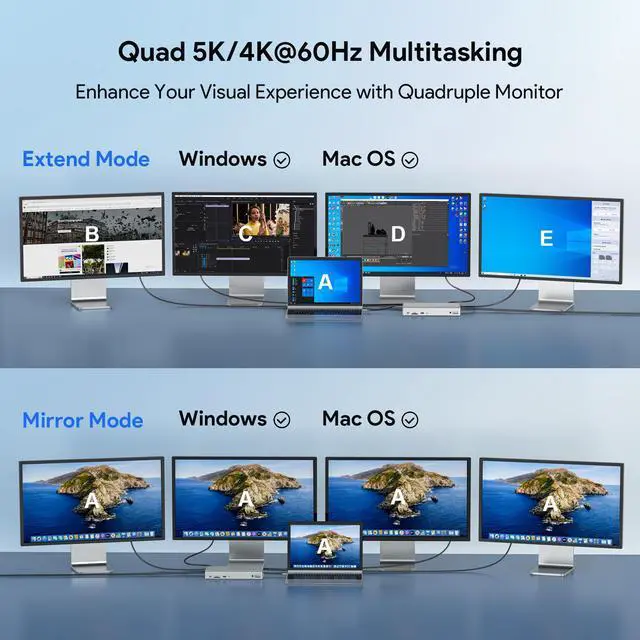
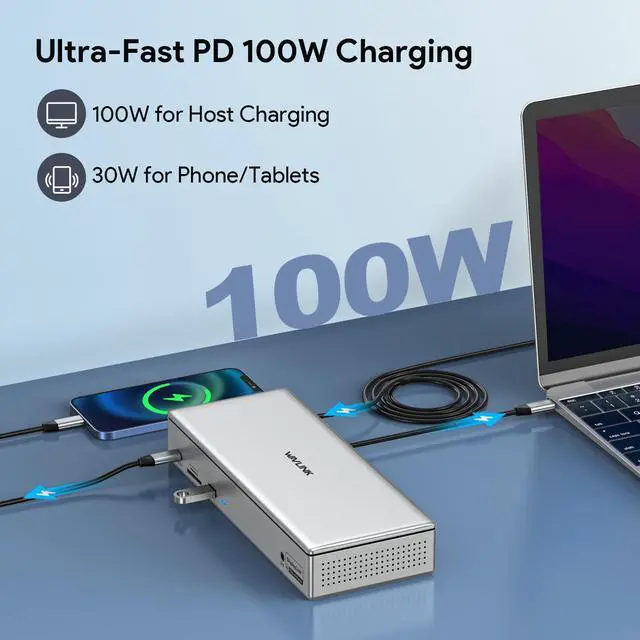
Provides up to 4 displays with crystal-clear resolutions of 5120x1440@60Hz or 3840x2160@60Hz, ensuring unbeatable clarity and detail. Enjoy high-bandwidth networking with speed up to 2.5 Gbps Ethernet, or transfer your media files with lightning-fast 10Gbps USB 3.1 -A, 5Gbps USB 3.0 -A Ports, and 312MB/s SD 4.0 /TF Card Readers. The Type-C connection provides up to 100W(PD 3.0 ) of charging for your computer while transmitting data. For computers without PD functionality, we offer USB-A connections. The USB-C port (PD) provides up to 30W of charging for your tablet, mobile phone, or any USB-C devices that support PD charging.
4-pole earphone jack combo with audio out/mic in for audio capabilities.
Please Check Before Purchase
Confirm that your laptop's type-C port supports charging or the dock will not be able to charge your laptop.
Steps are as follows:
Step 1: Please check the model of your laptop; it should be on the back of the label.
Step 2: Search brand + the model number of the device + manual in Google, for
example: asus ux435 manual.
Step 3: Check the manual, and navigate to the view to check the type-c specification. If it states it supports power delivery, which means it supports charging.
Driver Required Before Use
Please download the latest driver in DisplayLink official website before Use.
Steps are as follows:
Step 1: Access
URL: www. displaylink. com/downloads
Step 2: Choose the corresponding driver of your system, and download & install it.
Step 3: Start use after easy setting.
DisplayLink Chipset
Universally compatible with almost any operating system, the DL-6910 chipset helps to support mirroring or extending quadruple displays at a time, making it an ideal choice for multitasking or adding more workspace.
Perfect for M1/2 Macs
Designed to meet the needs of Macbook users with M1/M2 chips, the dock enables them to connect 4 external monitors with different contentexcellent to expand their workspace and increase their productivity.
Rotation & Clamshell Mode
Quad display capabilities provide crystal-clear visuals to make multitasking a breeze. Our dock also supports both rotation and clamshell modes on Windows, making it versatile enough for any worker's needs.
Please note: Mac users will require Mac OS 12.0 or above to support both display rotation and clamshell mode.
2-In-1 Audio & Mic
Connect your microphone, headphones, or mini stereo to the 4-pole earphone jack while accessing audio files or requiring clear audio capture, making listening, talking, or recording more accessible than ever before.
Security Lock Hole
Simply connect a Kensington lock (not included) to the lock hole included on your device to keep it secured and prevent it from being moved or stolen. Useful for those who travel with their devices or work in public areas.
Optimum Heat Dissipation
Double-sided ventilation holes and anti-dust mesh with a built-in heat sink ensure a stable and efficient performanceworry-free about any overheating or system instability, which further extends the device's service life.
Compatible Systems
-Windows 11/10/ 8.1 /8/7/Vista
-Mac OS 10.14 -13. x and latest
-Android 5.0 or later with USB OTG cable
-Ubuntu 20.04, 22.04
-Chrome OS and Harmony OS
Specification
1.
Model: WL-UG69PD12
2.
Ports (19): 1x DC IN (20V/9A, 180W), 1x USB-C (Host, PD100W), 1 x USB-C (PD 30W), 4x DisplayPort, 4x HDMI, 1x RJ45( 2.5G ), 1 x USB 3.1 -A (10Gbps), 3 x USB 3.0 -A (5Gbps), 1x SD 4.0 Card Slot, 1x TF Card Slot, 1 x Audio/Mic Port
3.
Unit Size: 24x 9.5 x4cm/ 9.4 x 3.7 x 1.6 in ( L x W x H )
4. USB-C to
C/A Cable Length: 100cm/ 39.4 in
Power Adapter Cable Length (plug end): 150cm/59in
Power Adapter Cable Length (round port end): 120cm/47in
5.
Unit Weight: 813g/ 28.7 oz
6.
Housing Material: ABS Plastic
7.
Shell Color: Silver
8.
LED Indicator Color: Blue
In the Box
1 x Quad 4K@60Hz Display Universal Docking Station
1 x 2-IN-1 USB-C to C Cable with USB-A Connector
1 x DC 20V/9A 180W Power Adapter
1 x Cable Holder
1 x Screwdriver
1 x Quick Start Guide
1 x Driver Link Card
Multiple Display Resolution (Max. Resolution)
Notice: Only one video port can be used in the same Video Stream, either a "DP++" or a "HDMI".
1)Single Display:
Video Stream A (HDMI/DP++): 5120x1440@60Hz/3840x2160@60Hz
Video Stream B (HDMI/DP++): 5120x1440@60Hz/3840x2160@60Hz
Video Stream C (HDMI/DP++): 5120x1440@60Hz/3840x2160@60Hz
Video Stream D (HDMI/DP++): 5120x1440@60Hz/3840x2160@60Hz
2)Dual Display:
Video Stream A (HDMI/DP++) + Video Stream B (HDMI/DP++): 2x 5120x1440@60Hz or 2x 3840x2160@60Hz
Video Stream A (HDMI/DP++) + Video Stream C (HDMI/DP++): 2x 5120x1440@60Hz or 2x 3840x2160@60Hz
Video Stream A (HDMI/DP++) + Video Stream D (HDMI/DP++): 2x 5120x1440@60Hz or 2x 3840x2160@60Hz
Video Stream B (HDMI/DP++) + Video Stream C (HDMI/DP++): 2x 5120x1440@60Hz or 2x 3840x2160@60Hz
Video Stream B (HDMI/DP++) + Video Stream D (HDMI/DP++): 2x 5120x1440@60Hz or 2x 3840x2160@60Hz
Video Stream C (HDMI/DP++) + Video Stream D (HDMI/DP++): 2x 5120x1440@60Hz or 2x 3840x2160@60Hz
3)Triple Display:
Video Stream A (HDMI/DP++) + Video Stream B (HDMI/DP++) +
Video Stream C (HDMI/DP++): 3x 5120x1440@60Hz or 3x 3840x2160@60Hz
Video Stream A (HDMI/DP++) + Video Stream B (HDMI/DP++) +
Video Stream D (HDMI/DP++): 3x 5120x1440@60Hz or 3x 3840x2160@60Hz
Video Stream A (HDMI/DP++) + Video Stream C (HDMI/DP++) +
Video Stream D (HDMI/DP++): 3x 5120x1440@60Hz or 3x 3840x2160@60Hz
Video Stream B (HDMI/DP++) + Video Stream C (HDMI/DP++) +
Video Stream D (HDMI/DP++): 3x 5120x1440@60Hz or 3x 3840x2160@60Hz
4)Quadruple Display:
Video Stream A (HDMI/DP++) + Video Stream B (HDMI/DP++) + Video Stream C (HDMI/DP++) +
Video Stream D (HDMI/DP++): 4x 5120x1440@60Hz or 4x 3840x2160@60Hz
Warm Tips
1. Please follow the instructions to download the latest DisplayLink driver from the official website before use.
2. Please keep it connected to the power supply when using this docking station (power adapter included).
3. Only one video port can be used in the same video stream, either a "DP++" or a "HDMI".
4. Please confirm that the type-c port of your laptop supports charging (Power Delivery), or the docking station's host charging function may not work.
5. Suggested for use with web and productivity software; not recommended for gaming, video playback, 2D/3D graphic tools.
6. Does not support HDCP (copy-protected) content playback from Blu-ray/Netflix/Prime/iTunes/Hulu, etc.
7. Does not support iPad OS/Linux



 All Categories