  • In Stock
  • Sold by NeweggBusiness
  • New
Brands
Show More
Price
Show More
Capacity
Interface
Show More
RPM
Show More
Cache
Form Factor
Usage
Show More
Sold by
All Top Brands
Availability
Condition
Discount
Useful Links
Customer Ratings
  • Featured Brands

    See Deals from Western DigitalSee Deals from SeagateSee Deals from SAMSUNG
Sort By:
View:
ST4000NM0023 Seagate 9ZM270 4TB 7200RPM 6Gbps  3.5" SAS HDD Hard Drive
Quick View
  •  
  • $75.00 –
Hewlett Packard Enterprise 1.8TB SAS Hard Drive 10K RPM, 791034-B21
Quick View
  •  
  • $531.75 –
01GV020 01GV021 01LK820 IBM 1.2TB 10000RPM 12Gbps 2.5" SAS HDD Hard Drive
Quick View
01GV020 01GV021 01LK820 IBM 1.2TB 10000RPM 12Gbps 2.5" SAS HDD Hard Drive
  • Model #: 01GV021-01GV020-ST1200MM0009-01LK820-atp
  •  
  • $230.00 –
WTJVY HUS724020ALS640 Dell 2TB 7200RPM 6Gbps NL HS 3.5"SAS HDD Hard Drive W/0 HRS
Quick View
  •  
  • $130.00 –
ST2000NM0033 Seagate CONSTELLATION ES.3 2TB 7.2K 6G 128MB 3.5" SATA Hard Drive
Quick View
  •  
  • $125.00 –
HP 375712-002 72-GB 3G 10K 2.5 SP SAS HDD
Quick View
  •  
  • $96.99 –
HPE 6 TB Hard Drive 3.5" Internal SAS 12Gb/s SAS 861754K21
Quick View
  •  
  • $452.33 –
56M6W ST1000NX0453 Dell 1TB 7200RPM 12Gbps 2.5 "SAS SERVER HDD Hard Drive W/RTray
Quick View
  •  
  • $245.00 –
DELL 400-ATKM 4 TB 3.5" NL-SAS 7200RPM Hard Drive
Quick View
  •  
  • $260.75 –
DRMYH ST4000NM0023 Dell ENTERPRISE 4TB 7.2K 6Gbps 128MB 3.5" SAS HDD Hard Drive
Quick View
  •  
  • $129.95 –
Dell 400-AOWP 600GB 10000 RPM SAS 12Gb/s 2.5" Internal Hard Drive
Quick View
  •  
  • $123.70 –
Dell R95FV 600GB 10000RPM 12Gb/s 2.5" SAS Hard Drive ST600MM0088
Quick View
  •  
  • $55.00 –
WD1003FBYX Western Digital 1TB 7.2K RPM 3Gb/s 3.5" SATA HDD Hard Drive
Quick View
  •  
  • $52.00 –
ST9300603SS Seagate 9FK066-006 300GB 10K RPM 6Gb/s 2.5" SAS HDD Hard Drive
Quick View
  •  
  • $68.00 –
Dell 400-ATIN 600GB 15000 RPM SAS 12Gb/s 2.5" 512n Hot-plug Drive
Quick View
  •  
  • $180.00 –
Dell 0TDNP7 TDNP7 Kioxia 1.92TB RI SAS 12Gb/s 2.5" SSD KPM5XRUG1T92 SDFBE85DAB01
Quick View
  •  
  • $750.00 –
ST4000NM0075 Seagate ENT EXOS 4TB SAS 3.5" 7.2K 12G 4Kn Hard Drive 1Z1207-004
Quick View
  •  
  • $145.00 –

What You Need to Know About Desktop Hard Disk Drives

Introduction

Though SSDs are becoming increasingly more popular, hard disk drives (HDD) are still essential internal data storage solutions for users that prioritize storage capacity over speed. Compared to hard disk drives, SSDs cost more per gigabyte and have smaller storage capacities. A commonly used configuration is to have a solid state drive as the primary drive and a desktop hard disk drive as the secondary drive. Below, NeweggBusiness answers several common questions about desktop hard disk drives.

What does interface type mean?

A hard disk drive must be connected to a motherboard via data cable in order to function as a system drive. The type of data cable that a hard drive supports can affect both system compatibility and data transfer speeds. This is often referred to as connection or interface type, and it is an important factor when shopping for a HDD.

For desktop hard disk drives, one of the most commonly used interface types is SATA. There have been several revisions for the SATA standard and the two most recent are SATA 3 Gbps and SATA 6 Gbps. They are often stylized as SATA II and SATA III respectively.

What is seek time?

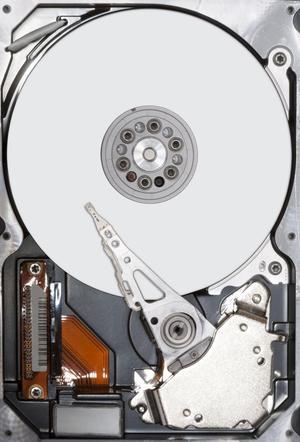
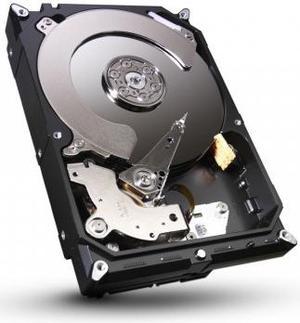
In order for data to be retrieved or written onto the hard disk, a read/write head must move to the correct position on the disk. This is not an instantaneous process and the time required for the head to move into position is referred to as seek time, which is rated in milliseconds.

Is it possible to use a desktop hard disk drive as an external HDD?

Adapting a desktop hard disk drive for external use is possible, though additional hard drive accessories are usually required. Three commonly used methods include, using an SATA to External SATA (eSATA™) cable, hard drive enclosure, or a hard disk drive dock.

What is the purpose of a hard disk drive’s S.M.A.R.T. feature?

Short for Self-mentoring, Analysis, and Reporting Technology, S.M.A.R.T. is a feature that allows hard disk drives to monitor and report on reliability indicators. This is done so that potential problems can be anticipated. To view the S.M.A.R.T. status of a hard disk drive, you will need to use a reporting tool.