


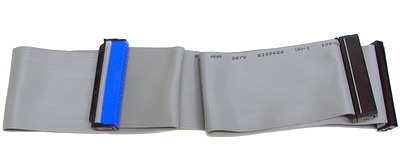
Internal Hard Drive Installation Guide Table of contents There are currently two types of internal hard drive connection interface used in desktop PCs: SATA (serial ATA) and the PATA (parallel ATA, also known as IDE). The newer SATA standard brings new features and improved I/O throughput compared to IDE, as well as other differences: Data cable The traditional IDE data cable consists of two or three 40-pin connectors, as well as a wide cable with 40- or 80-conductor inside (the IDE devices utilizing ATA 66, ATA 100 or ATA 133 interface must use the 80-conductor IDE cable). An IDE cable can be used to connect up to 2 IDE devices if there are three connectors present; one which is used to connect to the IDE port on the motherboard and other two the IDE ports on the storage devices.
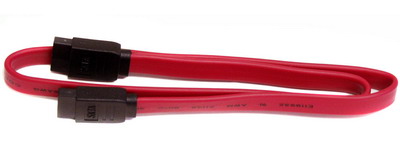
Compared to the IDE cable, the SATA cable is much thinner and simpler. The SATA cable features only seven pins for an easier connection. The slim design of the SATA cable promotes better airflow inside the case for improved temperature management. This is especially pronounced when there are 3~4 hard drives installed. A SATA cable is only allowed to connect to one SATA storage device.
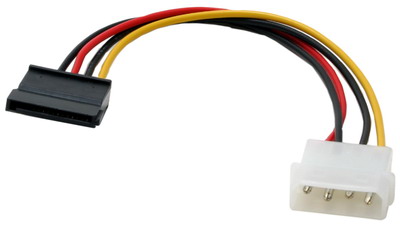
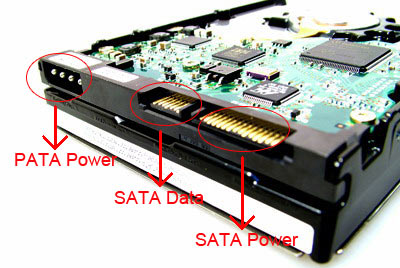
Power cable IDE hard drives receive power through a 4-pin molex connector, which typically provided in abundant numbers by most power supplies. The standard SATA power connector is a thinner but features more pins. Since the SATA power connector is unavailable on many power supplies, some SATA hard drives provide both the 4-pin molex and SATA power connectors for flexibility. The 4-pin molex to SATA converter cable is the other option.
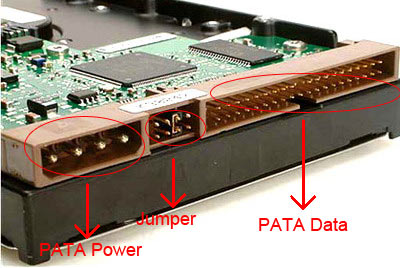
Back panel of hard drive On the back panel of an IDE (PATA) drive you will find, besides the power and data connectors, a set of jumpers which are used to set the hard drive to work in either master or slave mode. If you connect two hard drives (or a hard drive and another IDE device) on a single IDE cable, one of them should be set as master and the other as slave.
Since one SATA cable will only connect to one SATA hard drive, there is no jumper for slave/master mode selection on the back panel of a SATA hard drive (some SATA 3.0 Gbps compliant hard drives may feature a jumper for SATA 3.0 Gbps / SATA 1.5 Gbps mode selection). Thus you may only find a SATA power and SATA data connector available at the back of your SATA drive. There are SATA hard drives that feature the IDE and SATA power connectors for flexibility. In these cases please connect only one of the power connectors to the power supply.
Shock and Heat Hard drives tend to vibrate during operation if not securely fastened to the chassis. This is harmful to itself because it causes shock and may cause noise and annoyance to its user. Please securely fasten your hard drive to the 3.5” bay of your case for reduced vibration and noise. |


Who We Are
Who We Serve
Customer Service
B2B Marketplace
Newegg Logistics

© 2000-2026 Newegg Business Inc. All rights reserved.
Policy & Agreement | Privacy Policy | CA Transparency in Supply Chains Act | Cookie Preferences