


Scanner Buying Guide Table of contents
What Is a Scanner and what does it do for me?
A scanner is similar in concept to a digital camera in that they both convert light (analog signals) into digital data that computers can handle for further image manipulation.
What types of Scanners can I choose from? There are many different types of scanners available, and they differ in terms of feature function. This means that they can be utilized for different applications. The scanner you choose should depend on your own requirements/applications. Here are the major scanner types for home/office users: Flatbed Scanners
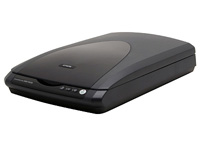
Flatbed scanners are the most common desktop scanners. They also look and work a lot like small photocopiers. The target piece of paper or object to be scanned is placed on top of a panel of glass and the light emitted from under the glass reflects off the objects and is captured by the image sensor in the moving scan head. Flatbed scanners gained popularity for their easy-to-use designs and extreme versatility—they can scan photos, books, documents and even three-dimensional objects (depending on the scanner). Sheetfed Scanners
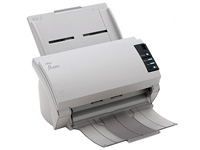
Unlike flatbed scanners, sheetfed scanners operate more like fax machines/printers than photocopiers. Sheetfed scanners work by moving documents/sheets instead of a scan head. Featuring a built-in ADF (automatic document feeder), the sheetfed scanner is capable of unsupervised scanning. Their compact designs also make them perfect in cramped/limited working spaces. Film, Slide and Transparency Scanners
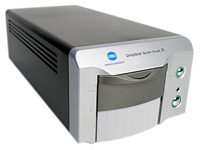
Transparent items demand special handling when scanning. Film and slides, for instance, require scanners to transmit light through the image rather than to reflect it off the surface. Because of their small physical sizes, slides and film need to be scanned by very high resolution scanners. To meet these requirements, dedicated film/slide scanners have been developed, although they are much less versatile and are merely capable of handling 35mm (or other) film/slides, and usually cost more than flatbed and sheetfed scanners. The average user is much better served by a flatbed scanner with a transparency/film adapter (generally adequate for average image quality requirements). Handheld, Card and Other Scanners
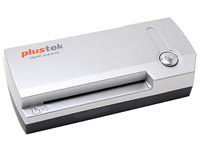
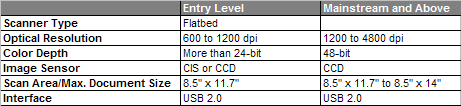
Handheld and portable scanners are extremely compact and portable designs that can fit perfectly into a briefcase or traveling bag. They are excellent additions to your laptop and are conveniently shared. Some portable scanners are specifically designed for business card scanning and may be of great help for businessmen and women. Whereas common scanners scan only one side of the scanning target during a single pass, duplex scanners can scan both sides as they often carry two image sensor/scan heads, each for one side of the paper. Therefore, duplex scanners usually cost more as well. Beyond Scanners Thanks to the never-ending development of technology, many multifunction products or "all-in-ones" (incorporating the printer, scanner, copier and sometimes a fax machine into one compact unit), are readily available in today's market. These products are very useful for most home users for their versatility, but an independent or dedicated scanner is still necessary for high-quality/high-volume scanning purposes. What Do I Look For In the Scanner Specs? Once you have decided to purchase a desktop scanner, it becomes important to understand the specifications that set individual models apart. Although each product may look significantly different, each product is defined by the performance of its components, which are common to all scanners: Image Sensor Contemporary scanners typically use either a CCD (Charge Coupled Device) or a CIS (Contact Image Sensor) image sensor. CIS is a more recent innovation developed for cost- effective entry-level consumer scanners. CIS-based scanners are smaller, less costly and consume less power than the CCD-based units, but the trade-off is they produce slightly lower-quality images. Resolution The scanner resolution specification helps to set a scanner apart from the rest. The resolution figure refers to the number of pixels a scanner can sample/capture and is often measured in dots per inch (dpi). Higher resolution scanners are capable of capturing more information from a given image than lower resolution scanners and therefore provide greater detail and image quality. High resolution scanners may also be capable of producing excellent images at resolution settings below their maximum resolution. For example, a 600 dpi scan from a 1200 dpi scanner may be better than a scan at the same resolution from a 600 dpi scanner (all else being equal). Color/Bit Depth The bit depth refers to the amount of information a scanner is capable of recording per pixel. The higher the bit depth, the more color/gray gradations the scanner can record, and this therefore results in higher image quality. A higher bit depth also means a larger file size, since more information can be stored per pixel. Dynamic range, also known as optical density (OD) or density range, is a measure of the scanner's ability to record different tones in an image. Dynamic range is measured on a logarithmic scale from 0 to 4 (0.0 represents perfect white, while 4.0 represents perfect black). The dynamic range is actually the difference between the darkest and brightest optical density that the scanner can capture. The bigger the difference, the larger the dynamic range can be, and the better the image quality the scanner can offer. There are three major types of connection for scanners: USB, SCSI, and parallel port (already phased out). USB and SCSI are the mainstream interfaces currently and some scanners feature both USB and SCSI interfaces. Speed The importance of the speed of a scanner depends on how often you plan on using it. The speed may not be an issue if a scanner is only used once or twice a day, which is typically the case with most home/personal usage. Of course, things can be totally different for those who are constantly acquiring images or documents. The bundled software, which is a very important part of the scanner, is often overlooked by many users. The bundle will probably contain a driver program, color calibration software, image-editing software and optical recognition software (OCR). But not all manufacturers offer a complete bundle of the above software for all models. With so many different scanner products available on the market, it can be hard to pinpoint the scanner product that best suits you. Here are our recommendations categorized by user type - typical usage attributes for reference. General Home/Office Users Most home/office users scan a variety of objects with their scanners, such as family photos/ film slides, pictures/pages from books and magazines, and transferring printed text into computer-editable text and etc. A flatbed scanner can perform all these tasks.
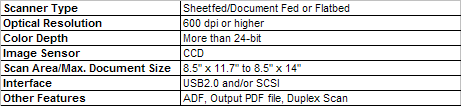
If your main purpose is to produce images used on websites, an entry-level scanner should be enough, and a 300 dpi resolution is sufficient for good OCR results (when transferring printed text into computer-editable text). A CCD scanner is needed if you demand higher quality scan results or if you want to scan physical objects (such as a motherboard, video card etc.). For users who want to print the scanned images, or demand higher image quality, we recommend opting for at least a mainstream scanner. For tasks involving the scanning of hundreds or even thousands of pieces of paper weekly, or for the conversion of a large number of catalogs into PDF form or any other frequent high-volume scanning requirements, we recommend scanners with the following specifications.
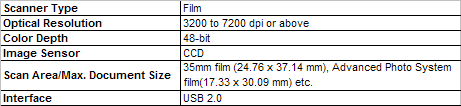
A dedicated film scanner is optimized for film/slide/negatives scanning and will also produce excellent results for transparency scanning
|


Who We Are
Who We Serve
Customer Service
B2B Marketplace
Newegg Logistics

© 2000-2026 Newegg Business Inc. All rights reserved.
Policy & Agreement | Privacy Policy | CA Transparency in Supply Chains Act | Cookie Preferences