


Server Motherboard Buying Guide Table of contents
As the backbone of a computer, the motherboard (sometimes called a system board or mainboard) connects all system components and allows them to interact. The motherboard also determines the major characteristics of a system, and affects your choice of CPU, memory. and expansion capabilities. Different motherboards are designed for different applications, but our focus here will be on motherboards designed for server systems.
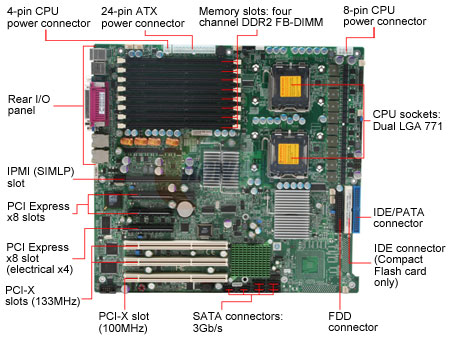
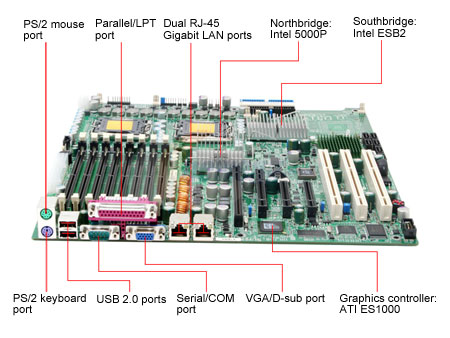
A server is a type of computer that coordinates and works with other computers over a network. Servers can be built from common computer components, but specialized hardware is recommended for heavy-load/critical applications. A workstation, on the other hand, is a high performance computer designed for intensive single-user applications such as 3D design/creation, video processing and engineering simulations. This is very different from a server. A server/workstation motherboard can be similar to a desktop motherboard in many ways, but may require different structure or functions. Note: The server/workstation we refer to here are mainly for personal/home/small business users who may elect to build a server/workstation on their own. The Vitals of a Server Motherboard A motherboard includes a variety of components that define its capabilities. Selecting the motherboard that is perfect for all your needs can be a complicated process. The two issues that require the closest attention when choosing a motherboard are: 1. The chipset, which determines the functionality, compatibility and connectivity of a motherboard, and 2. The CPU and memory support. Motherboard, CPU and memory should be considered as a whole when building a server system, since they are closely related to each other. Your choice of any one of them will affect your options for the other two. The chipset is the core of the motherboard. A motherboard's CPU and memory support, major I/O device support and expansion card support all depend on the chipset. When building a server/workstation, the chipset, processor and memory should be considered as a whole. The server/workstation platforms and products we mention here are geared towards personal/home/small business users, who may choose to build a server/workstation on their own. Therefore, the chipset information provided here is only a portion of the full range of server/workstation chipset products available on the market. CPU Support There are two concerns when it comes to CPU support: CPU type and count. For both AMD and Intel platform motherboards (compatible only with AMD or Intel processors respectively), the CPU socket type is required to match the motherboard's CPU socket for proper installation. For example, an LGA 771 CPU must be installed on an LGA 771 motherboard. LGA 775, Socket 603/604 and LGA 771 are Intel-compatible socket types, while Socket 939, Socket AM2, Socket 940 and Socket F (Socket 1207) are AMD-compatible socket types. Memory Support The Northbridge chip traditionally contained the memory controller, meaning that memory support - defined by memory type, memory channels, memory speed and memory capacity - was determined by the chipset. However, for AMD Opteron processors, the memory controller is integrated into the CPU. Therefore, the CPU, not the chipset determines the memory support on modern AMD platforms. As the name "Error Checking and Correction" suggests, ECC technology allows computers to correct memory errors. The most popular type of ECC is single bit error correction. This enables the detection and correction of single-bit errors (within a byte, or 8bits of data). With increasing system memory, the stability and performance deterioration of unbuffered memory is inevitable - the memory controller has to address each memory chip on all modules directly, which results in high electrical loads. To solve this problem, higher density systems use registered memory instead. Registered memory modules contain registers as a buffer to temporarily hold data (address and command data only) for one clock cycle before it is transferred. This increases the reliability of high-speed data access to high density memory but sacrifices some performance since there is one additional clock cycle between the Chip Select and the Bank Activate command. Things to Look For When Choosing a Server Motherboard Although the process of choosing a motherboard is complicated due to the various functions and connections motherboards provide, it can become much easier to find one that meets your requirements once we know what to look for. Graphics Support Since there aren't any intensive graphics/3D requirements in server applications, most server motherboards use an onboard graphics controller to provide video signals to the administrator's monitor. Expansion slots are used to install add-in cards such as network interface cards and HDD/RAID cards. This is very important to the expandability of server systems. Please make sure the motherboard selected provides sufficient expansion slots for all the add-in cards you plan to install.
PCI The PCI (Peripheral Component Interconnect) bus is a computer bus type used to connect computer peripherals. Most PCI buses work at 33MHz with a 32bit bit-width. This allows it to deliver a bandwidth of 133MB/s. 64-bit/66MHz PCI slots can also be found in server/workstation systems. PCI-X was introduced to address the need for increased bandwidth of PCI devices. The PCI-X specification enables higher operating frequency (66MHz, 133MHz, 266MHz and even 533MHz) with up to 64-bit bit-width to deliver more than 1066MB/s bandwidth. PCI-X protocol enhancements allow devices to operate at much higher efficiency to provide more useable bandwidth at any clock frequency. PCI Express is the next generation computer bus to come after PCI/AGP. PCI Express comes in several physical configurations to offer a variety of maximum bandwidths. For example, the fastest PCI Express x16 (first generation) configuration is used mainly for graphics cards and provides up to 8GB/s (bi-directional) bandwidth, or 4 times the bandwidth of AGP 8X. At the other end of the spectrum, PCI Express x1 is typically used for other types of peripherals and offers up to 500MB/s (bi-directional) bandwidth. The latest PCI Express 2.0 specification doubles the bandwidth by delivering up to 1GB/s (bi-directional) bandwidth over an x1 link. In server systems, SCSI is the most popular interface for storage devices, like hard drives. SCSI (Small Computer System Interface) is a standard for transferring data between devices and computers. Thanks to its outstanding ability to compartmentalize diverse operations, SCSI is very suitable for multitasking operating environments. SCSI also enhances critical performance in situations where more than one device is connected. Before serial signaling technology was applied into the SCSI field, all SCSI interface standards used parallel technology to transfer data. Currently, Ultra-160 (160MB/s throughput) and Ultra-320 (320MB/s throughput) are the most widely used standards of parallel SCSI. Certain Southbridge chipsets feature RAID support. RAID (Redundant Array of Independent/Inexpensive Disks) is a way of using multiple hard drives together for data storage. A RAID system with multiple hard drives appears as a single drive to the operating system. Depending on the RAID level, the benefits provided by RAID is one or more of the following: better throughput, fault-tolerance or capacity when compared to a single hard drive. 1. RAID level 0 (or RAID 0) is known as striping, where data is striped across multiple hard drives. RAID 0 provides the most advanced throughput and capacity, but offers no fault-tolerance. 2. RAID level 1 (RAID 1) is known as mirroring, which stores the exact same data within at least two hard drives, this method shows excellent fault-tolerance and reliability, but delivers less capacity efficiency. 3. RAID level 0+1 and RAID 1+0 are striping and mirroring, providing good fault-tolerance and throughput all at the same time. 4. RAID level 5 utilizes data block striping with distributed parity data blocks across all the array disks. RAID 5 provides excellent read performance but relatively poor write performance, and RAID 5 is able to recover the whole array when one of its array disks fails. But the failure of a second disk results in data loss. 5. RAID level 6 is an extension of RAID 5 - it adds an additional parity block for extra fault-tolerance. RAID 6 is able to recover the array when two disks fail. There are other RAID levels available too, such as RAID level 3 and RAID level 4, which are not widely used at the current time. Other Connections PS/2 PS/2 ports connect the keyboard and mouse to a computer and are usually color-coded on today's systems - purple for keyboards and green for mice. Most desktop motherboards still provide PS/2 ports, but an increasing number of keyboards and mice are using USB ports. The USB port is the most popular I/O interface standard used for connecting computers and peripherals or other devices. It is capable of supporting up to 127 daisy-chained peripheral devices simultaneously. The latest USB 2.0 specification can deliver 480Mbps data transfer bandwidth. Also known by the trademarked names of FireWire and i.LINK, IEEE 1394 is a standard for high-speed transfer of digital information. It is one of the most popular standards for connecting high-speed peripherals.
Almost all of the latest server motherboards provide integrated LAN functions, rated either at 10/100Mbps or 10/100/1000Mbps, since every server has to connect to a network. These numbers show the theoretical maximum throughput of the network interface card (onboard LAN controllers in this instance). Some motherboards provide two or even more LAN ports for users connecting more than one network device without needing an add-in card. The IPMI (Intelligent Platform Management Interface) is one of the hottest management features available at this time. IPMI specifications define common interfaces to the platform management subsystem, which is used to monitor system health and manage the system. Typical monitoring elements include system voltages, temperatures, fans, power supplies, etc. IPMI includes the definition of interfaces for extending platform management between motherboards within the main chassis, and between multiple chassis.
As mentioned above, we definitely recommend considering the entire platform as a unit when building a server system, and the platform should at least include CPU, the memory and motherboard. Since there are a lot of issues or factors to consider when choosing a motherboard, it is almost impossible to provide specific recommendations to meet the infinitely varied requirements. Please read the above sections of this buying guide to be sure of your own requirements.
At last, we suggest paying extra attention to memory support and expansion slots when choosing your server motherboard. For memory support, ECC is definitely a necessity - and most server motherboards do support ECC. Registered memory support is also important if you plan to install more than 4GB memory to your server. However, when it comes to FB-DIMM, registered memory is no longer an issue as FB-DIMM memory modules are fully buffered - unlike unbuffered DDR/DDR2 memory modules. Memory capacity is another vital issue for server systems, so make sure there are enough memory slots available on the motherboard, and the motherboard supports the capacity you need or may need in the future. Expansion slots on a server motherboard are usually meant for the installation of HDD/RAID controller cards or Multi-port Gigabyte Ethernet network interface cards. These cards consume extremely high bandwidth/throughput, therefore, the motherboard selected must provide enough high-throughput expansion slots - such as 64-bit/66MHz PCI slots, 66MHz/100MHz/133MHz PCI-X slots and PCI Express x4/x8 slots for expansion. |


Who We Are
Who We Serve
Customer Service
B2B Marketplace
Newegg Logistics

© 2000-2026 Newegg Business Inc. All rights reserved.
Policy & Agreement | Privacy Policy | CA Transparency in Supply Chains Act | Cookie Preferences