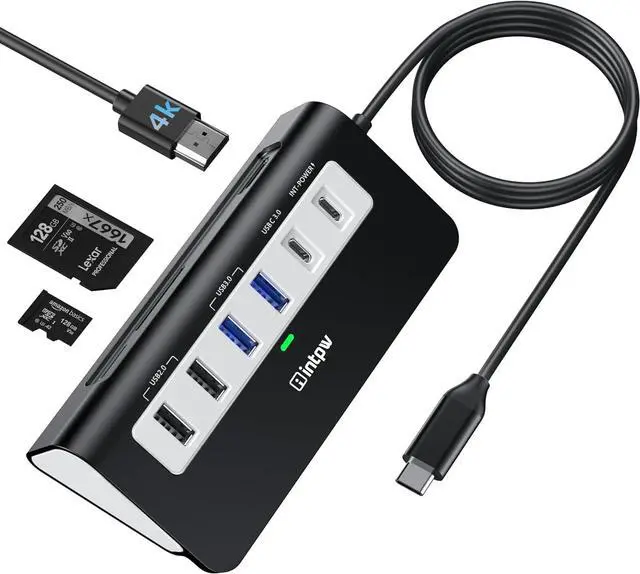
USB C Hub, P9 USB C Hub Multiport Adapter with 4K HDMI, PD 100W, Type-C & 2 USB A 3.0 5Gbps, 2 USB A 2.0, SD/TF Card Reader, Aluminum USB Hub for Laptop, iPhone 17 Series, MacBook, iPad
9-IN-1 USB C Hub: USB C docking station has perfectly combined most functions you need, includes 4K HDMI, PD 100W pass-through charging for laptop, 3 USB 3.0 5Gbps, 2 USB 2.0, SD/TF 3.0 Slots. USB-C Cable Length is about 19.7". Long enough to connect your laptopNote: USB-C PD port not support data transfer and video output.
HDMI 4K@30Hz: intpw usb hub for laptop can stream 4K@30Hz video to HDTV, Monitors or projectors via HDMI port, ensuring an immersive 3D visual experience for you. (Note:The host USB-C port on your device must support Display Port Alt Mode)
High-Speed Data Transfer: 3 USB 3.0 Ports transfer speed up to 5Gbps. USB C to hdmi takes only a few seconds to transfer photos or videos to your laptop. 2 USB 2.0 can connect to your keyboard and mouse. USB 3.0/2.0 data port not recommend for charging
Fast Charging: Using the 100W USB-C PD charging port to charge your Type-C laptop and tablets. For a better experience, when you use the usb hub, please use at least 65W power supply to charge your laptop via hub. (PD port not support data transfer)
Widely Compatibility: The powered usb hub is compatible with Windows, MacBook Air/Pro series to Latest, iPad Pro, iPhone 16, Lenovo, Samsung, Dell and most all Type-C devices. Note: Doesn't unplug or plug the PD charger when using the usb c adapter. This prevents the device from being disconnected, the HDMI connection screen is not displayed, and data transferred from external USB devices is lost
+
+
Overview
Specs
Reviews
USB C Hub, P9 USB C Hub Multiport Adapter with 4K HDMI, PD 100W, Type-C & 2 USB A 3.0 5Gbps, 2 USB A 2.0, SD/TF Card Reader, Aluminum USB Hub for Laptop, iPhone 17 Series, MacBook, iPad
Learn more about the Detailed Specifications
Additional Information
First Listed on Newegg
September 25, 2026
There are no reviews yet.
Do you own this product?
Warranty & Returns
Warranty, Returns, And Additional Information
Warranty
Please contact the Seller directly for warranty information. Warranty information may also be found on the Manufacturer's website.



 All Categories