Disconnected? Reconnect.
Reconnect your devices to your USB-C equipped computer with the OWC USB-C Dock. The full-featured connectivity companion you've been waiting for. Add ten ports with just one USB-C cable. Reconnect to your workflow, to your business, to your desktop and to your life.
Ports For Every Piece of the Puzzle
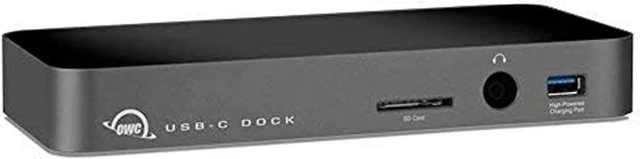
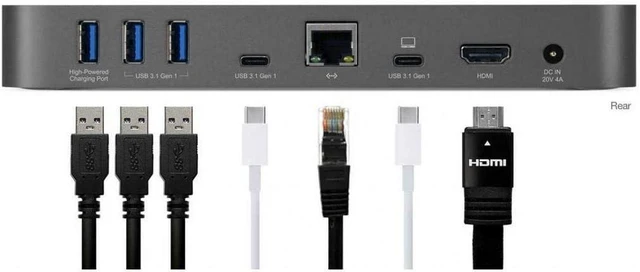
Featuring 10 ports, USB-C Dock brings the connectivity you need back into your day-to-day. Complete with five USB 3.1 Gen 1 ports - including two high-power charging ports and one USB-C port - you can reconnect and charge your current and future devices. The USB-C Dock also features Gigabit Ethernet, a newly added Mini DisplayPort for the professional / pro-sumer wanting a diversity of display options, and combo audio ports along with an SD card reader for even more connectivity.
Designed Better From Inspiration to Implementation
OWC USB-C Dock was designed to deliver the ultimate connectivity companion in both function and form. And with a choice of colors, USB-C Dock matches your style. An aluminum chassis completes the design story, so your dock is robust enough to handle your life, wherever it takes you.
Reliability and Support You Can Count On
Like all OWC products, USB-C Dock is designed and built from the ground up to the highest standards of quality, reliability and performance. It's rigorously tested and backed by OWC's award winning 24/7 customer support team.
Compatible with:
Model ID: MacBookPro13,3 Model ID: MacBookPro13,2 Model ID: MacBookPro13,1
Model ID: MacBook9,1
Model ID: MacBook8,1 C
Compatible with Windows/Chrome OS/Linux based PCs with USB Type-C ports.
Not Compatible with:
Not compatible with Mac desktops (including iMacPro1,1 iMac18,3 iMac18,2 iMac18,1)
Not compatible with 2017 Macbooks and MacBook Pros: MacBookPro14,3 MacBookPro14,2 MacBookPro14,1 MacBook10,1
Available Port Types
1 SD Card Slot
1 3.5mm Combo Audio Port (microphone or headphones supported)
4 USB 3.1 Gen1 Standard-A Ports (2 high-powered charging ports)
1 USB 3.1 Gen1 Type-C Port
1 USB 3.1 Gen1 Type-C Computer Link
1 Gigabit Ethernet Port
1 Mini DisplayPort
Display Support
Up to 4K/30Hz resolution via mini DisplayPort connection
Pure Power Completes the Picture
Connectivity is only part of the solution. Of course, the OWC USB-C dock provides ample power alongside connectivity, delivering 80W of power to your connected devices, including up to 60W to charge your computer. You'll never have to worry about juggling between connectivity and a dead battery again. Computers that charge through the USB Type-C Computer Link port and require a power supply larger than 60W may charge more slowly or not at
INCLUDES
OWC USB-C Dock
0.5 m (18 inches) USB Type-C Cable
External power supply and power cable
USB-C Dock mDP User Guide
Bootability
USB 3.0 - OS X 10.10 or later
System Requirements
Software OS OS X 10.10 or later1
Windows 10 or later (PC or Boot Camp)
Driver
Ethernet driver required for Mac hosts.
Driver not required for Windows 10 or later (PC or Boot Camp)
Hardware
Mac or PC featuring a built-in USB Type-C interface2
SD Card reader is compatible with SD, SDHC, SDXC up to 2TB
SD Card reader is compatible with UHS-1 (Ultra High Speed) up to 70MB/s
1. The Apple SuperDrive is not currently supported through the USB-C Dock.
2. A built-in USB-C connection is required to use the Mini DisplayPort interface on the dock. The Mini DisplayPort interface will not function if the USB-C connection on the computer is provided by a PCIe card.
3. High power USB ports for charging mobile devices are compliant with the USB-IF Battery Charging 1.2 specification, delivering up to 1.5 A or 1500 mA.
4. The USB



 All Categories