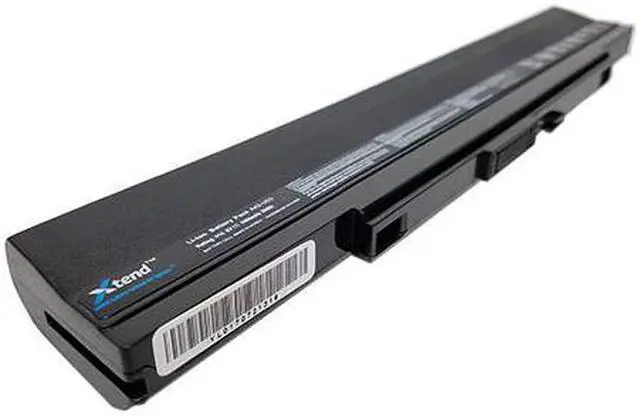
Asus U53JC-A1 Laptop Battery ReplacementThis is a brand new Asus U53JC-A1 replacement battery. This battery ships fully tested and ready to go. Inside the Asus U53JC-A1 battery are South Korea's best Lithium-ion rechargeable battery cells. The superior battery cells will provide longer run times between charges as well as a longer service life than cheaper batteries. In addition, Li-ion batteries are not subject to the memory effect common with older battery technology. This means you can recharge your laptop any time without diminishing your battery capacity. This laptop battery replacement is typically superior to the original battery and is 100% compatible with your Asus U53JC-A1 notebook computer.
The battery is individually tested before shipment and backed by 30 day complete satisfaction guarantee and a 2 Year warranty.
Brand:;
Voltage:;
Battery Capacity:;
Battery Type:;
Cell Origin:;
Color:;
Warranty:;
Guarantee:;
Useful Life:; XTend replacement computer battery; 11.1 Volts - also compatible with 10.8 Volt systems; 4400 mAh; 6 Cell Li-ion; Samsung (South Korea); Black; 2 Year Warranty; 30 day full satisfaction guarantee; 300-500 recharge cycles; You can expect about 2 - 2.5 hours of run time with this computer battery when new, depending on your energy use. The battery cells inside this cartridge have an energy capacity of 4400 mAh. This battery replaces the Asus U53JC-A1 series. Replaces these many
Asus laptop battery part numbers: A31-U53 A32-U53 A41-U53 A42-U53 07G016EY1875M 70-NZ51B4000Z 70-NZ64B1000Z 70-NZL1B1000Z 90-NZ51B2000Y Laptop Battery Express only deals with brand new premium computer batteries. We never carry recycled or used batteries. We only use the highest quality cells inside the battery pack so you will have a long service life (300-500 recharge cycles). We do not use cheaper battery cells which can wear out in a little as 6 months. Our inventory turns rapidly and you will always receive a freshly manufactured battery. How to care for your Asus U53JC-A1 battery. You can extend the life of your laptop battery significantly through the proper care and handling of your battery. Any new laptop battery should first be fully charged by leaving it plugged in overnight. Once a computer battery is fully charged it will no longer accept any more power. It is a common practice to leave laptops plugged in after they have been turned off so that the battery has a full charge the next time you use your laptop. It is probably fully charged within 5 hours.; A brand new notebook battery is in a weakened condition since it has not been conditioned yet.
Condition and break in your new battery by performing 5 partial discharge and recharge cycles the first week you receive your new battery.; Run on battery power without the AC adapter cord at least once a week to keep the battery cells active and at their peak potential. When your laptop is plugged into the power adapter the battery goes to "standby mode" while your laptop runs directly on electricity from the wall outlet.; Even though your battery indicates it is fully charged, your battery will return to a weakened state again in a few months if it does not get some exercise through partial discharge and recharge cycles while running on battery power alone.; If your battery has not been actively used 2 months or more, condition your battery again with 5 partial discharge & recharge cycles to increase the batteries capacity and run time.; Don't run your battery all the way to empty. Your battery will have a longer service life if it receives shallow discharge and recharge cycles. Research has shown that the useful life of the battery will be much longer if you begin to recharge the battery any time before reaching 20% of the remaining power capacity.
Recharging the battery even after 10 minutes will not reduce the battery's life span as lithium batteries do not have the memory effect which was found in older NiCad battery techn