


Meet Your Seller

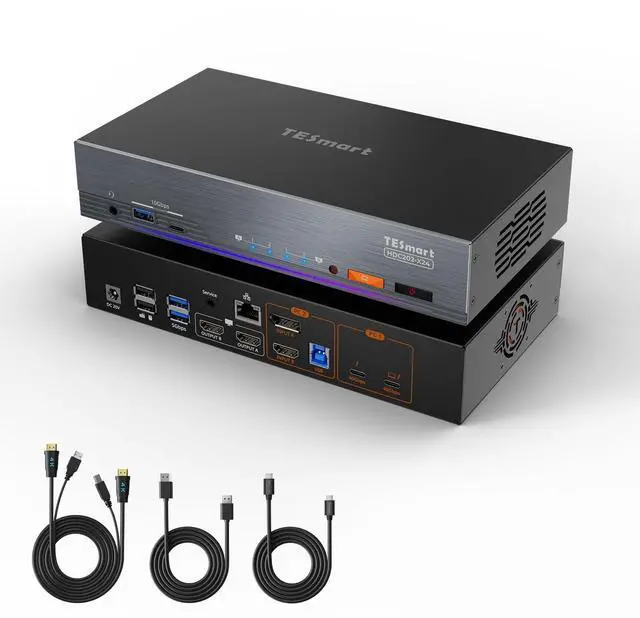


TESmart Thunderbolt 4 KVM Switch 2 Monitors 2 Computers 4K@60Hz, HDMI+DisplayPort KVM Switch Dual Monitor for 1 Laptop (TB4 USB C w/Charging 60W) & 1 Desktop (HDMI 2.0 & DP1.2), Gigabit Network, EDID
- Item #: 9SIVNKXKZS0942
- Mfr. Part #: 415280896616
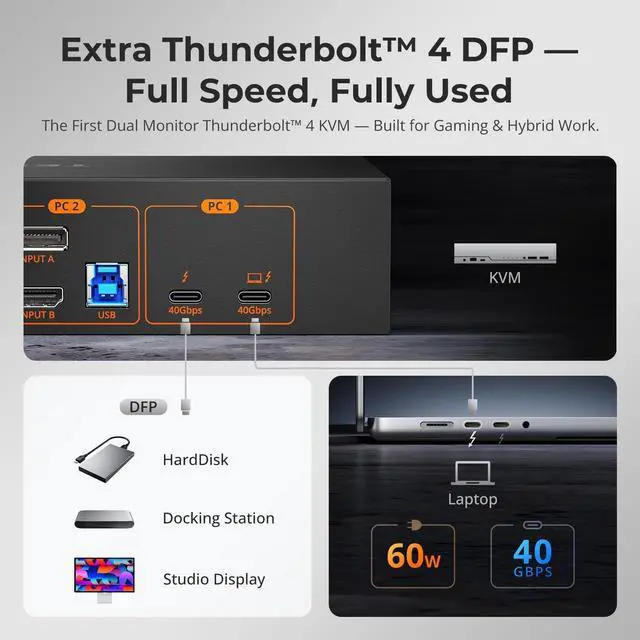
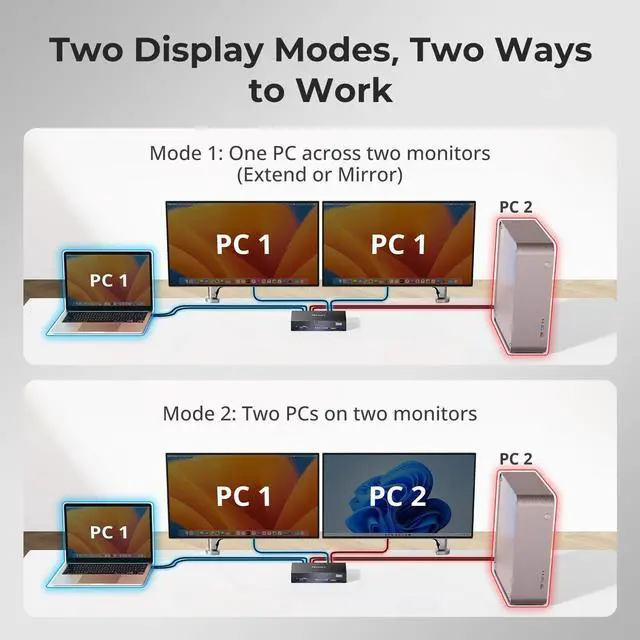
- The First Dual Monitor Thunderbolt 4 KVM for Hybrid Workflows Designed for desktop and USB-C laptop setups (your desktop requires 1 DisplayPort and 1 HDMI). Displays connect through HDMI only, and no USB-C video output is available. For an Apple Studio Display-compatible solution, please explore TESmart THK402-X4 or TKS202-X4.
- UHD 4K@60Hz Display Quality - This 2 port KVM Switch supports HDMI 2.0 with up to 4K@60Hz 4:4:4, as well as high refresh rates for 1080P@240Hz/165Hz/144Hz/120Hz and 25601440@120Hz.
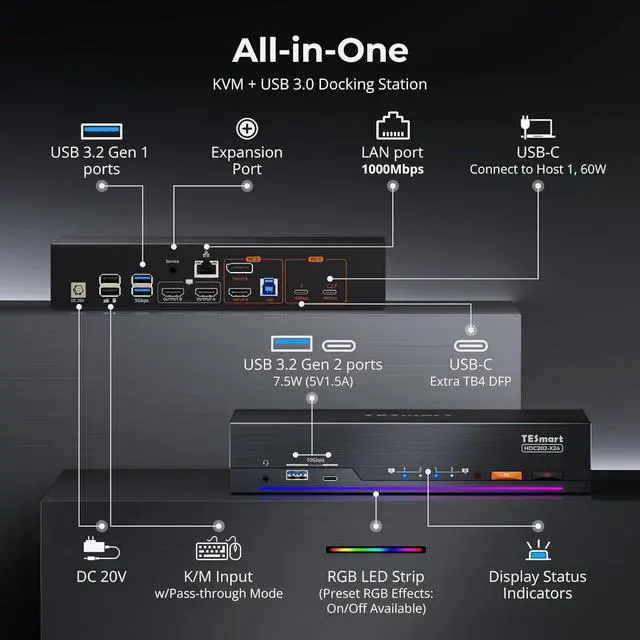
- All-in-One KVM Docking Station - Includes 2x USB 3.2 Gen 2 (10Gbps, 7.5W power output), 2x USB 3.2 Gen 1 (5Gbps), 2x USB 1.1 (with pass-through for keyboards and mice), 1x LAN (1000 Mbps), 1x 3.5mm headphone/microphone jack, and 2x HDMI 2.0 outputs.
- For further help with issues encountered while using monitors, computers, or USB devices, please see the Troubleshooting Guide (PDF) under Safety Documents on this product page.
- 60W Power Delivery for MacBook Workstations - Thi
+
+
Overview
Specs
Reviews
The First Dual Monitor Thunderbolt 4 KVM for Hybrid Workflows Designed for desktop and USB-C laptop setups (your desktop requires 1 DisplayPort and 1 HDMI). Displays connect through HDMI only, and no USB-C video output is available. For an Apple Studio Display-compatible solution, please explore TESmart THK402-X4 or TKS202-X4. ^^ UHD 4K@60Hz Display Quality - This 2 port KVM Switch supports HDMI 2.0 with up to 4K@60Hz 4:4: 4, as well as high refresh rates for 1080P@240Hz/165Hz/144Hz/120Hz and 25601440@120Hz. ^^ All-in-One KVM Docking Station - Includes 2x USB 3.2 Gen 2 (10Gbps, 7.5W power output), 2x USB 3.2 Gen 1 (5Gbps), 2x USB 1.1 (with pass-through for keyboards and mice), 1x LAN (1000 Mbps), 1x 3.5 mm headphone/microphone jack, and 2x HDMI 2.0 outputs. ^^ For further help with issues encountered while using monitors, computers, or USB devices, please see the Troubleshooting Guide (PDF) under Safety Documents on this product page. ^^ 60W Power Delivery for MacBook Workstations - This USB-C KVM Switch supplies up to 60W PD and includes a USB-C cable so laptops including MacBooks without chargers can power up instantly.
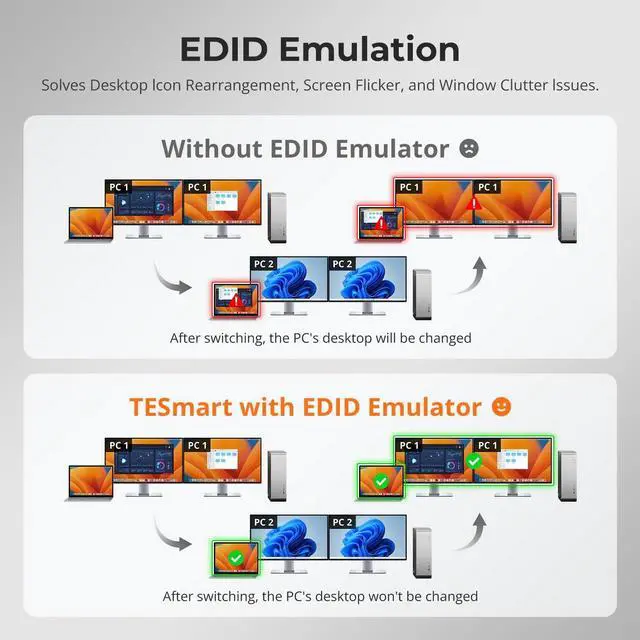
^^ Note: If your laptop charging protocol does not support 20V DC voltage, a handshake failure may occur, causing the laptop to receive only 7.5W of power. It is currently found that some models in the Lenovo Thinkpad series are affected by this issue and are unable to receive the expected 60W power supply. ^^ Gigabit Ethernet - Enables both PCs connected to the KVM switch to share a single Ethernet cable for network access. ^^ EDID Emulators - Each input port has an EDID emulator, ensuring your computers always receive the correct display information, eliminating the need for constant display settings adjustments. ^^ Effortless Switching -
Select from 4 convenient options: keyboard hotkeys, front panel button, mouse wheel, or IR remote (AAA batteries not included). Experience instant, lag-free keyboard and mouse control after switching
Warranty & Returns
Warranty, Returns, And Additional Information
Warranty
- Please contact the Seller directly for warranty information. Warranty information may also be found on the Manufacturer's website.
- CONTACT
Return Policies
- Return for refund within: 30 days
- Return for replacement within: 30 days
- This item is covered by StarDragon Return Policy
Manufacturer Contact Info
- For a directory of all our manufacturers, please click below.
- Manufacturers Directory
LOADING...