



With the portability of todays technology, Laptop, tablets and ultrabooks are fabulous tools for busy people on-the-go. But as tablets and ultrabook are limited in screen size and often lacking in ports.
The Wavlink UG39DK4 with its sleek, easy-to-use design and featuring Display Link technology, the docking station enables multiple USB2.0 ,USB 3.0 , HDMI/DVI VGA devices to be connected to your laptop, Macbook, or Windows.
INFORMATION ABOUT MACOS 10.15
Some users updating to 10.15 have found their DisplayLink devices have stopped working. 5.2 software is designed to run on Mac OS 10.15, but the OS can disable our kernel extension during the udpate. Please check the kernel extension is enabled and screen recording is also enabled, to ensure DisplayLink enabled devices continue to work when migrating to 10.15.


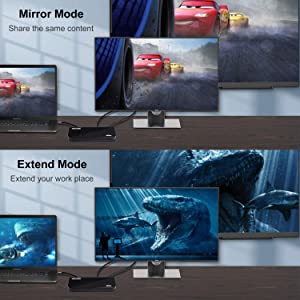
Supports Dual monitors resolutions up to 1920x1080 @60Hz.
Support Single HDMI resolutions up to 2560x1440.
Support DVI/VGA port resolutions up to 2048x1152/1920x1200.
Support Mirror / Extend / Primary/Distinct/Rotate Mode.

Simultaneously operate multiple different screens to improve work efficiency.Recommended for use with web and productivity software. Not recommended for games.Cut down the time it takes to work on those highly productive tasks.
Featuring DisplayLink graphic technology, so this docking station is a universal docking station for most computers and laptops, with more compatibility and more functionality than other docking stations.You can connect this dock to a USB 3.0 or USB-C Windows or Mac laptop.

Two USB 3.0 and four USB 2.0 ports to share data or connect external devices (eg. B. an external hard drive or other USB graphics adapter).

Access a powerful network and Internet via a Gigabit Ethernet port that provides a backward compatible 10/100 Mbps wired connection.
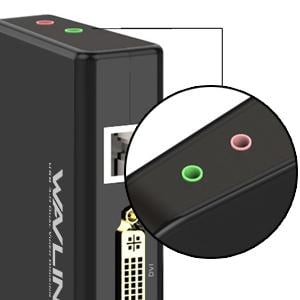
The integrated microphone input and audio output allow you to easily connect a headset or computer speakers.

Host connection: USB 3.0/3.1 port (Type A or C)
Processor: Intel Core i7 2+GHz / AMD Richland A10-575x / AMD Kaveri A10-7400P or better
Memory: 8GB
Graphics processor: Integrated or discreet Intel HD 4000, ATI Radeon HD 8650, NVidia GeForce 7xxM graphics processors or better
Disk: 7200RPM or SSD
Operating System:
WINDOWS: Windows 11, Windows 10, Windows 7, Windows 8.1, Windows 8, Windows 7, Windows Vista, Windows XP (32bit)
MAC OS X:
Monterey 12, Big Sur 11
macOS 10.15-macOS 10.6
ANDROID: Available on the Google Play Store. For Android v5.0 (Lollipop) or Later
CHROME: DisplayLink USB devices are supported on Chromebooks.
Ubuntu :Ubuntu14.10 onwards
Not Compatible With:
Windows 2000 (SP1 to SP4) or earlier Windows OSes, Windows 2003 Server, Windows XP 64 bit, Windows RT platforms, Windows Embedded 7, Windows POSReady 2009, Windows 10 IoT Core, Windows 10 Mobile
Mac OS X 10.5 or earlier
Android v4.4 or earlier
iOS

- If 2.4 Ghz wireless devices such as wireless keyboard/mouse receivers,Bluetooth and WiFi adapter do not work in the USB3.0 ports, please try to connect the USB 2.0 ports.
- DispalyLink Chipset will not Compatibility with SMSC Software,Magic Control Technology (MCT or j5Create) Software,Fresco Logic Software.
- 2560x1440 output only available when using a single HDMI display. If dual displays are connected, each will be limited to a maximum resolution of 1920x1200. 2560x1440 output requires a "High Speed" HDMI cable
-Does not provide power attached to host laptop or tablet; the host system will still require its power cable/charger.
Attention:
1. Not recommended for gaming or video editing. Do not support plug and play. Please install the latest driver from wavlink website for better performance.
2.This dock DOES NOT support charging the host PC.





