



Network camera with a bracket
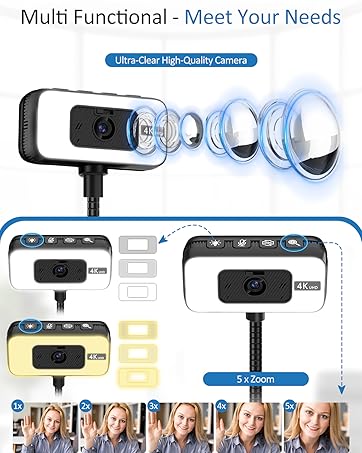
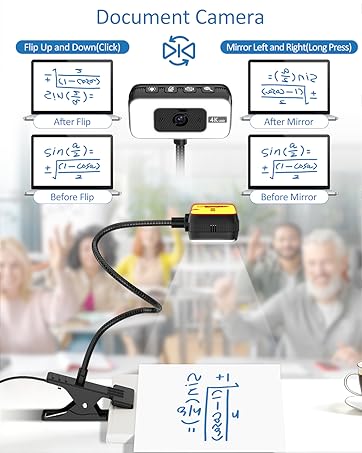
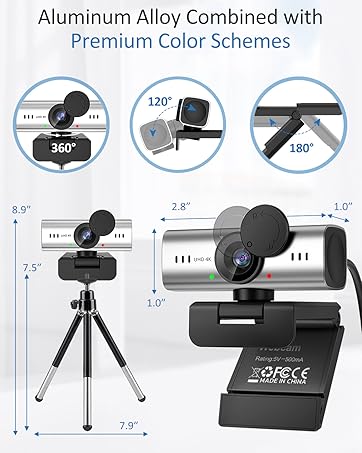
This webcam with a stable stand offers adjustable angles for clear, steady video, perfect for meetings and streaming

Focus on network cameras
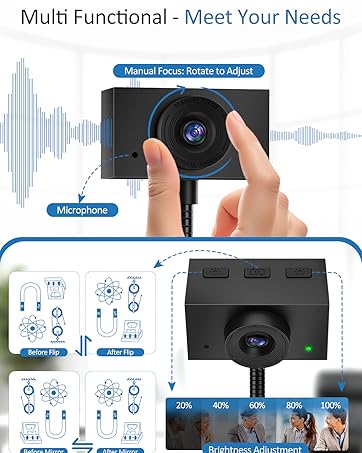
High-performance network cameras can enhance your online experience - whether for work, study or social activities. Equipped with high-definition sensors, they offer vivid video images with natural colors, clear details and dynamic scenes, making them ideal for meetings, live broadcasts or video chats. Make every online interaction a smooth and professional visual experience
How did we get our start?
Rooted in quality and user experience, we turned ideas into reality, step by step.
What makes our products unique?
Unique factory-direct customized product,not available anywhere else.Enjoy one-of-a-kind quality & style that stands out.
Why do we love what we do?
Crafted with exceptional quality and thoughtful design,our product turns ordinary work into a joyful experience.It’s not just a tool—it’s the reason you love what you do.
Elevate your workflow, boost your mood,and fall in love with work all over again.



Can this Majiphi network camera really be used with both USB-C and USB-A type computers for plug-and-play functionality?
Yes. It is designed for a simple plug-and-play setup. The included USB-A to USB-C adapter ensures compatibility with almost all modern or older computers, and it can be used directly without the need for additional drivers
Does the Majiphi camera support video conferencing software?
Yes, this Majiphi camera is compatible with a variety of video conferencing software. It can be used in conjunction with software such as Zoom, Microsoft Teams, Google Meet, CISCO Webex, FaceTime, GoToMeeting, Lifesize, Slack, Line, TrueConf, etc
Can I connect this webcam to a USB hub or an external docking station?
Yes, but to ensure stability, please connect directly to a USB port. The hub may cause intermittent video interruptions. Please use the included Type-C adapter. This will enable the device to be used stably for streaming or calls
Does this camera perform well in low-light conditions?
This network camera features automatic exposure, low-light enhancement and color optimization functions. It performs best under normal or bright lighting conditions. Avoid strong backlight or extremely dim environments
What should I do if the Majiphi webcam is not working?
If the network camera is not working, please follow these steps:
1. Check compatibility
2. Confirm the type of USB interface
3. Try replacing a different port or device and update the driver


Can this Majiphi network camera really be used with both USB-C and USB-A type computers for plug-and-play functionality?
Yes. It is designed for a simple plug-and-play setup. The included USB-A to USB-C adapter ensures compatibility with almost all modern or older computers, and it can be used directly without the need for additional drivers
Does the Majiphi camera support video conferencing software?
Yes, this Majiphi camera is compatible with a variety of video conferencing software. It can be used in conjunction with software such as Zoom, Microsoft Teams, Google Meet, CISCO Webex, FaceTime, GoToMeeting, Lifesize, Slack, Line, TrueConf, etc
Can I connect this webcam to a USB hub or an external docking station?
Yes, but to ensure stability, please connect directly to a USB port. The hub may cause intermittent video interruptions. Please use the included Type-C adapter. This will enable the device to be used stably for streaming or calls
Does this camera perform well in low-light conditions?
This network camera features automatic exposure, low-light enhancement and color optimization functions. It performs best under normal or bright lighting conditions. Avoid strong backlight or extremely dim environments
What should I do if the Majiphi webcam is not working?
If the network camera is not working, please follow these steps:
1. Check compatibility
2. Confirm the type of USB interface
3. Try replacing a different port or device and update the driver
Network camera with a bracket
This webcam with a stable stand offers adjustable angles for clear, steady video, perfect for meetings and streaming
Focus on network cameras
High-performance network cameras can enhance your online experience - whether for work, study or social activities. Equipped with high-definition sensors, they offer vivid video images with natural colors, clear details and dynamic scenes, making them ideal for meetings, live broadcasts or video chats. Make every online interaction a smooth and professional visual experience
How did we get our start?
Rooted in quality and user experience, we turned ideas into reality, step by step.
What makes our products unique?
Unique factory-direct customized product,not available anywhere else.Enjoy one-of-a-kind quality & style that stands out.
Why do we love what we do?
Crafted with exceptional quality and thoughtful design,our product turns ordinary work into a joyful experience.It’s not just a tool—it’s the reason you love what you do.
Elevate your workflow, boost your mood,and fall in love with work all over again.





