



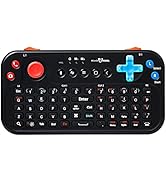
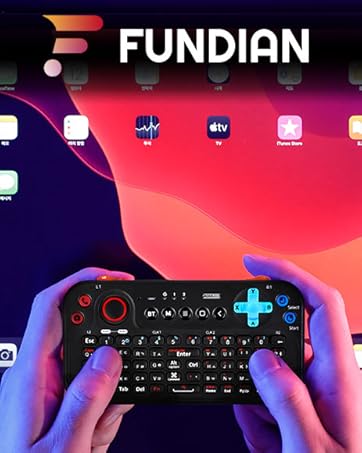

(OTA_1st Gen_v3)Pocket Sized Bluetooth Media Keyboard with Jog and Audio Receiver (Updated on April 9th 2023)
Bluetooth Pairing Guide for Various devices and functions
- This product is the 1st generation with 'OTA_1st Gen_v3' firmware applied.
- (Windows, Linux, Mac-based PC, Android) Basic pairing 'PV-K01-a' connection available (press and hold the 'Bluetooth' button), If basic pairing 'PV-K01-a' cannot be connected, 'PV-K01-1' (long press 'Alt' + 'Bluetooth' button) can be connected
- (iOS-based mobile) iOS-only pairing 'PV-K01-i-k' (press and hold 'Fn' + 'Bluetooth' button) connection, M1, M2, Audio available to use, G mode is not available at iOS
- ** Depending on the OS update for each device, available modes and functions may be limited
- (Audio connection) This is a separate independent pairing, so you can pair and use it only when necessary.
- ** 'PV-K01-audio' (If it is not found in the pairing list, turn the keyboard power off/on again)

1. Enjoy 3 modes of Control with FUNDIAN Keyboard. (Available modes and functions may be limited according to OS policy and update)
- M1 mode : Jog is set as mouse and XYAB is set as Directional Key.
- M2 mode : Jog is set as Directional Key and XYAB is set as Home,PaUp,PgDn,End
- G mode : It works as Gamepad
2. Note
- G mode is only compatible with devices and games supporting Standard HID Gamepad. Normally, can use at Android mobile and Nvidia Shield TV, Fire TV Stick, Xiaomi Mi Box and TV Stick, but can not use with iOS and Brand Game consoles restricting standard controllers.
- Mouse control works with OS and Devices supporting Mouse control. (For the iOS, turn on AssitiveTouch at setting menu)
- For most android Systems, One of paring is available between 'PV-K01-a' and 'PV-K01-1'.
- Only when user can find issue on pairing with lastest android mobile and streaming devices(ie. Chromecast with Google TV), it is advised to update keyboard firmware.
- Latest keyboard firmware can be downloaded at ' fundian.com/pv-k01-ota-firmware-documents-english/ '

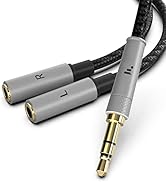
Built-in Bluetooth Audio Receiver function
You can enjoy Hi-Fi receiver function with this keyboard. Use with your wired earphone and headset.
_________________________________________
Product Firmware and Compatibility Info
- M1/M2 mode : Available at Various OS and Devices supporting standard bluetooth Keyboard and Mouse
- G mode is only compatible with devices and games supporting Standard HID Gamepad. Normally, can use at Android mobile and Nvidia Shield TV, Fire TV Stick, Xiaomi Mi Box and TV Stick, but can not use with iOS and Brand Game consoles restricting standard controllers.
- Mouse control works with OS and Devices supporting Mouse control. (For the iOS, turn on AssitiveTouch at setting menu)
- For most android Systems, One of paring is available between 'PV-K01-a' and 'PV-K01-1'. But some functions can be limited according to OS policy and update.

Hands-Free and Camera Selfie
- Once Audio pairing is done, you can use Hands-Free function. You can call via Earset and Headset being connected with this Keyboard.
- Camera Selfie button is compatible with 'Volume down'. it can be used when you use mobile camera.

Smart TV and Android Mobile Hot Keys
- Bluetooth Button is lowered positioning to avoid to push pairing again.
- Home, Backward and Menu buttons are very useful when you control Mobile and TV Box.

Built-in Bluetooth Audio
- Once Audio pairing is done, you can use Hi-fi Audio receiver function.
- This device use CSR Bluetooth chipset for receiver function.

Wide Compatibility
- Best for Mobile Mirroring Control. Android Mobile, Tablet.
- Best for Android TV Box, Nvidia Shield TV, Fire TV, Mi Box.
- Various Pairing mode supporting Wide Compatibility with latest devices.

QWERTY Backlit
- This keyboard has built-in Backlit QWERTY Keys.
- You can easily use at night without Room light.

Simple Game Play only for games supporting standard HID control
- G mode is available at Various OS and Devices supporting standard bluetooth Gamepad ; For Android Mobile/TV Box(Fire TV, Shield TV, Mi Box etc) and Windows For the games supporting gamepad control
- ** G mode is not available at MacOS, iOS and PadOS, and Dedicated Brand Game console(Xbox etc)
 FUNDIAN Pocket Keyboard Gen1 - V3 | FUNDIAN Pocket Keyboard Gen1 - V4 |  FUNDIAN Pocket Keyboard Gen2 | |
|---|---|---|---|
| Customer Reviews | — | — | — |
| Price | — | — | — |
| Price | — | — | — |
| Gen/Firmware | Gen1/V3 | Gen1/Latest Firmware | Gen2/Latest Firmware |
| Color | Black,White | Black,White | Black |
| Charging Port | Micro USB | Micro USB | Type C |
| Backlight | ? | ? | ? |
| Android Touch-mapping mode | no data | no data | ? |
(OTA_1st Gen_v3)Pocket Sized Bluetooth Media Keyboard with Jog and Audio Receiver (Updated on April 9th 2023)
Bluetooth Pairing Guide for Various devices and functions
- This product is the 1st generation with 'OTA_1st Gen_v3' firmware applied.
- (Windows, Linux, Mac-based PC, Android) Basic pairing 'PV-K01-a' connection available (press and hold the 'Bluetooth' button), If basic pairing 'PV-K01-a' cannot be connected, 'PV-K01-1' (long press 'Alt' + 'Bluetooth' button) can be connected
- (iOS-based mobile) iOS-only pairing 'PV-K01-i-k' (press and hold 'Fn' + 'Bluetooth' button) connection, M1, M2, Audio available to use, G mode is not available at iOS
- ** Depending on the OS update for each device, available modes and functions may be limited
- (Audio connection) This is a separate independent pairing, so you can pair and use it only when necessary.
- ** 'PV-K01-audio' (If it is not found in the pairing list, turn the keyboard power off/on again)
1. Enjoy 3 modes of Control with FUNDIAN Keyboard. (Available modes and functions may be limited according to OS policy and update)
- M1 mode : Jog is set as mouse and XYAB is set as Directional Key.
- M2 mode : Jog is set as Directional Key and XYAB is set as Home,PaUp,PgDn,End
- G mode : It works as Gamepad
2. Note
- G mode is only compatible with devices and games supporting Standard HID Gamepad. Normally, can use at Android mobile and Nvidia Shield TV, Fire TV Stick, Xiaomi Mi Box and TV Stick, but can not use with iOS and Brand Game consoles restricting standard controllers.
- Mouse control works with OS and Devices supporting Mouse control. (For the iOS, turn on AssitiveTouch at setting menu)
- For most android Systems, One of paring is available between 'PV-K01-a' and 'PV-K01-1'.
- Only when user can find issue on pairing with lastest android mobile and streaming devices(ie. Chromecast with Google TV), it is advised to update keyboard firmware.
- Latest keyboard firmware can be downloaded at ' fundian.com/pv-k01-ota-firmware-documents-english/ '
Built-in Bluetooth Audio Receiver function
You can enjoy Hi-Fi receiver function with this keyboard. Use with your wired earphone and headset.
_________________________________________
Product Firmware and Compatibility Info
- M1/M2 mode : Available at Various OS and Devices supporting standard bluetooth Keyboard and Mouse
- G mode is only compatible with devices and games supporting Standard HID Gamepad. Normally, can use at Android mobile and Nvidia Shield TV, Fire TV Stick, Xiaomi Mi Box and TV Stick, but can not use with iOS and Brand Game consoles restricting standard controllers.
- Mouse control works with OS and Devices supporting Mouse control. (For the iOS, turn on AssitiveTouch at setting menu)
- For most android Systems, One of paring is available between 'PV-K01-a' and 'PV-K01-1'. But some functions can be limited according to OS policy and update.
Hands-Free and Camera Selfie
- Once Audio pairing is done, you can use Hands-Free function. You can call via Earset and Headset being connected with this Keyboard.
- Camera Selfie button is compatible with 'Volume down'. it can be used when you use mobile camera.
Smart TV and Android Mobile Hot Keys
- Bluetooth Button is lowered positioning to avoid to push pairing again.
- Home, Backward and Menu buttons are very useful when you control Mobile and TV Box.
Built-in Bluetooth Audio
- Once Audio pairing is done, you can use Hi-fi Audio receiver function.
- This device use CSR Bluetooth chipset for receiver function.
Wide Compatibility
- Best for Mobile Mirroring Control. Android Mobile, Tablet.
- Best for Android TV Box, Nvidia Shield TV, Fire TV, Mi Box.
- Various Pairing mode supporting Wide Compatibility with latest devices.
QWERTY Backlit
- This keyboard has built-in Backlit QWERTY Keys.
- You can easily use at night without Room light.
Simple Game Play only for games supporting standard HID control
- G mode is available at Various OS and Devices supporting standard bluetooth Gamepad ; For Android Mobile/TV Box(Fire TV, Shield TV, Mi Box etc) and Windows For the games supporting gamepad control
- ** G mode is not available at MacOS, iOS and PadOS, and Dedicated Brand Game console(Xbox etc)
| Keypad | QWERTY English / Backlit |
| Distance | Up to 10m |
| Transmission mode | HID - Bluetooth 4.0+EDR / Audio - Bluetooth 4.2 CSR |
| Product Size | 5 x 2.56 x 0.4 in |
| Product Weight | 2.3oz |
| Charging Voltage | 4.40 - 5.25V |
| Charging Current | < 300mA |
| Working Current | < 40mA |
| Battery | 450mA Lithium-ion Polymer |
FUNDIAN Pocket Keyboard Gen1 - V3 | FUNDIAN Pocket Keyboard Gen1 - V4 | FUNDIAN Pocket Keyboard Gen2 | |
|---|---|---|---|
| Customer Reviews | — | — | — |
| Price | — | — | — |
| Price | — | — | — |
| Gen/Firmware | Gen1/V3 | Gen1/Latest Firmware | Gen2/Latest Firmware |
| Color | Black,White | Black,White | Black |
| Charging Port | Micro USB | Micro USB | Type C |
| Backlight | ? | ? | ? |
| Android Touch-mapping mode | no data | no data | ? |
FUNDIAN Smart Devices





