







If low power remind, How long can it use?
. If remind low power, at least 10-20 mins left
. And we suggest you can charge for 10 mins, then you can play at least for 100 mins
. 10 mins charged, 100 mins used
Can I use Bluetooth mode with PC and PS5/4?
Bluetooth function doesn't directly support PS5, PS4,PC, additional ?USB Bluetooth Adapter? is required (not included), recommend to use the 2.4G USB mode in PS5, PS4, PC devices.
How do I mute the microphone?
1. Turn on/off the mic : Double-click the button "+" .
2. Check the mute setting of your device.
3. Directly to ask seller. (We always here)
How to connect the PS5/PS4?
1.Connect the USB into USB port on PS4/5 main box
2.Setting headset to 2.4GHz mode
2.Console settings: Main menu-Settings-Devices-Audio-Audio devices-Set input & output device to OW810-Set output to headphones to all audion-Set volume control to 100%
Is this headset with wired mode?
· We attached a 3.5mm cable, when headset is low power, wired mode could be used for urgent
· Note: Our 3.5mm cable & USB transmiter not compatible with xbox series s.


If low power remind, How long can it use?
. If remind low power, at least 10-20 mins left
. And we suggest you can charge for 10 mins, then you can play at least for 100 mins
. 10 mins charged, 100 mins used
Can I use Bluetooth mode with PC and PS5/4?
Bluetooth function doesn't directly support PS5, PS4,PC, additional ?USB Bluetooth Adapter? is required (not included), recommend to use the 2.4G USB mode in PS5, PS4, PC devices.
How do I mute the microphone?
1. Turn on/off the mic : Double-click the button "+" .
2. Check the mute setting of your device.
3. Directly to ask seller. (We always here)
How to connect the PS5/PS4?
1.Connect the USB into USB port on PS4/5 main box
2.Setting headset to 2.4GHz mode
2.Console settings: Main menu-Settings-Devices-Audio-Audio devices-Set input & output device to OW810-Set output to headphones to all audion-Set volume control to 100%
Is this headset with wired mode?
· We attached a 3.5mm cable, when headset is low power, wired mode could be used for urgent
· Note: Our 3.5mm cable & USB transmiter not compatible with xbox series s.
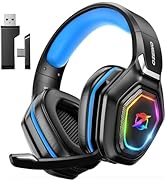
Ozeino Gaming Headset
Sensitive Noise-Cancelling Mic
Durable High-quality Flexible Material
Cool RGB Gradient Light
Experience new level of Ozeino





