


- WARNING: This cable is for monitor or TV with RCA connector, if your TV/Monitor only have HDMI connection, you’ll also need a RCA to HDMI converter.
- Compatible with Playstation 1, 2 3 and 3 Slim, 6 FT long, Plug and Play cables that connects directly to your console.
- This multi-functional AV cable provides composite video & audio output for viewing on a TV / Monitor Dock connector plugs directly into the game console.
- Ultra thick and flexible jacket with color coded connectors to simplify installation. Dock connector can be plug directly into the game console.
- Material: copper wire coated with PVC jacket
- Quantity: 1 piece
- Color: Black
Troubleshoot
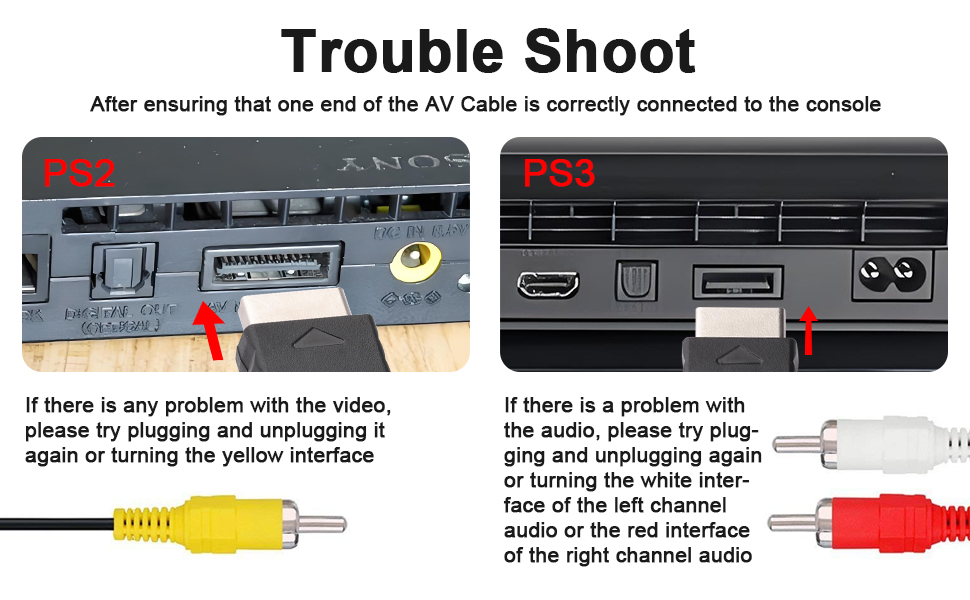
IMPORTANT
This cable is for monitor or TV with RCA connector, if your TV/Monitor only have HDMI connection, you’ll also need a RCA to HDMI converter
Troubleshooting: No Signal on TV When Using Our AV Cable
If you previously connected your PS2/PS3 console to the TV using an HDMI cable or other non-This cables, you may encounter a “No Signal” message on your TV when switching to our AV cable.
This is a common issue with PlayStation consoles, and there’s an easy fix!
1. Power Off Your Console.
2. Connect Our AV Cable.
3. Reset Display Settings: Press and hold the console’s power button before turning it on. Keep holding until you hear two distinct “beep” sounds. The first beep indicates the console is powering on, and the second beep signals that the display settings have been reset to AV output.
4. Release the Button & Enjoy: After the second beep, release the power button. Your TV should now display the console’s output. If not, double-check all cable connections and try the process again.
- WARNING: This cable is for monitor or TV with RCA connector, if your TV/Monitor only have HDMI connection, you’ll also need a RCA to HDMI converter.
- Compatible with Playstation 1, 2 3 and 3 Slim, 6 FT long, Plug and Play cables that connects directly to your console.
- This multi-functional AV cable provides composite video & audio output for viewing on a TV / Monitor Dock connector plugs directly into the game console.
- Ultra thick and flexible jacket with color coded connectors to simplify installation. Dock connector can be plug directly into the game console.
- Material: copper wire coated with PVC jacket
- Quantity: 1 piece
- Color: Black
Troubleshoot
IMPORTANT
This cable is for monitor or TV with RCA connector, if your TV/Monitor only have HDMI connection, you’ll also need a RCA to HDMI converter
Troubleshooting: No Signal on TV When Using Our AV Cable
If you previously connected your PS2/PS3 console to the TV using an HDMI cable or other non-This cables, you may encounter a “No Signal” message on your TV when switching to our AV cable.
This is a common issue with PlayStation consoles, and there’s an easy fix!
1. Power Off Your Console.
2. Connect Our AV Cable.
3. Reset Display Settings: Press and hold the console’s power button before turning it on. Keep holding until you hear two distinct “beep” sounds. The first beep indicates the console is powering on, and the second beep signals that the display settings have been reset to AV output.
4. Release the Button & Enjoy: After the second beep, release the power button. Your TV should now display the console’s output. If not, double-check all cable connections and try the process again.





