


Doohoeek Universal Mini Keyboard High-Visibility
Merchant VideoComparison Mini Keyboards
Small | Keyboard Size | Small |
Backlilt | ||
Trackpad | ||
Dual Bluetooth | ||
7.7*3.3*0.6in | Dimensions(Closed) | 7.7*3.3*0.8in |
Small | Keyboard Size | Large |
Backlilt | ||
Trackpad | ||
Dual Bluetooth | ||
7.7*3.3*0.6in | Dimensions(Closed) | 9.6*4.5*0.6in |


The Bluetooth "Wireless keyboard" dosen't showcase on my device! What should I do?
Reset the keyboard & then reconnect it: 1. Press & hold the first and the last key at the top row of the keyboard until all indicators flash; 2. Bluetooth light flickers quickly, auto entering Bluetooth pairing mode (If not, long press Fn + 1 or 2)
How to switch between devices?
Short press "Fn" + "1" or "2" key.
The keyboard suddently can not enter any letters and the keyboard still connect to my devices, what happened?
We believe you may accidentally lock the keyboard by pressing Fn + cap lock , only press the Fn + cap lock again you can use the keyboard normally.
I want to hide the on-screen / virtual keyboard, what should I do?
Please press Fn + Tab key to hide or show up the virtual keyboard;


Ergonomic Angle
Kickstand supports up to 150° adjustments. You could adjust it to the most comfortable viewing angle.

Auto Detect Multi OS
The shortcut keys will aware different system and you could simply press corresponding shortcuts effortlessly.


Doohoeek Universal Mini Keyboard High-Visibility
Merchant VideoComparison Mini Keyboards
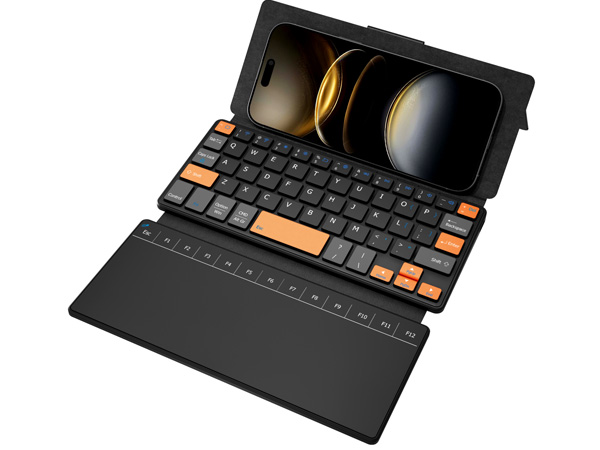
Mini Travel Keyboard
Keyboard Size
Small
Backlilt
Trackpad
Dual Bluetooth
Dimensions(Closed)
7.7*3.3*0.6in
Travel Keyboard Touch
Keyboard Size
Small
Backlilt
Trackpad
Dual Bluetooth
Dimensions(Closed)
7.7*3.3*0.8in
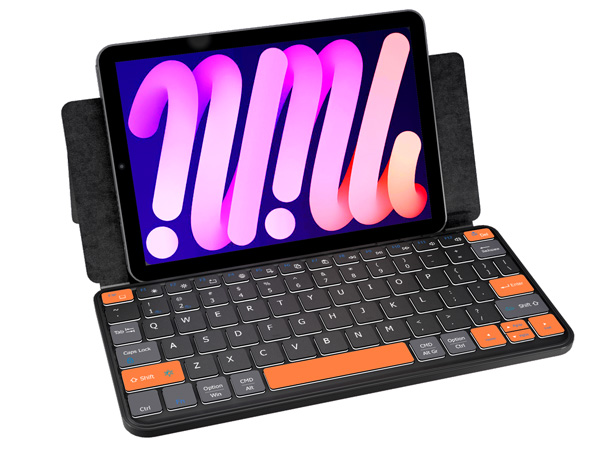
Travel Keyboard Plus
Keyboard Size
Large
Backlilt
Trackpad
Dual Bluetooth
Dimensions(Closed)
9.6*4.5*0.6in
The Bluetooth "Wireless keyboard" dosen't showcase on my device! What should I do?
Reset the keyboard & then reconnect it: 1. Press & hold the first and the last key at the top row of the keyboard until all indicators flash; 2. Bluetooth light flickers quickly, auto entering Bluetooth pairing mode (If not, long press Fn + 1 or 2)
How to switch between devices?
Short press "Fn" + "1" or "2" key.
The keyboard suddently can not enter any letters and the keyboard still connect to my devices, what happened?
We believe you may accidentally lock the keyboard by pressing Fn + cap lock , only press the Fn + cap lock again you can use the keyboard normally.
I want to hide the on-screen / virtual keyboard, what should I do?
Please press Fn + Tab key to hide or show up the virtual keyboard;


Ergonomic Angle
Kickstand supports up to 150° adjustments. You could adjust it to the most comfortable viewing angle.
Auto Detect Multi OS
The shortcut keys will aware different system and you could simply press corresponding shortcuts effortlessly.







