


Nitecore MT2A Pro LED EDC Rechargeable Flashlight
Nitecore MT2A Pro 1000 Lumen LED EDC Flashlight
Merchant Video


What sets the Nitecore MT2A Pro apart from other flashlights?
1. A maximum 1000 lumen brightness and a 279-yard throw, all packed within a compact 5-inch body
2. Compatible with 2 commonly available Alkaline AA
3. A two-way pocket clip that can be easily clipped onto a pocket or strap for hands-free use
What LED does the MT2A Pro use? What is its LED temperature?
The MT2A Pro is equipped with the Nitelab UHi20, the latest LED generation crafted for flashlights, known for its high light density (brightness) and exceptional beam intensity (throw distance). The LED temperature is 5700-6300K.
How do you turn on the MT2A Pro? Does the flashlight retain the previous brightness setting?
The MT2A Pro features a user-friendly switch located on the tail cap. To activate the light, press the switch fully. Adjust the brightness by gently tapping the switch when the light is on. The flashlight remembers the last brightness level.
How do I charge the MT2A Pro flashlight? Where do I find the two-way clip?
Locate the built-in charging port on top of the power source. The indicator stays red while charging and turns green when charging is complete.
The pocket clip is packed inside the accessory bag with the lanyard.
Nitecore MT Series with difference sizes and different rechargeable batteries
 Nitecore MT2A Pro |  Nitecore MT1A Pro |  Nitecore MT1C Pro |  Nitecore MT2C Pro | |
|---|---|---|---|---|
Customer Reviews | — | — | — | — |
Maximum Output | 1000 lumens | 800 lumens | 1000 lumens | 1800 lumens |
Distance | 279 yards | 273 yards | 393 yards | 568 yards |
Maximum Runtime (lowest mode) | 20 hours | 10 hours | 16 hours | 28 hours |
Size | 5.62" x 0.78" x 0.77" | 3.66" x 0.78" x 0.68" | 3.46" x 1.06" x 0.84" | 4.63" x 1.06" x 0.84" |
Weight (w/o battery) | 1.41 oz | 1.13 oz | 1.87 oz | 4.02 oz |
Nitecore MT2A Pro LED EDC Rechargeable Flashlight
Nitecore MT2A Pro 1000 Lumen LED EDC Flashlight
Merchant Video

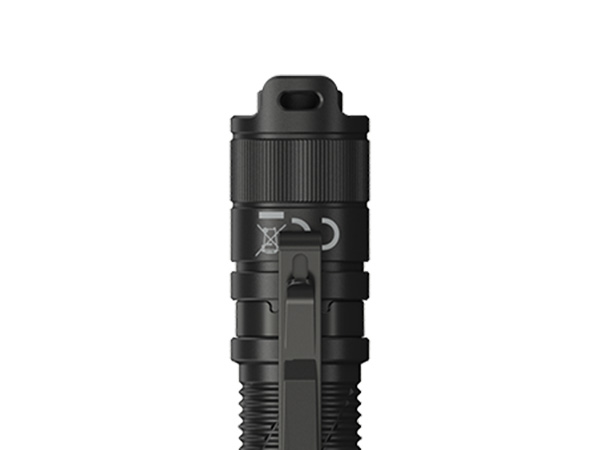
U-Shaped Tail Cap
Protects from accidental activation and gives the MT2A Pro the ability to tail stand. Also has a hole for the lanyard attachment.

Anti-Slip Knurling
Anti-slip knurling design allows for an easy grip even with wet hands or wearing gloves.

Advanced Temperature Regulation
The integrated ATR technology regulates the output of the MT2A Pro to maintain the optimal performance.


What sets the Nitecore MT2A Pro apart from other flashlights?
1. A maximum 1000 lumen brightness and a 279-yard throw, all packed within a compact 5-inch body
2. Compatible with 2 commonly available Alkaline AA
3. A two-way pocket clip that can be easily clipped onto a pocket or strap for hands-free use
What LED does the MT2A Pro use? What is its LED temperature?
The MT2A Pro is equipped with the Nitelab UHi20, the latest LED generation crafted for flashlights, known for its high light density (brightness) and exceptional beam intensity (throw distance). The LED temperature is 5700-6300K.
How do you turn on the MT2A Pro? Does the flashlight retain the previous brightness setting?
The MT2A Pro features a user-friendly switch located on the tail cap. To activate the light, press the switch fully. Adjust the brightness by gently tapping the switch when the light is on. The flashlight remembers the last brightness level.
How do I charge the MT2A Pro flashlight? Where do I find the two-way clip?
Locate the built-in charging port on top of the power source. The indicator stays red while charging and turns green when charging is complete.
The pocket clip is packed inside the accessory bag with the lanyard.
Nitecore MT Series with difference sizes and different rechargeable batteries
Nitecore MT2A Pro | Nitecore MT1A Pro | Nitecore MT1C Pro | Nitecore MT2C Pro |
|---|---|---|---|
| Customer Reviews | |||
| — | — | — | — |
| Maximum Output | |||
| 1000 lumens | 800 lumens | 1000 lumens | 1800 lumens |
| Distance | |||
| 279 yards | 273 yards | 393 yards | 568 yards |
| Maximum Runtime (lowest mode) | |||
| 20 hours | 10 hours | 16 hours | 28 hours |
| Size | |||
| 5.62" x 0.78" x 0.77" | 3.66" x 0.78" x 0.68" | 3.46" x 1.06" x 0.84" | 4.63" x 1.06" x 0.84" |
| Weight (w/o battery) | |||
| 1.41 oz | 1.13 oz | 1.87 oz | 4.02 oz |





