



Conrain M4S MP3 Player
1. Steady Bluetooth 5.3 Connection
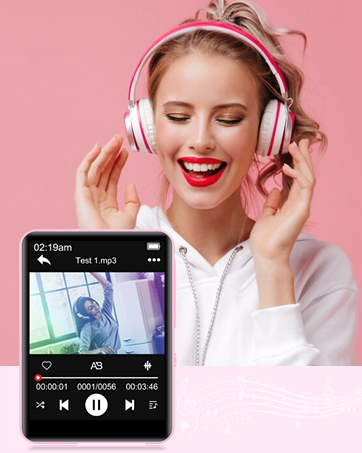
2. Exquisite Exterior: 2.4" highly sensitive full touch screen let you have a better visual experience.
3. Large Capacity: Built-in 64GB internal memory + up to 128GB TF card.
4. Built-in Speaker: You can listen to your favorite music without headphones.


Bluetooth 5.3 Technology
The mp3 player with Bluetooth 5.3 technology features faster and stable signal transmission, clearer sound quality, and lower power consumption, ensuring a strong, stable connection with all Bluetooth headphones, speakers. Just enjoy your music when running, jogging, travel, or in the gym.

FM Radio Player
Built-in FM radio, it has a powerful channel capture capability. You can listen to news, sports events, music stations, etc. that you want to listen to. Furthermore, you can also record FM as you like.
Tips: The radio is only available when plugging in a wired headphones, it is used as antenna. If you want to listen to FM radio with Bluetooth headphone, you need to plug wired headphone firstly.

Voice Recording
The voice recording function can help you a lot when you need to record important information in-class lectures, meetings or interviews.
You won't miss an important message anymore! It can also record your favorite station’s content and share it with your friends.

Specification
FAQ

Conrain MP3 Player
Join us on our mission to make music a richer part of your world. Explore conrain and experience music the way it's meant to be heard.

At conrain, we believe in enhancing every beat, every note, and every moment. Founded by passionate music enthusiasts, our journey began with a simple desire: to bring the purest essence of music into your daily life.
Conrain MP3 Player
Driven by innovation and a commitment to quality, we've crafted a range of MP3 music players that redefine audio excellence.
How did we get started?
Inspired by the harmony between technology and artistry, each conrain music player is meticulously designed to resonate with your lifestyle.
What makes our company unique?
Our products stand out due to their exceptional sound quality, seamless user experience, and stylish yet functional design that enhances every listening moment.
Why do we love what we do?
We love our work because it allows us to bring joy and inspiration to people's lives through music. Every positive review and happy customer remind us why we do what we do.
Conrain M4S MP3 Player
1. Steady Bluetooth 5.3 Connection
2. Exquisite Exterior: 2.4" highly sensitive full touch screen let you have a better visual experience.
3. Large Capacity: Built-in 64GB internal memory + up to 128GB TF card.
4. Built-in Speaker: You can listen to your favorite music without headphones.
Bluetooth 5.3 Technology
The mp3 player with Bluetooth 5.3 technology features faster and stable signal transmission, clearer sound quality, and lower power consumption, ensuring a strong, stable connection with all Bluetooth headphones, speakers. Just enjoy your music when running, jogging, travel, or in the gym.
FM Radio Player
Built-in FM radio, it has a powerful channel capture capability. You can listen to news, sports events, music stations, etc. that you want to listen to. Furthermore, you can also record FM as you like.
Tips: The radio is only available when plugging in a wired headphones, it is used as antenna. If you want to listen to FM radio with Bluetooth headphone, you need to plug wired headphone firstly.
Voice Recording
The voice recording function can help you a lot when you need to record important information in-class lectures, meetings or interviews.
You won't miss an important message anymore! It can also record your favorite station’s content and share it with your friends.
Specification
| Bluetooth version | Bluetooth 5.3 |
| Screen | 2.4 in TFT color screen, 240 * 320 resolution |
| USB connection | USB 2.0 |
| E-Book | TXT format only |
| Image format | JPG, BMP |
| Music format | MP3 / WMA / APE / FLAC / WAV / / DRM / ACELP |
| Voice recording format | WAV / MP3 |
| Compatible system | XP (Home, Pro, with SP1, SP2, SP3), 32 bit / Windows 7 - 10 64 bit |
| Item size | 49*68*10mm |
| Item weight | 66g |
| Video | AVI |
FAQ
| Question: | Why I can't listen to FM radio? |
| Answer: | You need to connect wired headphone to listen to FM radio, the wired headphone is used as antenna. |
| Question: | Why does it show error when I transfer the video with AVI format? |
| Answer: | Because the resolution of the downloaded video does not match the mp3, it will not play video even if you have downloaded the correct format (screen resolution 240*320), please tell us to get a professional video converter. |
| Question: | Why does the Bluetooth can't connect my headphone? |
| Answer 1: | Turn on the Bluetooth headphone, then turn on mp3 device Bluetooth function and search the the Bluetooth name you need to connect to, click on the link. |
| Answer 2: | When you have successfully connected to a Bluetooth device and you need to connect to another Bluetooth device again, please disconnect the previously connected Bluetooth device firstly. |
| Tips: | The M4S mp3 player can only connect with Bluetooth headphone and speaker, it can't connect with smartphone or car by Bluetooth. |
| Question: | Why I can't turn on the device? |
| Answer 1: | If you have charged for the mp3 player, but you can't turn it on, you could long-press the power button for 15 seconds to turn it on. |
| Answer 2: | Please check if the battery is out of power, if so, you need to charge for the mp3, then you could long-press the power button to turn it on. |
Conrain MP3 Player
Join us on our mission to make music a richer part of your world. Explore conrain and experience music the way it's meant to be heard.
At conrain, we believe in enhancing every beat, every note, and every moment. Founded by passionate music enthusiasts, our journey began with a simple desire: to bring the purest essence of music into your daily life.
Conrain MP3 Player
Driven by innovation and a commitment to quality, we've crafted a range of MP3 music players that redefine audio excellence.
How did we get started?
Inspired by the harmony between technology and artistry, each conrain music player is meticulously designed to resonate with your lifestyle.
What makes our company unique?
Our products stand out due to their exceptional sound quality, seamless user experience, and stylish yet functional design that enhances every listening moment.
Why do we love what we do?
We love our work because it allows us to bring joy and inspiration to people's lives through music. Every positive review and happy customer remind us why we do what we do.





