
Built for How Business Buys.

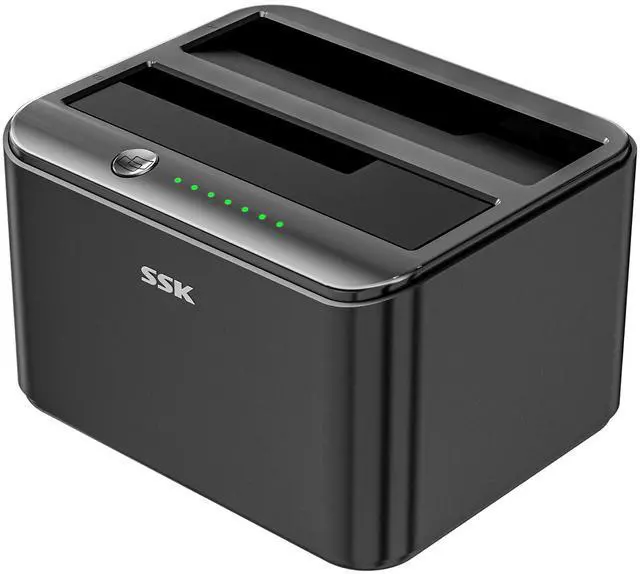
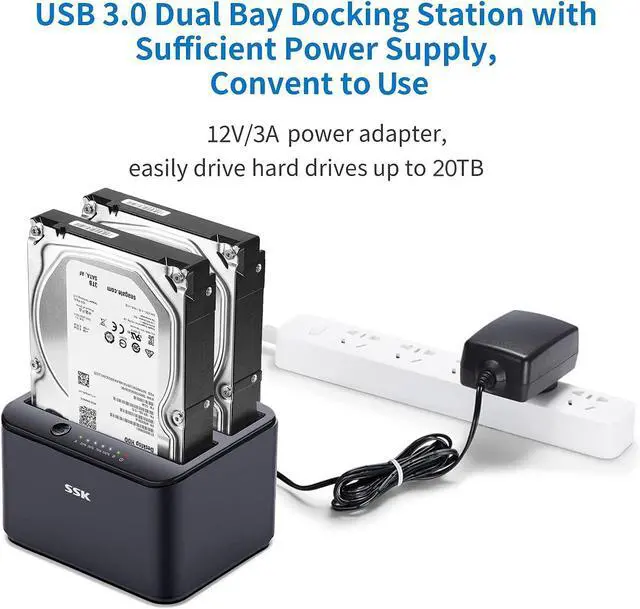


SSK USB 3.0 to SATA I/II/III Dual Bay External Hard Drive Docking Station for 2.5 / 3.5in HDD, SSD with Hard Drive Duplicator/Cloner Function
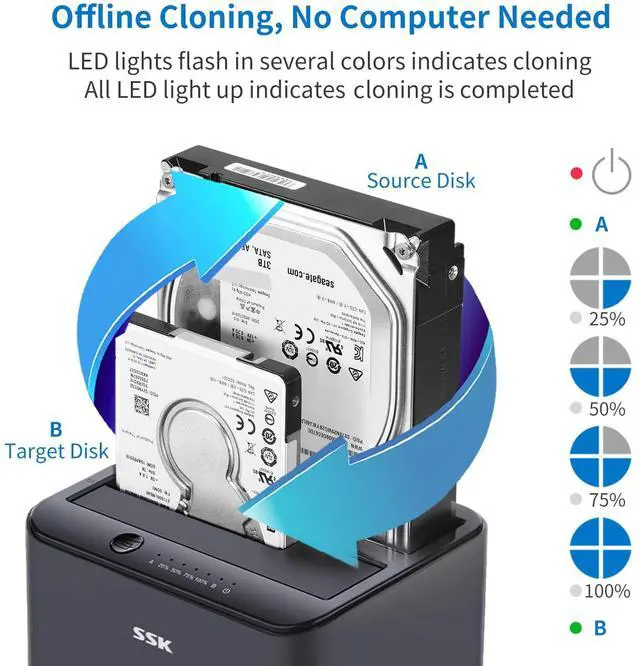
How to Use Hard Drive Offline Clone Function?
- Disconnect the docking station from your computer.
- Insert Source Disk into hard drive bay A, and Target Disk into bay B.
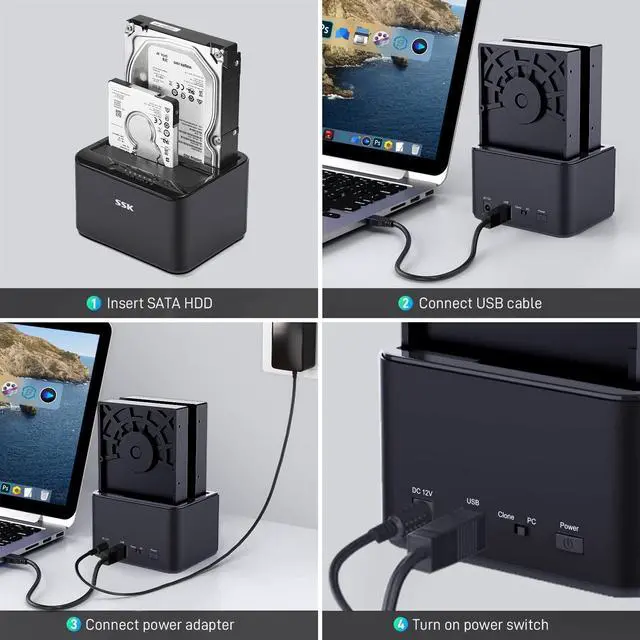
- Connect power supply, switch on power, and toggle the mode switch to "Clone" mode.
- Press and hold the CLONE button, release when you see all lights flashing.
- Then quickly press the CLONE Button. A Yellow LED will flash on 25% indicating that the cloning process has begun.
- The cloning process is complete when you hear the'Bang noise'for three times (25%-100%).
- Finally press the power switch to the OFF position and eject your drives.
Attention:
- The target drive has to be at least equal or larger than the source drive in capacity to use offline drive-to-drive cloning.
- Please confirm your source drive and target drive both can work properly, and target drive has no important data. The cloning process will eliminate your target drive's existing data. Since the target drive will be cloned to be the same as the source drive in partition, format and data.
- To keep the existing data on the target drive and the source drive, switch the dock to PC mode and connect the dock to your PC to transfer data through your computer manually.
- Please do not directly unplug the drives when cloning. Only when you hear the 'Bang noise' for three times indicating the cloning process is complete, can you eject your drives.
- When your hard drive is transferring data with the computer, PLEASE do not directly unplug the hard disk when the data transfer is in process. Eject the drive from the computer ONLY when transmission completed, or you may suffer from data loss.
Avoid the two hard drives influence each other:
1. When clone completed, please noted:
- To better protect your drive data and prolong the service life of the hard disk, please power off the HDD dock or switch to PC mode after clone completed.
2. When In PC mode, please noted:
- To better protect your drive data and prolong the service life of the hard disk, Do Not insert or unplug your drive when the HDD dock is on.
- Please eject your drives from the computer before turn off the HDD dock.

SSK Aluminum Dual Bay Docking Station one click clone

It is not compatible with IDE drives
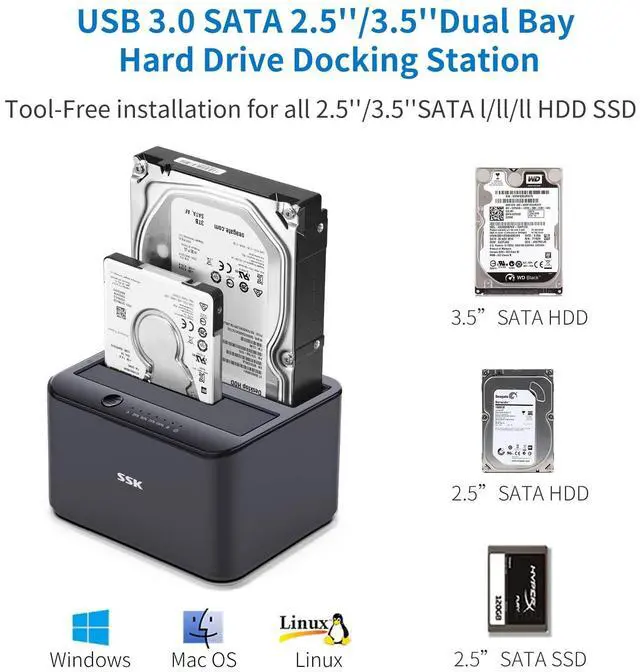
SSK HDD docking station is not compatible IDE drives.It compatible with all 2.5 inch and 3.5 inch SATA HDD and SSD.
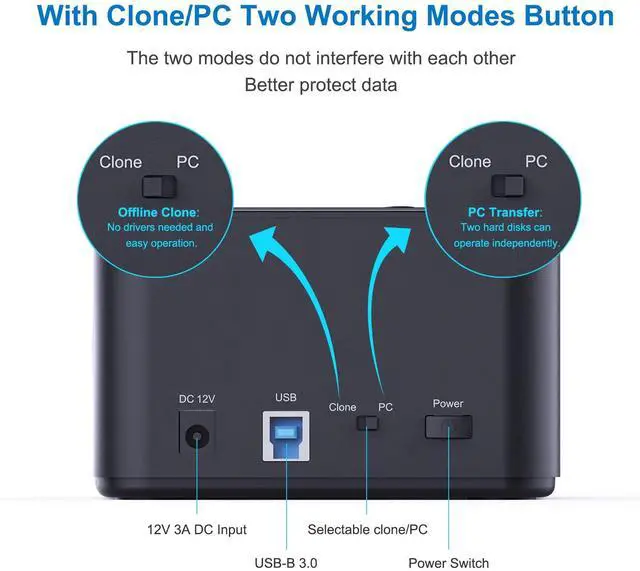
Noted:1. This HDD docking station DK103PRO is our updated design. We put the CLONE/PC selectable button on the back, better protect the data.
2. Due to the hard disk properties,please timely backup your data stored on the Hard disk In case of loss.
- Package Includes:
- 1x SSK DK103PRO Docking
- 1x USB 3.0 Cable
- 1x 12V/3A Power Adapter
- 1x User Manual
SSK USB 3.0 to SATA Dual-Bay External Hard Drive Docking Station
Clone one disk to another without computer
The Dual Dock provides simultaneous access to both drives, uses external power for stable drive performance and supports hot-swapping so you won't need to reboot your computer.
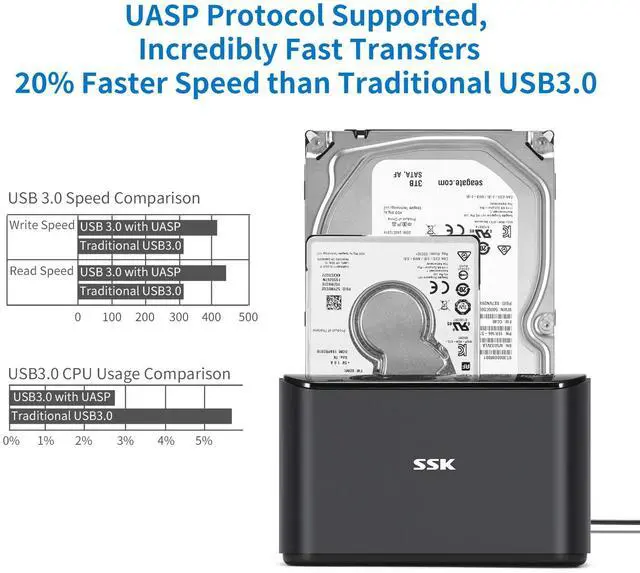
Supports UASP technology,UASP is a new transport protocol, which can increase data transfer speed, up to 20% faster than conventional USB 3.0. Transfer 1G file within 10 seconds.
- Compatible HDD:2.5/3.5 inch
- Max HDD Capacity:20TB
- Maximum data transfer rates:5 Gbps
- Aluminum+ ABS Plastic(Excellent heat dissipation)
- Item Dimensions:5 x 3.8 x 2.8 in

Two Independent System in One Dock
Cloning mode and PC mode are two independent systems in the dock. They work indecently without interfere each other by simply toggling the mode switch behind the dock.
1. Fast Cloning at Ease:
Clone and backup the data in your drive without connecting to PCs at full speed by simply press the clone key on the dock.
2. Data Protection Design:
Switch the dock to PC mode to protect your data from being erased by pressing the clone key unintentionally. In PC mode, only your connected PC could read and write in your drive, so that the safety of your cherished data is fully in your own hand.

Upgrade Capacity of your Xbox
SSK external hard drive docking station can upgrade capacity of your Xbox to install more large games. Enjoy the freedom to play your favorite games in more places than ever.
Wherever you go, connect to your Xbox you can continue to play with your friends and record your best game moments.

Build Private Cloud Storage
If your router supports external hard drive, you can build private cloud storage central location to store and protect all data from every PC and Mac computer, tablet and smartphone in your home or small office.
Store, access and share files from anywhere over your network at speeds up 10/100/1000 Mbp.

Enjoy High Definition Quality Movie
Thousands of movies, hundreds of songs, loads of photos. SSK external hard drive docking station helps protect all of it with proven reliability, seamless backup, Mac and Windows usability,USB 3.0 ports supports UASP and SATA 5Gbps for even faster data transfers.
Plug and play, no driver needed LED indicator status display.
 For SATA SSD/HDD |  For SATA SSD/HDD |  SATA SSD/HDD Dock |  SATA SSD/HDD Dock |  M.2 SSD Enclosure | |
|---|---|---|---|---|---|
| Customer Reviews | — | — | — | — | — |
| Price | — | — | — | — | — |
| SSD Protocol | SATA SSD/HDD | SATA SSD/HDD | SATA SSD/HDD | SATA SSD/HDD | M.2 SSD |
| Supported sizes | 2.5-inch | 2.5/3.5-inch | 2.5/3.5-inch | 2.5/3.5-inch | 2242/2260/2280 |
| Drive Bay | Single Bay | Dual Bay-Clone | Single Bay | Single Bay | Single Bay |
| Max speed | UASP 5Gbps | UASP 6Gbps | UASP 5Gbps | UASP 5Gbps | 10Gbps |
| Power Adapter | USB Host Powered | 12V/3A | 12V/2A | 12V/2A | USB Host Powered |
| MAX Capacity | 10TB | 20TB | 20TB | 20TB | 8TB |


About SSK Brand
Founded in 2001, SSK is a professional IT peripherals brand with 25 years of experience, focusing on quality, innovation and creativity
We design, develop and manufacture. With ISO9001 certification, we provide efficient connectivity solutions to simplify digital life and enable seamless connection
Each SSK product ensures premium quality, steady performance and sound reliability, bringing trusted storage peripherals to global users worldwide


8K + 10Gbps Hub
Portable SSD

2.5/3.5 HDD Dock

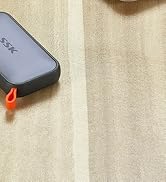
External SSD
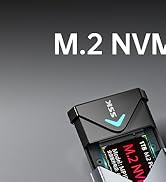

M.2 SSD Enclosure
SSK USB 3.0 to SATA I/II/III Dual Bay External Hard Drive Docking Station for 2.5 / 3.5in HDD, SSD with Hard Drive Duplicator/Cloner Function
How to Use Hard Drive Offline Clone Function?
- Disconnect the docking station from your computer.
- Insert Source Disk into hard drive bay A, and Target Disk into bay B.
- Connect power supply, switch on power, and toggle the mode switch to "Clone" mode.
- Press and hold the CLONE button, release when you see all lights flashing.
- Then quickly press the CLONE Button. A Yellow LED will flash on 25% indicating that the cloning process has begun.
- The cloning process is complete when you hear the'Bang noise'for three times (25%-100%).
- Finally press the power switch to the OFF position and eject your drives.
Attention:
- The target drive has to be at least equal or larger than the source drive in capacity to use offline drive-to-drive cloning.
- Please confirm your source drive and target drive both can work properly, and target drive has no important data. The cloning process will eliminate your target drive's existing data. Since the target drive will be cloned to be the same as the source drive in partition, format and data.
- To keep the existing data on the target drive and the source drive, switch the dock to PC mode and connect the dock to your PC to transfer data through your computer manually.
- Please do not directly unplug the drives when cloning. Only when you hear the 'Bang noise' for three times indicating the cloning process is complete, can you eject your drives.
- When your hard drive is transferring data with the computer, PLEASE do not directly unplug the hard disk when the data transfer is in process. Eject the drive from the computer ONLY when transmission completed, or you may suffer from data loss.
Avoid the two hard drives influence each other:
1. When clone completed, please noted:
- To better protect your drive data and prolong the service life of the hard disk, please power off the HDD dock or switch to PC mode after clone completed.
2. When In PC mode, please noted:
- To better protect your drive data and prolong the service life of the hard disk, Do Not insert or unplug your drive when the HDD dock is on.
- Please eject your drives from the computer before turn off the HDD dock.
SSK USB 3.0 to SATA Dual-Bay External Hard Drive Docking Station
It is not compatible with IDE drives
SSK HDD docking station is not compatible IDE drives.It compatible with all 2.5 inch and 3.5 inch SATA HDD and SSD.
Noted:1. This HDD docking station DK103PRO is our updated design. We put the CLONE/PC selectable button on the back, better protect the data.
2. Due to the hard disk properties,please timely backup your data stored on the Hard disk In case of loss.
- Package Includes:
- 1x SSK DK103PRO Docking
- 1x USB 3.0 Cable
- 1x 12V/3A Power Adapter
- 1x User Manual
SSK Aluminum Dual Bay Docking Station one click clone
Clone one disk to another without computer
The Dual Dock provides simultaneous access to both drives, uses external power for stable drive performance and supports hot-swapping so you won't need to reboot your computer.
Supports UASP technology,UASP is a new transport protocol, which can increase data transfer speed, up to 20% faster than conventional USB 3.0. Transfer 1G file within 10 seconds.
- Compatible HDD:2.5/3.5 inch
- Max HDD Capacity:20TB
- Maximum data transfer rates:5 Gbps
- Aluminum+ ABS Plastic(Excellent heat dissipation)
- Item Dimensions:5 x 3.8 x 2.8 in
Two Independent System in One Dock
Cloning mode and PC mode are two independent systems in the dock. They work indecently without interfere each other by simply toggling the mode switch behind the dock.
1. Fast Cloning at Ease:
Clone and backup the data in your drive without connecting to PCs at full speed by simply press the clone key on the dock.
2. Data Protection Design:
Switch the dock to PC mode to protect your data from being erased by pressing the clone key unintentionally. In PC mode, only your connected PC could read and write in your drive, so that the safety of your cherished data is fully in your own hand.
Upgrade Capacity of your Xbox
SSK external hard drive docking station can upgrade capacity of your Xbox to install more large games. Enjoy the freedom to play your favorite games in more places than ever.
Wherever you go, connect to your Xbox you can continue to play with your friends and record your best game moments.
Build Private Cloud Storage
If your router supports external hard drive, you can build private cloud storage central location to store and protect all data from every PC and Mac computer, tablet and smartphone in your home or small office.
Store, access and share files from anywhere over your network at speeds up 10/100/1000 Mbp.
Enjoy High Definition Quality Movie
Thousands of movies, hundreds of songs, loads of photos. SSK external hard drive docking station helps protect all of it with proven reliability, seamless backup, Mac and Windows usability,USB 3.0 ports supports UASP and SATA 5Gbps for even faster data transfers.
Plug and play, no driver needed LED indicator status display.
For SATA SSD/HDD | For SATA SSD/HDD | SATA SSD/HDD Dock | SATA SSD/HDD Dock | M.2 SSD Enclosure | |
|---|---|---|---|---|---|
| Customer Reviews | — | — | — | — | — |
| Price | — | — | — | — | — |
| SSD Protocol | SATA SSD/HDD | SATA SSD/HDD | SATA SSD/HDD | SATA SSD/HDD | M.2 SSD |
| Supported sizes | 2.5-inch | 2.5/3.5-inch | 2.5/3.5-inch | 2.5/3.5-inch | 2242/2260/2280 |
| Drive Bay | Single Bay | Dual Bay-Clone | Single Bay | Single Bay | Single Bay |
| Max speed | UASP 5Gbps | UASP 6Gbps | UASP 5Gbps | UASP 5Gbps | 10Gbps |
| Power Adapter | USB Host Powered | 12V/3A | 12V/2A | 12V/2A | USB Host Powered |
| MAX Capacity | 10TB | 20TB | 20TB | 20TB | 8TB |
About SSK Brand
Founded in 2001, SSK is a professional IT peripherals brand with 25 years of experience, focusing on quality, innovation and creativity
We design, develop and manufacture. With ISO9001 certification, we provide efficient connectivity solutions to simplify digital life and enable seamless connection
Each SSK product ensures premium quality, steady performance and sound reliability, bringing trusted storage peripherals to global users worldwide
8K + 10Gbps Hub
Portable SSD
2.5/3.5 HDD Dock
External SSD
M.2 SSD Enclosure