



EYOOLD – Bridging Memories, Powering Futures
Every hard drive holds a story. Yet, as tech evolves, millions of drives become “obsolete”—abandoned in drawers, labeled “dead.”
EYOOLD was born to bridge the gap between old and new. Our adapters aren’t just cables and chips—they’re keys to unlock legacies
Your drive isn’t “old.”
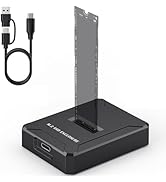
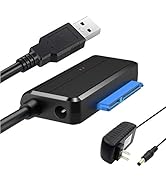
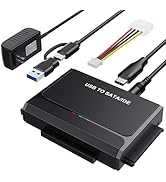
Data Recovery Hero
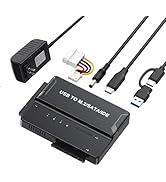
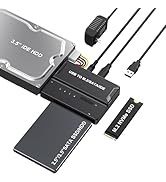
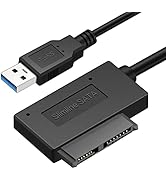
Rescue Lost Memories
Universal Hard Drive Reader

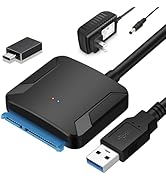
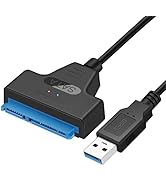
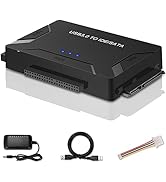
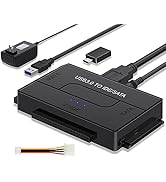
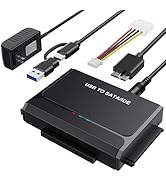
SATA / IDE to USB 3.0 Adapter, Hard Drive Reader for Universal 2.5 3.5-Inch IDE and SATA External HDD/SSD, with 12V 2A Power Supply Support 6TB
A hard drive reader allows you to connect internal 2.5”/3.5” SATA or IDE hard drives (HDDs) and SSDs to a computer via USB for data recovery, backups, or file transfers. They are plug-and-play, featuring external power for stability.

Features:
- Supported Drives: 2.5"/3.5" SATA HDD/SSD; 2.5"/3.5" IDE HDD; DVD-ROM, CD-ROM, CD-RW, DVD-RW, DVD+RW;
- Compatible Systems: Windows8/7/10/Vista/XP/Mac OS 9/10/Linux;
- Supports drives with a capacity of up to 6 TB;
- Support speed up to 5Gbps; Backward compatible with USB 2.0/1.1;
- On/Off Switch for HDD protection;
- DC Power Supply 12V 2A included for 3.5" devices ;
- LED activity indicator, Plug & Play, simple, reliable and stable
NOTE: If your hard drive is new, please make a partition before using it.
5Gbps Data Transmission Rates


NOTE: Why the SATA IDE hard drive reader not work with my drive?
- 1) If you are using a new SSD drive or an HDD, you need to initialize it first and then format it. Start/Run then type Disk Management
- 2) If it is an old hard disk or disassembled hard disk, first confirm whether the hard disk is good.
- 3) If it is an Apple OS mac system, set up the hard disk format
- 4) wrong hard drive type - Your drive interface may be the SCSI interface; the SAS interface, the adapter not work with them.
- 5)Bad USB port on the computer;
NOTE:

Here are some common causes and troubleshooting steps:
1. Ensure that the hard drive is properly connected to your computer. Check the cables and connections to make sure they are secure. If it's an external hard drive, try using a different USB port or cable.
2. Power Supply: Make sure that the hard drive is receiving power.
3. Disk Management: Open Disk Management in Windows to see if the drive is detected but not properly initialized or assigned a drive letter.
4. Device Manager: Look for the hard drive under "Disk drives" or "Other devices." If it's listed with a yellow exclamation mark, there may be a driver issue.
5. Driver Issues: Update or reinstall the drivers for the hard drive.
6. BIOS/UEFI Settings: If the hard drive is internal, check your computer's BIOS/UEFI settings to see if the drive is recognized there.
7. Hardware Failure: The hard drive may have failed.
8. Compatibility: Sometimes, certain hard drives may not be compatible with a particular system.
 EYOOLD SATA to USB 3.0 Adapter Cable for 2.5 inch Hard Drive HDD/SSD Data Tra... |  EYOOLD SATA IDE to USB 3.0 Adapter, Hard Drive Reader for Universal 2.5 3.5 I... |  EYOOLD SATA to USB 3.0 Adapter, External Hard Drive Converter Cable for 2.5" ... |  EYOOLD SATA to USB 3.0 Adapter Cable, SATA III Hard Drive Disk Converter for ... | |
|---|---|---|---|---|
| Customer Reviews | — | — | — | — |
| Price | — | — | — | — |
| USB Interface | USB 3.0 | USB 3.0 | USB 3.0 | USB 3.0 |
| Transfer Speed | 6Gbps max | 5Gbps max | 5Gbps max | 5Gbps max |
| Support Interface | SATA | SATA/IDE | SATA | SATA |
| Include Power Suppy | No need | ? | ? | ? |
Universal Hard Drive Reader
SATA / IDE to USB 3.0 Adapter, Hard Drive Reader for Universal 2.5 3.5-Inch IDE and SATA External HDD/SSD, with 12V 2A Power Supply Support 6TB
A hard drive reader allows you to connect internal 2.5”/3.5” SATA or IDE hard drives (HDDs) and SSDs to a computer via USB for data recovery, backups, or file transfers. They are plug-and-play, featuring external power for stability.
Features:
- Supported Drives: 2.5"/3.5" SATA HDD/SSD; 2.5"/3.5" IDE HDD; DVD-ROM, CD-ROM, CD-RW, DVD-RW, DVD+RW;
- Compatible Systems: Windows8/7/10/Vista/XP/Mac OS 9/10/Linux;
- Supports drives with a capacity of up to 6 TB;
- Support speed up to 5Gbps; Backward compatible with USB 2.0/1.1;
- On/Off Switch for HDD protection;
- DC Power Supply 12V 2A included for 3.5" devices ;
- LED activity indicator, Plug & Play, simple, reliable and stable
NOTE: If your hard drive is new, please make a partition before using it.
5Gbps Data Transmission Rates
NOTE: Why the SATA IDE hard drive reader not work with my drive?
- 1) If you are using a new SSD drive or an HDD, you need to initialize it first and then format it. Start/Run then type Disk Management
- 2) If it is an old hard disk or disassembled hard disk, first confirm whether the hard disk is good.
- 3) If it is an Apple OS mac system, set up the hard disk format
- 4) wrong hard drive type - Your drive interface may be the SCSI interface; the SAS interface, the adapter not work with them.
- 5)Bad USB port on the computer;
NOTE:
Here are some common causes and troubleshooting steps:
1. Ensure that the hard drive is properly connected to your computer. Check the cables and connections to make sure they are secure. If it's an external hard drive, try using a different USB port or cable.
2. Power Supply: Make sure that the hard drive is receiving power.
3. Disk Management: Open Disk Management in Windows to see if the drive is detected but not properly initialized or assigned a drive letter.
4. Device Manager: Look for the hard drive under "Disk drives" or "Other devices." If it's listed with a yellow exclamation mark, there may be a driver issue.
5. Driver Issues: Update or reinstall the drivers for the hard drive.
6. BIOS/UEFI Settings: If the hard drive is internal, check your computer's BIOS/UEFI settings to see if the drive is recognized there.
7. Hardware Failure: The hard drive may have failed.
8. Compatibility: Sometimes, certain hard drives may not be compatible with a particular system.
EYOOLD SATA to USB 3.0 Adapter Cable for 2.5 inch Hard Drive HDD/SSD Data Tra... | EYOOLD SATA IDE to USB 3.0 Adapter, Hard Drive Reader for Universal 2.5 3.5 I... | EYOOLD SATA to USB 3.0 Adapter, External Hard Drive Converter Cable for 2.5" ... | EYOOLD SATA to USB 3.0 Adapter Cable, SATA III Hard Drive Disk Converter for ... | |
|---|---|---|---|---|
| Customer Reviews | — | — | — | — |
| Price | — | — | — | — |
| USB Interface | USB 3.0 | USB 3.0 | USB 3.0 | USB 3.0 |
| Transfer Speed | 6Gbps max | 5Gbps max | 5Gbps max | 5Gbps max |
| Support Interface | SATA | SATA/IDE | SATA | SATA |
| Include Power Suppy | No need | ? | ? | ? |
EYOOLD – Bridging Memories, Powering Futures
Every hard drive holds a story. Yet, as tech evolves, millions of drives become “obsolete”—abandoned in drawers, labeled “dead.”
EYOOLD was born to bridge the gap between old and new. Our adapters aren’t just cables and chips—they’re keys to unlock legacies
Your drive isn’t “old.”
Data Recovery Hero
Rescue Lost Memories





