




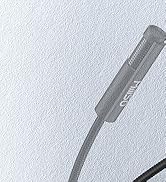
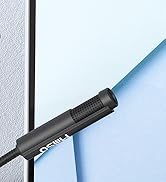




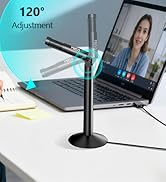


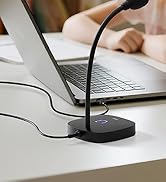

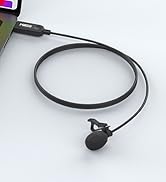
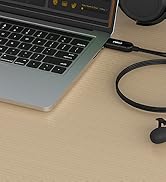


120-degree Adjustable Design
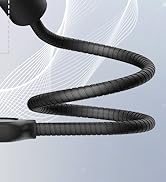
The microphone head position is adjustable to meet user comfort requirements.

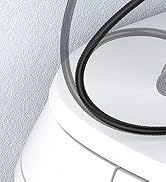
Omnidirectional Pickup Pattern
Capture crystal-clear audio equally from all sides of the microphone.


Some Things You Want to Know
MillSO Microphone Series
 USB External Microphone |  USB Computer Microphone |  USB Gooseneck Microphone |  External USB Microphone |  USB PC Microphone |  USB Lavalier Microphone |  USB Lapel Microphone | |
|---|---|---|---|---|---|---|---|
Customer Reviews | — | — | — | — | — | — | — |
Price | — | — | — | — | — | — | — |
Length | 4 ft / 1.2 m | 4.6 ft / 1.4 m | 1 ft / 35 cm | 1 ft / 35 cm | 4.9 ft / 1.5 m | 6.5 ft / 2 m | 6.5 ft / 2 m |
Design Style | Stand | Gooseneck Stand | Gooseneck Stand | Gooseneck Stand | Lavalier or Handheld | Lavalier or Handheld | Lavalier or Handheld |
Feature | 120° adjustable up and down | 360° adjustable | 360° adjustable | 360° adjustable | 360° adjustable | 360° adjustable | 360° adjustable |
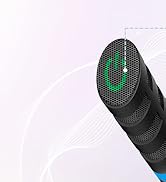
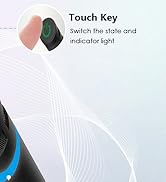
Touch Key | ? | ? | ? | ? | ? | ? | ? |
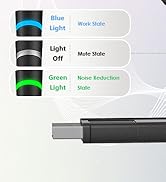
LED Indicator Lights | ? | ? | ? | ? | ? | ? | ? |
One-touch Mute | ? | ? | ? | ? | ? | ? | ? |
Noise Reduction | ? | ? | ? | ? | ? | ? | ? |


120-degree Adjustable Design
The microphone head position is adjustable to meet user comfort requirements.
Omnidirectional Pickup Pattern
Capture crystal-clear audio equally from all sides of the microphone.


Some Things You Want to Know
| Tip 1 | No gain control, please adjust the volume on the device or via Windows software. |
|---|---|
| Tip 2 | Please check the system and software preferences and make sure this microphone is set as the Default Input Device, so that Windows can recognize it. |
| Tip 3 | Ambient noise and excessive gain may affect the sound quality and signal of the microphone. Please try to adjust the volume to an appropriate level. |
| Tip 4 | It is recommended to place the microphone no more than 30 cm away from you to get a great and clear sound. Once you have the microphone set up correctly for your head position, don't move it around! |
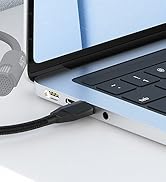
| Tip 5 | Connecting to an external USB hub may weaken the signal sent by the device. If the microphone can't be recognized, please connect it directly to the computer to determine whether it is a defective microphone or a compatibility issue with the USB Hub. |
MillSO Microphone Series
USB External Microphone | USB Computer Microphone | USB Gooseneck Microphone | External USB Microphone | USB PC Microphone | USB Lavalier Microphone | USB Lapel Microphone |
|---|---|---|---|---|---|---|
| Customer Reviews | ||||||
| — | — | — | — | — | — | — |
| Price | ||||||
| — | — | — | — | — | — | — |
| Length | ||||||
| 4 ft / 1.2 m | 4.6 ft / 1.4 m | 1 ft / 35 cm | 1 ft / 35 cm | 4.9 ft / 1.5 m | 6.5 ft / 2 m | 6.5 ft / 2 m |
| Design Style | ||||||
| Stand | Gooseneck Stand | Gooseneck Stand | Gooseneck Stand | Lavalier or Handheld | Lavalier or Handheld | Lavalier or Handheld |
| Feature | ||||||
| 120° adjustable up and down | 360° adjustable | 360° adjustable | 360° adjustable | 360° adjustable | 360° adjustable | 360° adjustable |
| Touch Key | ||||||
| ? | ? | ? | ? | ? | ? | ? |
| LED Indicator Lights | ||||||
| ? | ? | ? | ? | ? | ? | ? |
| One-touch Mute | ||||||
| ? | ? | ? | ? | ? | ? | ? |
| Noise Reduction | ||||||
| ? | ? | ? | ? | ? | ? | ? |
USB Gooseneck Microphone
USB Gooseneck Microphone
USB Computer Microphone
External USB Microphone
External USB Microphone
USB Lavalier Microphone
USB Lapel Microphone





