• WD Red Pro - AI NAS Drives
  • Register Now - ASRock AI Center Interactive Webinar
  • HPE Smart Choice Servers
  • AMD EPYC 4005 Series
  • Register Now - ASRock AI Center Interactive Webinar
  • VAR Partner Program
  • WD Red Pro - AI NAS Drives
  • HPE Smart Choice Servers
  • AMD EPYC 4005
  • Featured Brands

    See Deals from LogitechSee Deals from CorsairSee Deals from ASUSSee Deals from MSISee Deals from RAZER

Gaming & Streaming Gear Featured Items

See All Featured Shop all products
Razer Seiren V3 Mini Wired Ultra-compact Condenser USB Microphone - Black
  • Brand: Razer
  • Series: Seiren V3 Mini
  • Color: Black
  • Connector: Type A to Type C USB Cable
  • Model #: RZ19-05050100-R3U1
  • Item #: 9B-0UK-00D7-00010
  • Return Policy: Iron Egg Guarantee Return Policy
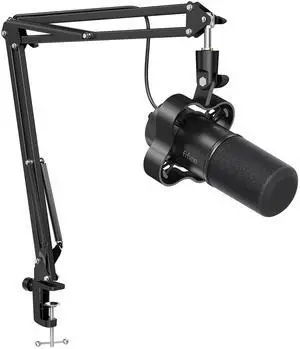
FIFINE K688 Neo USB/XLR Podcast Microphone - Dynamic Pro Mic, Mute & Monitor for Streaming, Gaming, Vocal & Music Recording Audio, for PC USB-C Smartphone Mixer, boom arm
  • Brand: FIFINE
  • Color: balck
  • Specification: Type: Dynamic Polar Pattern: Cardioid Output Connection: USB type-C (mic end) to type-A 2.0 (computer end)/XLR USB Power Consumption Voltage: 5 +-0.25 V Current: 86 mA Bit Depth/Sample Rate:16-bit/44.1k-48k Hz Frequency Response:70-15k Hz S/N Ratio: >75 dB Max. SPL:130 dB Sensitivity: -58+- 3dB Adjustable Gain Range: 0 to +12 dB Shipping Weight: 1.0 kg What's in the box? 1. Microphone with Shock Mount 2. USB Cable 3. Mic Boom Arm 4. Desk Clamp 5. 3/8" to 5/8" Adapter 6. User's Manual
  • Features: 1.Touch-mute, live monitoring & I/O level controls in USB mode guarantee user-friendliness. 2.The XLR not only adds more possibilities of connection & widens the use scenarios, but brings out the best. 3.Bright-sounding tone & easy-to-drive signal from a dynamic microphone are the sign...
  • Model #: K688 NEO CT
  • Item #: 9B-36-985-004
  • Return Policy: Iron Egg Guarantee Return Policy
Corsair Void V2 Wireless Gaming Headset w/ Bluetooth for PC, PS5, PS4, Switch, Mobile – Dolby Atmos, 70hr Battery, Dual Wireless, Lightweight, Fast Charging – Carbon
  • Brand: Corsair
  • Series: VOID WIRELESS
  • Part Number: CA-9011379-WW
  • Compatibility: Nintendo Switch / PC / PlayStation 5
  • Model #: CA-9011379-WW
  • Item #: 9B-26-816-223
  • Return Policy: Iron Egg Guarantee Return Policy
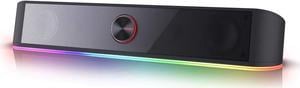
Redragon GS560 Adiemus RGB Desktop Soundbar, 2.0 Channel Computer Speaker with Dynamic Lighting Bar Audio-Light Sync/Display, Touch-Control Backlit with Volume Knob, USB Powered w/ 3.5mm Cable

+ $9.50 off w/ promo code BBNWF36, limited offer
  •  
  • $36.99 –
Creative Pebble 2.0 USB Desktop Speakers, Compact Stereo Sound, Far-Field Drivers, PC & Laptop Audio
  • Driver: 2.00"
  • Frequency Response: 100Hz - 17KHz
  • Signal to Noise Ratio(SNR): 86dB
  • Features: X Marks the Spot Featuring a 45° elevated custom-tuned far-field driver solution, the Creative Pebble directs audio to your ears, placing you in the sweet spot for great audio enjoyment. Small but Mighty With its built-in passive radiators and an impressive combined RMS of 4.4W, the small Creative Pebble is able to deliver balanced audio with depth, immersiveness and crystal clear details. Simply connect your device via the 3.5 mm input and get ready to be blown away. Convenience Within Reach Instantly control your volume with the Pebble's convenient front panel control knob. No Desk Space? No Problem Measuring at only 4.4 inches wide each, the Creative Pebble can be conveniently placed next to your PC monitor without compromising on valuable desk ...
  • Model #: 51MF1680AA000
  • Item #: 9B-0S6-004H-00065
  • Return Policy: Iron Egg Guarantee Return Policy
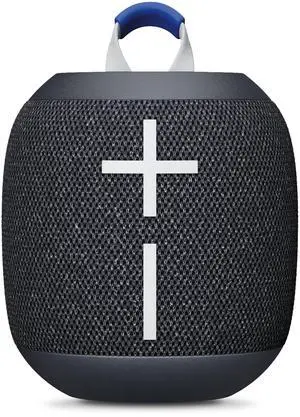
Ultimate Ears WONDERBOOM 4 Wireless Bluetooth Speaker - Blue
  • Brand: Ultimate Ears
  • Name: ULTIMATE EARS WONDERBOOM™ 4 - Blue
  • Part Number: 984-001877
  • Color: Blue
  • Model #: 984-001877
  • Item #: 9B-55-247-031
  • Return Policy: Iron Egg Guarantee Return Policy
Ultimate Ears WONDERBOOM 4 Wireless Bluetooth Speaker - Black
Logitech
Ultimate Ears WONDERBOOM 4 Wireless Bluetooth Speaker - Black
  • Brand: Ultimate Ears
  • Name: ULTIMATE EARS WONDERBOOM™ 4 - BLACK
  • Part Number: 984-001876
  • Color: Black
  • Model #: 984-001876
  • Item #: 9B-55-247-030
  • Return Policy: Iron Egg Guarantee Return Policy
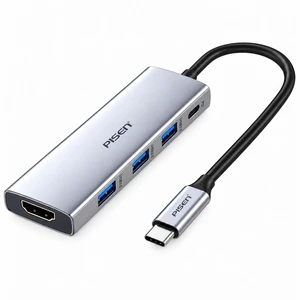
PISEN Type-C 5-in-1 Hub PGM-HB01
  • Brand: PISEN
  • Type: Type-C 5-in-1 Multi-Function Hub / Docking Station
  • Ports: 3 x USB 3.0, 1 x USB-C PD
  • Transfer Rate: Up to 5 Gbps
  • Model #: PGM-HB01
  • Item #: 9B-17-948-003
  • Return Policy: Iron Egg Guarantee Return Policy
  •  
  • $34.99 –
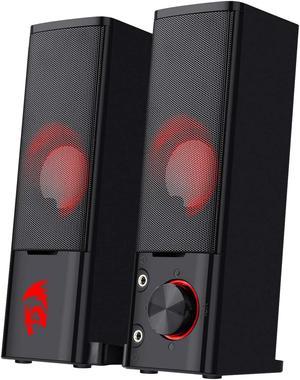
Redragon GS550 Orpheus PC Gaming Speakers, 2.0 Channel Stereo Desktop Computer Sound Bar with Compact Maneuverable Size, Headphone Jack, Quality Bass and Decent Red Backlit, USB Powered w/ 3.5mm Cable

+ $3 off w/ promo code BBNWF35, limited offer

  • Features: Plug & Play for Broad Compatibility. USB powered with 3.5mm audio and mic cables allows this rockstar to party on wide type of stages for PC, TV, and Laptop
  • Brand: Redragon
  • Series: GS550
  • Color: Black
  • Model #: GS550
  • Item #: 9B-19S-01WE-00016
  • Return Policy: Standard Return Policy
  •  
  • $24.99 –
Ultimate Ears - BOOM 4 Portable Wireless Bluetooth Speaker with Waterproof, Dustproof and Floatable design - Black
Logitech
Ultimate Ears - BOOM 4 Portable Wireless Bluetooth Speaker with Waterproof, Dustproof and Floatable design - Black
  • Brand: Ultimate Ears
  • Name: Ultimate Ears BOOM 4 Wireless Bluetooth® Speaker (Black)
  • Part Number: 984-001963
  • Color: Black
  • Model #: 984-001963
  • Item #: 9B-55-247-034
  • Return Policy: Iron Egg Guarantee Return Policy

How to Shop for Input Devices

Introduction

A computer input device such as a keyboard, mouse, and graphics tablet can have a huge impact on user experience and productivity. They need to be adequate for the tasks that they will be used to complete and also ergonomic, because they can be used for long periods of time every day. Below, NeweggBusiness has outlined some considerations to help you select top-notch computer input devices for your organization.

Mice

Purchasing a new mouse can be a very subjective process, as the ideal solution can vary from person to person. However, there are general considerations that hold true in most situations.

Dots Per Inch (DPI)

This refers to the resolution of the mouse, with higher DPI meaning more sensitivity. Some users may prefer higher DPI, but it can vary from person to person. High-DPI mice are usually marketed towards home consumers and tend to cost more than mice not marketed as high-DPI.

Size

The size of the mouse is largely a personal preference, but can affect portability. Smaller mice are more portable than larger ones, so professionals that use their laptops on business trips can benefit from smaller mice. Mice for desktops can be larger, as they usually will not be moved away from the workstation much.

Connectivity

Wired and wireless mice each have their own advantages and your purchasing decision will need to factor in the needs of the user as well as the computers that they will be used with.

  • Wired – The more cost-effective option of the two, wired mice are less portable since the wire can tangle while in transport. Most wired mice are USB though they usually do include PS/2 adapters. One disadvantage is that they are less portable and fit for travel than wireless mice.

  • Wireless – Wireless mice can be split into two camps, Bluetooth® mice and radio frequency (RF) mice. Bluetooth mice require the laptop or desktop to have Bluetooth functionality, which can be either built-in or added with a Bluetooth USB accessory. RF wireless mice all include USB receivers that specifically work with them. Whether you purchase a Bluetooth mouse or RF mouse, both are more portable than wired mice.

Keyboard

Like purchasing a mouse, purchasing a keyboard is a decision that is partially dependent on user preference. However, there are some general considerations that should be factored into your purchasing decision.

Ergonomics

If your organization’s staff is requesting sick days because of repeated strain injuries (RSI), it could be because their keyboards are not ergonomic enough.

Connectivity

Wired USB keyboards are standard for desktops and laptops, but some users may prefer the extra portability of wireless keyboards. Wired keyboards also tend to cost less, which makes them more attractive from a budget standpoint.

Wired – Most new wired keyboards use USB connectors, but many also include PS/2 adapters for systems that don’t have USB ports available. For the user, there is little difference between the two types and adapters can fix any compatibility issues.

Wireless – Using wireless keyboards can reduce cable clutter for desktop and laptop workstations, which may be beneficial for already crowded desks. Tablets can benefit from Bluetooth keyboards, as they allow a user to do word processing tasks much more easily.

Graphics Tablets

Graphics tablets are a type of input device that complement mice and are designed specifically for the needs of designers and artists. However, some users in non-design and artistic roles also prefer them over mice because graphics tablets can be more intuitive and ergonomic. Unless a workstation will be used for design or media purposes, a graphics tablet is usually not needed.

Final Words

Purchasing computer input devices for your organization is a non-trivial matter, but catering to every individual’s personal preferences is impractical. You should factor in general considerations such as what type of workstation the input device will be used with and what tasks the workstation will be used to complete. Avoid purchasing a computer input device with extra features that may go unused to lower costs.