










Featured Products See All
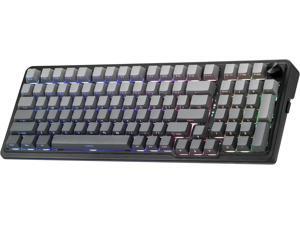
Redragon K686 PRO 98 Keys Wireless Gasket RGB Gaming Keyboard, 3-Mode PBT ...
$72 .99
Free Shipping
+ $20 off w/ promo code BFTTF235, limited offer
- GASKET Design - The body structure differs from traditional screw fixing by using precision-locked covers with gaskets to assist with noise reduction and flexibility. It provides even feedback while the vertical cushioning reduces rigid noise, delivering a crisp, clean and softer typing feel.
- 3-Mode Connection - Geared with Redragon advanced tri-mode connection technology, USB-C wired, BT 3.0/5.0 & 2.4Ghz wireless modes which make the user experience upgraded to another level in all fields.
- Custom Leopard L Switch - With thick-lubed custom linear switches combo with a gasket form factor, K686 PRO features cushioned rich linear travel with silky creamy and cozy typing feedback. The brand new upgraded socket is nearly all switches(3/5 pins) compatible.
- Noise Dampening x 5 - Equipped with 3.5mm PO foam, IXPE switch foam, PET sound pad, bottom socket foam, silicone bottom pad along with the silicone gasket. Significantly reduce the hollow noise, creating dampened and ultra-clean typing acoustics, making each keystroke satisfying and comfortable.
- Tactical 98 Keys - The innovative design keeps the original 100% layout’s function while shrinking the size 20% smaller to provide more compactness. Misery vibe gradient PBT keycaps with side-printed tech equipped with south-facing LEDs, the RGB glows never looked so good.
- ONE-Knob Control - Armed with a convenient easy access control knob, the keyboard backlight brightness and media (volume, play/pause, switch)
$72 .99
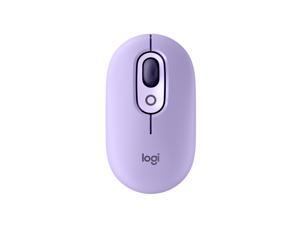

Logitech POP Mouse, Wireless Mouse with Customizable Emojis, SilentTouch Technology, ...
Save: $10.00 (33%)
$19 .99
Free Shipping
- Positive energy only: Open your mind with lavender and mystic purples in hand, giving you only good vibes with POP Silent Mouse in Cosmos
- Bold, comfy, quiet: A compact and comfy wireless mouse with up to 24-month battery life that fits snugly in your palm, handbag and computer case, with SilentTouch Technology for whisper-quiet working
- The emoji button: Press the colorful mouse's magic middle button to open a menu of emojis to use in your chats, or give it your own shortcut using Logitech Software (Windows and macOS only)
- Shift gears on the fly: As if reading your mind, POP Mouse’s SmartWheel shifts from high-precision tracking to speed scroll mode, helping you whizz through long documents with one confident flick
- FLOW between worlds: Connect to up to 3 devices on Windows, Mac, Chrome OS or Android using Bluetooth and glide between screens using the Easy-Switch button or FLOW
Save: $10.00 (33%)
$19 .99
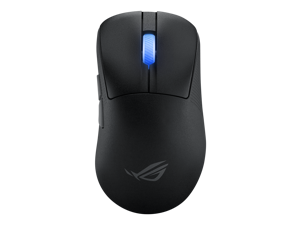

ASUS ROG Keris II WL Ace (54-gram ergonomic mouse, 42000-dpi, ROG Micro Switch, ...
Save: $19.00 (12%)
$140 .99
Free Shipping
- Lightweight 54-gram gaming mouse: Ergonomically shaped shell design is tested and approved by FPS esports professional
- ROG Polling Rate Booster: Attach the mouse receiver directly onto the device to drive polling rates up to 4000 Hz in wireless mode and up to 8000 Hz in wired mode.
- ROG AimPoint Pro optical sensor: 42,000-dpi optical sensor with < 1% deviation for ultimate precision, and track-on-glass capability
- ROG Optical Micro Switches: Clicky and instant actuation, with 100-million-click lifespan
- Tri-mode connectivity: Flexibility via wired USB, low-latency 2.4 GHz RF, or Bluetooth® mode that’s able to pair with up to three devices
- ROG SpeedNova wireless technology: Low-latency, reliable wireless 2.4 GHz RF performance and optimized energy efficiency
Save: $19.00 (12%)
$140 .99
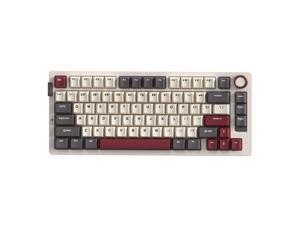

Rosewill Neon S75 Wireless Mechanical Gaming Keyboard, 80-Key Layout w/ Volume Knob, ...
$39 .99
Free Shipping
- Featuring a 75% layout with 80 keys, Gasket mount, and hot-swappable sockets for solder-free DIY customization.
- Enjoy versatile tri-mode connectivity (BT5.0, 2.4G, USB-C) and a dedicated quick-switch button for seamless transitions between devices.
- Equipped with a large 6000mAh battery for significantly extended usage time and long-lasting wireless performance.
- Bluetooth mode supports pairing with up to 3 devices and allows quick and easy switching among them.
- Fully compatible with both Windows and macOS systems, featuring a convenient hotkey for seamless system switching.
$39 .99
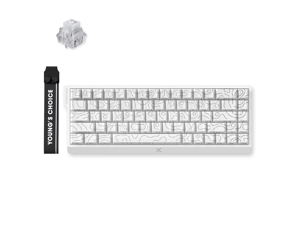
MCHOSE ACE 68 60% Mechanical Gaming Keyboard Wired Rapid Trigger Hall Effect Keyboard ...
$49 .99
Free Shipping
- Magnetic Switch Keyboard
- Up to 0.08 ms Latency
- Up to 0.001 mm RT Accuracy
- 8kHz Polling Rate
- 0 Dead Zone
- SOCD, RS, DKS, MT, TGL, Key Macros
- Hot-Swappable
- Adjustable Actuation
- 0.1- 3.4mm Actuation Range
$49 .99
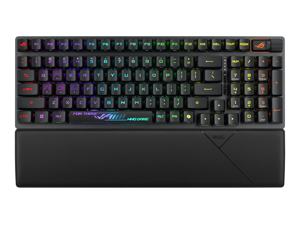
ASUS ROG Strix Scope II 96 RX Wireless Gaming Keyboard, Optical Switches, Low Latency ...
Save: $50.00 (28%)
$129 .99
Free Shipping
+ $10 off w/ promo code BFTTF224, limited offer
- 96% layout: Retains all function and number keys in a more compact and efficient layout that frees up desk space, with a form factor that is only 1 cm wider than a standard 80% keyboard.
- ROG RX optical switches: Light actuated for consistent wobble-free keystrokes with near-zero debounce delay.
- ROG-themed ABS keycaps: UV-coated keycaps with special ROG elements for unique look.
- Support ROG Polling Rate Booster: Achieves 8000 Hz polling rate and provides a 0.125 ms response time - up to 8X faster than other leading gaming keyboards.
- Tri-mode connection: Connect using Bluetooth? (up to three devices), 2.4 GHz with ROG SpeedNova wireless technology (up to 378 hours of battery life) or wired USB.
- Sound-dampening foam: Unique, integrated dampening foam structure absorbs pinging noises and echoes for improved keystroke acoustics.
- Enhanced typing experience: Pre-lubed keyboard stabilizers produce less friction for smoother keystrokes and stability for longer keys; UV-coated ABS keycaps offer a premium feel and shine resistance.
- Hotkeys: F1–F5 keys are pre-programmed as hotkeys for Xbox Game Bar and recording.
- Intuitive controls: Multi-function button and multiwheel for media playback, volume, and keyboard lighting.
- ROG Omni Receiver: Connect to multiple supported devices wirelessly with a single receiver.
- Ergonomic design: Three tilt positions and a detachable wrist rest.
Save: $50.00 (28%)
$129 .99
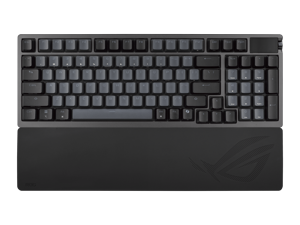
ASUS ROG Azoth 96 HE Wireless Gaming Keyboard, Hall Effect Magnetic Switches, ...
$319 .99
Free Shipping
- Hot-swappable ROG HFX V2 Magnetic Switch: Refined keystrokes with customizable 0.1-3.5mm actuation and 0.01mm-step precise tuning
- New ROG Hall Sensor: Exceptional precision, accurate input detection, reduces electrical noise and interference, and increases magnetic flux tolerance for superior performance
- Superb connectivity: ROG SpeedNova 8K wireless technology, wired USB, and Bluetooth connectivity supports up to five devices simultaneously; wired and wireless modes offer up to 8K polling rate
- Full-color OLED touchscreen: View system info and customize keyboard settings; built-in three-way knob allows for instant adjustments
- Gasket mount and six-layer dampening design: Delivers a cushioned typing feel, with four PORON® layers, an IXPE pad, and a silicone pad to absorb vibrations and switch pinging noises. Gasket softness can also be adjusted by swapping out the underlying dampening foam
- Refined top cover design: Redesigned metallic top cover enhances metallic aesthetics
- Extended Silicone Wrist Rest: Ensures comfortable typing experiences, and retains firmness over time
- Unique ROG-themed keycaps: Additional translucent keycaps with ROG markings provide unique customization options
$319 .99
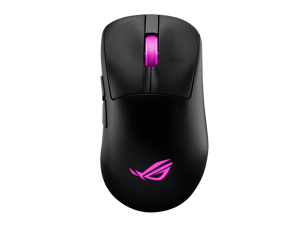
ASUS ROG Keris II Origin Wireless Gaming Mouse - Right-Handed Ergonomic, 65g, Tri-Mode ...
$144 .99
Free Shipping
- Ergonomic 65-gram design: Pro-tested shape built to cater to most grip styles
- Impeccable style: Individually customizable 3-zone RGB lighting, and pre-cut mouse grip tape that enables lighting to shine through
- ROG Push-Fit Switch Socket II: Exclusive switch design for quick, easy swaps and customization
- ROG Micro Switch II: Crisp clicks with exceptional 100-million-click lifespan
- ROG AimPoint Pro optical sensor: 42,000dpi optical sensor for ultimate precision, plus track-on-glass technology
- Ultrafast wireless performance: ROG SpeedNova wireless technology and compatibility with ROG Polling Rate Booster for up to 8000Hz polling rates
- Versatile connectivity: 2.4GHz wireless RF, Bluetooth, and wired USB; bundled ROG Omni Receiver supports multiple-device wireless connections with a single receiver
- ROG Paracord and 100% PTFE mouse feet: Quality materials facilitate smooth and fast movements
- Onboard control: Frequently-used mouse settings can be adjusted directly by pressing different mouse button combinations
$144 .99
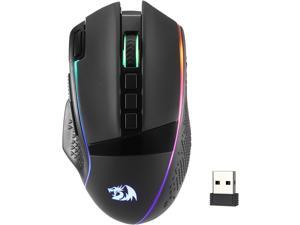
Redragon M991 Wireless Gaming Mouse, 26000 DPI 3-Mode Gamer Mice w/Rapid Fire Key, 9 ...
$36 .99
Free Shipping
+ $7 off w/ promo code BFTTF228, limited offer
- 3 Modes Connect Tech - Cables truly will affect your detailed battle reaction, M991 geared with BT and 2.4Ghz nano receiver offers you the purest and preciser mouse moving experience and hype your KDA rise again
- Acme Adjustable DPI to 26000 - Geared with 6 on-board DPI levels (1000/2000/4000/8000/13000/26000) which allow your mouse movements to be registered to each pinpoint location. 6 DPI levels are free to DIY with software, enable gamers to switch swiftly in game
- Easy Keybinding with Macro - All 9 programmable buttons are all editable with customizable tactical keybinds in whatever game or work you are engaging. 1 rapid fire + 2 side macro buttons offer you a better gaming and working experience
- Ultra Long-lasting Core - Equipped with the PAW3395 Optical Pixart sensor, the mouse consumption is further optimized with 1000Hz Polling Rate in dual mode. Durable rechargeable battery keeps the mouse working up to 240 hours at maximum (RGB OFF)
- Adjustable True Color - With Redragon Pr
$36 .99
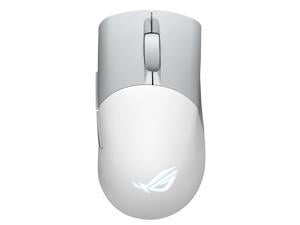
Asus ROG Keris Wireless AimPoint Gaming Mouse, Tri-mode connectivity (2.4GHz RF, ...
$114 .99
Free Shipping
- Perfect precision: 36,000 dpi ROG AimPoint optical sensor with 650 ips and 50 g acceleration rate, plus 1000 Hz polling rate
- Tri-mode connectivity: Game with RGB on for up to 119 hours with low-latency 2.4 GHz RF, pair up to three devices via Bluetooth® mode, or charge and play with wired USB
- ROG SpeedNova wireless technology: Delivering low-latency, reliable wireless performance and an optimized power solution in the 2.4 GHz RF mode
- Lightweight structure: Updated design with durable inner structure keeps mouse weight down to just 75 grams
- Push-Fit Switch Socket II: Swappable switch design for easy customization; Keris AimPoint includes ROG Micro Switches and is compatible with other 3-pin mechanical and 5-pin optical micro switches
- PBT L/R buttons: Feature a durable nonslip surface that resists wear or shine to ensure a consistent feel
- Anti-slip ROG patterned mouse grip tape: Provides users with a more secure grip and an added bit of flair
- Smooth and fast movements
$114 .99
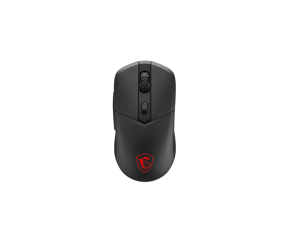

MSI VERSA 300 WIRELESS 8K VERSA3008K RGB Wireless Optical Gaming Mouse
Save: $20.00 (20%)
$79 .99
Free Shipping
+ $10 off w/ promo code BFTTF226, limited offer
- PIXART PAW3395 OPTICAL SENSOR, 26000DPI
- 8000Hz polling rate
- TRI-MODE WITH MSI SWIFTSPEED 2.4GHz Wireless(MSISWIFTSPEED)/ Bluetooth5.3 /USB2.0
- ULTRA-LIGHTWEIGHT COMFORT 66g
- UP TO 196 HOURS OF FAST-PACED AIMING
- RGB LED
- GAMING GRADE PURE 100% PTFE SKATES
Save: $20.00 (20%)
$79 .99
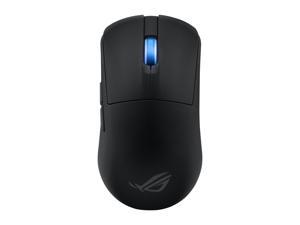
ASUS ROG Harpe Ace Mini Wireless Gaming Mouse, Lightweight, AimPoint Pro 42K Optical ...
$129 .99
Free Shipping
- A smaller form of the pro-approved Harpe Ace mouse, made to fit a wider spectrum of handshapes and grip types
- Optimized weight design to ensure maximum stability and control when flicking and tracking
- 42,000 dpi optical sensor with track-on-glass technology
- Instant actuation with every crisp click and a 100-million-click lifespan
- Flexibility with wired USB, low-latency 2.4 GHz RF, plus Bluetooth® mode
- Wireless performance with minimalized delays and maximized cursor precision with ROG SpeedNova wireless technology and compatibility with the ROG Polling Rate Booster
$129 .99
Loading Dynamic Data...
Questions to Ask When Purchasing Keyboards and Mice
Introduction
Shopping for keyboards and mice for your organization’s computers is a process that involves considering many factors, but the answers above will give you a better idea of what most professionals need and don’t need. To stay under budget, get a keyboard and mouse that fits the tasks at hand and avoid buying those with features that may go unused.
Keyboards
Do I need a wireless keyboard?
Wireless functionality in a keyboard can be a great feature if your organization’s staff can take advantage of it. A wireless keyboard is excellent for using a desktop from a distance, such as in a home theater PC situation. If your organization has computers that need to be controlled from a distance, a wireless keyboard is a solid alternative. Another reason to get a wireless keyboard is that it can reduce cable clutter if a desk already has too many cables for other devices. If your staff’s desks suffer from cable clutter that can’t be easily organized, then wireless keyboards are good choices.
Should I get a keyboard with special keys for software?
Some keyboards include additional keys for used by specific programs for quicker access to certain functions. Multimedia keyboards for instance include buttons that control audio and video playback for compatible programs. Other variations include keyboards with buttons to launch specific programs or act as shortcuts for Microsoft Office functions such as copy and paste. Unless your staff can take advantage of those extra keys and functionality, you can lower costs by choosing a no-frills keyboard.
What extra features are important?
Certain situations can necessitate keyboards with special functions, features, or ergonomics. For instance, if some of your staff work in unlit or dimly lit environments they may be more productive using backlit keyboards. Or if some of your staff type for long periods of time, keyboards with additional wrist rests or unique ergonomic key layouts can reduce the risk of carpal tunnel injury.
Mice
Do I need a high sensitivity mouse?
A high sensitivity mouse can sometimes be marketed as having high dots per inch (DPI) as well. DPI means dots per inch and is a measure of how many dots are in a given line one inch long. 800 DPI is average for most mice while high-DPI mice can range from the low to high thousands. Some high-DPI mice also have adjustable DPI, though they tend cost more. Unless your organization’s professionals require high-DPI mice, average sensitivity mice are more than adequate.
Should I get a wired or wireless mouse?
The choice between a wired or wireless mouse should take into account what type of computer the mouse will be used with and how it will be used. For a desktop computer, a wired mouse is sufficient unless the mouse will be used far away from the computer or there is a problem with cabling.
A laptop can benefit from a wireless mouse, especially if the laptop is often used while out of the office. If you are considering a wireless mouse, you can choose either radio frequency (RF) or Bluetooth. A RF mouse requires the laptop to use an attached USB receiver while a Bluetooth mouse requires your laptop to have Bluetooth functionality either built-in or added on with a USB Bluetooth receiver.
What is a trackball mouse?
A trackball mouse utilizes a ball locked in a socket with sensors that track the ball’s rotation. Instead of moving the entire mouse with your hand, a trackball mouse uses either the thumb or fingers to manipulate the ball. They can be beneficial for users that suffer from wrist injuries, as they minimize wrist movement.
