
Built for How Business Buys.
Your Browsing History







OUT OF STOCK
Shopping for keyboards and mice for your organization’s computers is a process that involves considering many factors, but the answers above will give you a better idea of what most professionals need and don’t need. To stay under budget, get a keyboard and mouse that fits the tasks at hand and avoid buying those with features that may go unused.
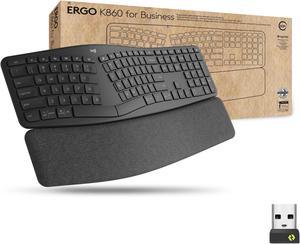
Wireless functionality in a keyboard can be a great feature if your organization’s staff can take advantage of it. A wireless keyboard is excellent for using a desktop from a distance, such as in a home theater PC situation. If your organization has computers that need to be controlled from a distance, a wireless keyboard is a solid alternative. Another reason to get a wireless keyboard is that it can reduce cable clutter if a desk already has too many cables for other devices. If your staff’s desks suffer from cable clutter that can’t be easily organized, then wireless keyboards are good choices.
Some keyboards include additional keys for used by specific programs for quicker access to certain functions. Multimedia keyboards for instance include buttons that control audio and video playback for compatible programs. Other variations include keyboards with buttons to launch specific programs or act as shortcuts for Microsoft Office functions such as copy and paste. Unless your staff can take advantage of those extra keys and functionality, you can lower costs by choosing a no-frills keyboard.
Certain situations can necessitate keyboards with special functions, features, or ergonomics. For instance, if some of your staff work in unlit or dimly lit environments they may be more productive using backlit keyboards. Or if some of your staff type for long periods of time, keyboards with additional wrist rests or unique ergonomic key layouts can reduce the risk of carpal tunnel injury.
A high sensitivity mouse can sometimes be marketed as having high dots per inch (DPI) as well. DPI means dots per inch and is a measure of how many dots are in a given line one inch long. 800 DPI is average for most mice while high-DPI mice can range from the low to high thousands. Some high-DPI mice also have adjustable DPI, though they tend cost more. Unless your organization’s professionals require high-DPI mice, average sensitivity mice are more than adequate.
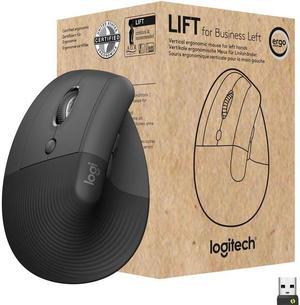
The choice between a wired or wireless mouse should take into account what type of computer the mouse will be used with and how it will be used. For a desktop computer, a wired mouse is sufficient unless the mouse will be used far away from the computer or there is a problem with cabling.
A laptop can benefit from a wireless mouse, especially if the laptop is often used while out of the office. If you are considering a wireless mouse, you can choose either radio frequency (RF) or Bluetooth. A RF mouse requires the laptop to use an attached USB receiver while a Bluetooth mouse requires your laptop to have Bluetooth functionality either built-in or added on with a USB Bluetooth receiver.
A trackball mouse utilizes a ball locked in a socket with sensors that track the ball’s rotation. Instead of moving the entire mouse with your hand, a trackball mouse uses either the thumb or fingers to manipulate the ball. They can be beneficial for users that suffer from wrist injuries, as they minimize wrist movement.


