


Blu-Ray Burners - Showing 49 - 49 of 49 Products
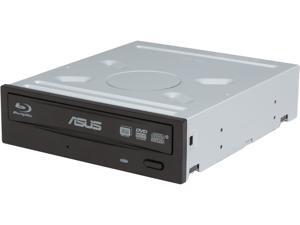

Refurbished: ASUS Black 12X BD-R 2X BD-RE 16X DVD+R 12X DVD-RAM 8X BD-ROM 8MB ...
- Cache: 8MB
- BD-R: 12X
- BD-RE: 2X
- DVD+R: 16X
- DVD+RW: 8X
- DVD-R: 16X
- DVD-RW: 6X
- CD-R: 48X
- Model #: BW-12B1ST
- Item #: 9SIVS12KST3163
- Return Policy: LINKNET NETWORK LIMITED Return Policy
Blu-ray Burner Tips You Should Know
Introduction
As Blu-ray™ media becomes more common, the prices of Blu-ray burners and readers have slowly decreased. In addition to being the new optical standard for high definition multimedia entertainment, Blu-ray media has many advantages as a data storage solution. A single-sided, single-layer Blu-ray disc is capable of storing up to 25 GB of data. Below, NeweggBusiness provides tips and advice to users shopping for a Blu-ray burner.
Blu-ray Burner Write Speeds
The write speed of a Blu-ray burner greatly impacts the amount of time required to burn data onto Blu-ray media. Similar to other types of optical recorders such a DVD burner, a Blu-ray burner’s speed is rated as a factor of X. For DVD and Blu-ray discs, 1X is equal to 1.35 MBps and 4.39 MBps respectively.
Authoring Blu-ray Media
In order to properly author Blu-ray discs so they can be played with other Blu-ray drives and players, you will need to use authoring software. While operating systems typically have built-in burning capabilities that allow users to burn data discs, they often cannot burn Blu-ray multimedia discs for playback with Blu-ray players.
Blu-ray Disc Playback
Playing encoded Blu-ray discs such as movies requires Blu-ray-specific codecs to be installed. Unfortunately, PC operating systems typically do not have such codecs preinstalled. However, Blu-ray codecs are included with specialized multimedia playback software such as PowerDVD or WinDVD®.
Adding a Blu-ray Burner to a Laptop
To add Blu-ray functionality to a laptop, you can either use an external optical drive or upgrade the laptop’s existing internal optical drive if it has one. However, there may be some compatibility issues with internal Blu-ray burners and laptops. If you want to add a Blu-ray burner to your laptop, an external model is easier to install.

