




Featured Products
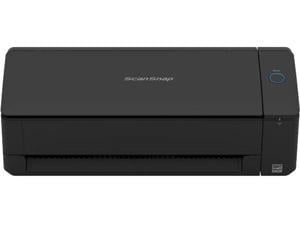
Ricoh ScanSnap iX1300 Document Scanner - Black
Save: $40.00 (13%)
$279 .99
- Easy One-Button scanning
- Optical Resolution: 600 dpi
- Scan Speed: 30 ppm
- 20-page Automatic Document Feeder with U-turn Path Ejection
- Manual Feeder with Return Path Ejection
- Dual-feeder Duplex Scanning
- Connect by Wi-Fi (2.4/5 GHz) and USB 3.2 (cable incl.)
- Wireless Router Connect and Direct Connect modes
- Paper skew protection
- Fast Startup
- Scan to PC, Mac, iOS, Android and Chromebook
- Device-less scanning to ScanSnap Cloud (optional)
- Scan documents, receipts and paperwork with Automatic Document Feeder
- Scan envelopes, business cards, plastic cards, folded A3 documents, booklets, photos and more with Manual Feeder
Save: $40.00 (13%)
$279 .99

Brother ADS3100 600 x 600 dpi Sheet Fed High-Speed Desktop Scanner for Small Office & ...
$399 .99
- 600 x 600 dpi
- 1200 x 1200 dpi
$399 .99

Brother ADS-4300N 600 x 600 dpi Duplex Document Scanner
$433 .00
Free Shipping
- 600 x 600 dpi
- 1200 x 1200 dpi
$433 .00
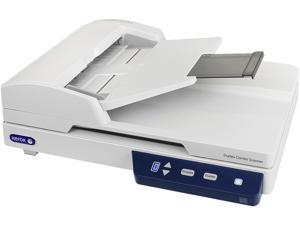
XEROX XD-Combo 600 dpi 24-bit color, 8-bit grayscale, 1-bit black & white Hi-speed USB 2.0 ...
$308 .99
Free Shipping
- CIS Image Sensor
- 600 dpi 24-bit color, 8-bit grayscale, 1-bit black & white
- Hi-speed USB 2.0 (3.0 compatible) Interface
$308 .99
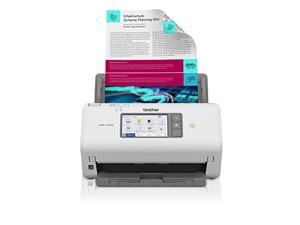
Brother ADS4700W Dual CIS 600 x 600 dpi Sheet Fed Professional Desktop Scanner
$599 .99
OUT OF STOCK
- Dual CIS
- 600 x 600 dpi
- 1200 x 1200 dpi
$599 .99
Loading Dynamic Data...
Tips for Buying a Scanner
Introduction
Scanners are essential tools for professionals that need to transfer physical documents and images onto a digital format for editing or record keeping. However, shopping for a scanner can be a complicated process, requiring knowledge of key technologies and types of scanners. If you are just beginning that process or are already in the thick of it, the information below will help you make an informed purchasing decision.
Key Technologies
Charge-coupled Device (CCD)
A CCD scanner uses a light source to illuminate the document being scanned. Then the image is magnified by a lens, which is captured by an image sensor similar to what you would find in a DSLR camera. This allows for high resolution details and more color information to be captured.
Contact Image Sensor (CIS)
Instead of using one lens, a CIS scanner uses many small fiber optic lenses to transfer the image to an array of sensors. A CIS scanner is usually less expensive than a CCD scanner, though image quality may not be as high.
Resolution
For monitors and televisions, resolution is given as the number of pixels in each dimension (length x height). But for scanners, resolution is rated in dots per inch (DPI) or pixels per inch (PPI). Both refer to the number of dots or pixels in a given line one inch long. The higher the resolution or DPI, the more detail and better quality the scanned image will be. Unfortunately, higher resolution scanners may end up costing more, but are able to capture smaller details. Aim for around 300 DPI for scanning text and 600 DPI for web-quality images. If your organization plans to reprint scanned images however, you will need to find a scanner with even higher DPI.
Color Depth
Color depth for scanners is rated in bits per pixel and is a measure of how much color data a scanner can capture. The higher the bit rating, the higher color depth is and therefore more colors able to be captured. When shopping for a scanner, aim for 24-bits for scanning text, and 36 for images.
Software
If you need specialty scanning software, try to find a scanner with that software bundled with it to avoid spending extra on programs. For instance, text recognition programs are available separately, but you can lower costs by buying a scanner that is bundled with text recognition software.
Duplex
This refers to being able to scan both sides of a page at once. Not needed unless your organization expects to scan many double sided documents, as duplex scanners tend to cost more.
Automatic Document Feeder (ADF)
An ADF automatically feeds the next page in a multiple page document into the scanner and is useful feature to have if your organization often scans stacks of papers. One advantage is that an ADF scanner will allow your organization’s professionals complete other tasks while waiting for the scanner to finish scanning.
Types of Scanners
Flatbed
Flatbeds are versatile scanners that can be used to scan a variety of different objects, both thick and thin. The object that will be scanned is placed on the transparent scanner bed and as long as it can fit, it can be scanned. Flatbed scanners work well with letter sized office paper but some may be incompatible with larger legal paper sized documents. As a bonus, they can also be used to scan thicker objects such as pages on books and magazines.
Document
These scanners can resemble printers or fax machines with trays to load blank papers. They often have automatic document feeders and are compatible with document sizes, from letter to legal. However, they are not able to scan larger objects such as books, magazines, or notepads.
Portable
The term portable scanner can refer to two different types of scanners, barcode scanners and portable document scanners. Barcode scanners are used to scan just barcodes while portable document scanners are used to scan paper documents. Portable document scanners are useful tools for professionals that need to scan documents while on business trips.
Business Card
Designed to scan business-card-sized objects, many can be used to scan ID cards, credit cards, and other items with similar dimensions.
Conclusion
While shopping for a scanner, keep the above tips in mind and you will be able to make an informed decision. There are many different technologies and types of scanners, of which some may be unneeded by your organization. Identifying the scanner that best fits your organization’s needs instead of buying the most feature-packed one will save costs down the line.
