




Shop by Type



Featured Products See All
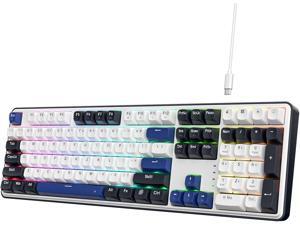
Redragon K689 Wired Gasket RGB Gaming Keyboard, 108 Keys Mechanical Keyboard w/Extra ...
$49 .99
Free Shipping
+ $13 off w/ promo code BCYGF62, limited offer
- REDRAGON GASKET OUT - The body structure differs from traditional screw fixing by using precision-locked covers with gaskets to assist with noise reduction and flexibility. It provides even feedback while the vertical cushioning reduces rigid noise, delivering a crisp, clean and softer typing feel.
- Full Size 108 Keys Layout - 104 keys anti-ghosting allows you to simultaneously click multiple keys. While adding the extra 4 shortcut keys, featuring more convenience and practicality.
- Custom Dragon Chant Switch - With thick-lubed custom linear switches combo with a gasket form factor, K689 features cushioned rich linear travel with silky creamy and cozy typing feedback.
- Noise Dampening x 3 - Equipped with 3.5mm PO foam, IXPE switch foam, bottom socket foam along with the silicone gasket. Significantly reduce the hollow noise, creating dampened and ultra-clean typing acoustics, making each keystroke satisfying and comfortable.
- Ergonomic Design - The 2 stage adjustable feet makes typing more comfortable and relaxes your wrists. 3 colors Mixed Keycaps adding more DIY interest. When every time you play the game it can be a different experience.
- Pro Software Supported - Expand your options using the available software to design your own new modes and effects found on redragonshop. Macros with different keybindings or shortcuts for more efficient work and gaming.
$49 .99
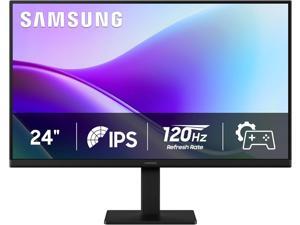

Samsung S3 24 inch Full HD 120Hz IPS Flicker Free, Eye Saver Mode 2x HDMI ports LCD ...
Save: $20.00 (14%)
$119 .99
Free Shipping
- VIVID COLORS ACROSS THE WHOLE SCREEN: Experience stunning colors across the entire display with the IPS panel. Colors remain bright and clear across the screen, even when you change angles.
- SMOOTH PERFORMANCE ACROSS VARIOUS CONTENT: Stay in the action when playing games, watching videos, or working on creative projects. The 120Hz refresh rate reduces lag and motion blur so you don't miss a thing in fast-paced moments.
- OPTIMIZED GAME SETTINGS FOR EACH GENRE: Gain a competitive edge with optimizable game settings. Color and image contrast can be instantly adjusted to see scenes more clearly, while Game Picture Mode adjusts any game to fill your screen.
- EASY ON THE EYES: Protect your vision and stay comfortable, even during long sessions. Stay focused on your work with reduced blue light and screen flicker.
- A MODERN AESTHETIC: Featuring a super slim design with ultra-thin border bezels, this monitor enhances any setup with a sleek, modern look. Enjoy a lightweight and stylish addition to any environment.
- CONNECT TO MORE: Plug devices straight into your monitor for increased flexibility, making your computing environment even more convenient.
Save: $20.00 (14%)
$119 .99
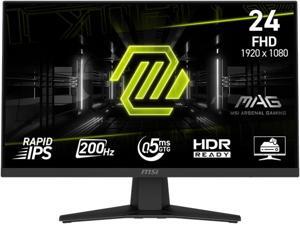

MSI 24 inch (23.8" viewable) Full HD 200Hz IPS with AMD FreeSync Premium 0.5ms HDR Ready ...
Save: $20.00 (17%)
$99 .99
Free Shipping
- Ultra-Fast 200Hz Refresh Rate - Smooth, responsive gameplay with a 200Hz refresh rate and 0.5ms (GtG, Min) response time, perfect for FPS, RPG/MMORPG, and racing simulators.
- HDR Ready Display - Enhances contrast and shadows for more vivid and immersive visuals.
- Rapid IPS Panel - Accurate colors and wide 178° viewing angles with anti-glare coating for reduced reflections.
- Adaptive Sync Technology - Supports AMD FreeSync Premium to reduce screen tearing and stuttering during gameplay.
- Console Ready - Supports VRR on PS5 and Xbox, plus HDMI CEC for easy console integration.
- Ergonomic & Functional Design - Tilt-adjustable stand, VESA mounting support (100x100mm), and compact design for desktop setups.
Save: $20.00 (17%)
$99 .99
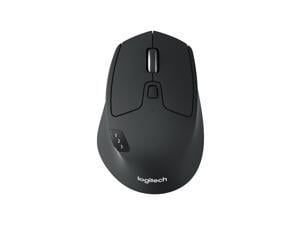

Logitech M720 Triathlon Wireless Multi-Device Mouse, Bluetooth & USB Receiver, Ergonomic ...
$39 .99
Free Shipping
- Long-lasting and Versatile: Designed for endurance with 24-month battery life (1), M720 is compatible with computers, laptops and tablets, Windows, macOS, Chrome OS, Linux, and iPadOS.
- Comfortable Grip: Crafted for the right hand, this full-sized wireless PC mouse features a rubber body and a sculpted design for palm rest grip and comfort like never before
- Hyper-Fast Scrolling: Fly through long documents and web pages with a simple spin of the mouse wheel with the additional instant-stop feature and an option to switch to click-to-click scrolling
- Dual Connectivity: Connect the cordless mouse via Bluetooth or the wireless Logitech Unifying receiver, which lets you connect up to 6 compatible Logitech peripherals with only 1 USB receiver
- Multi-Device Wireless Mouse: Move cursor, text, and files across multiple computers with Logitech FLOW; easily switch between up to 3 computers or laptops with the touch of a button
- Product carbon footprint: 5.08 kg CO2e
$39 .99
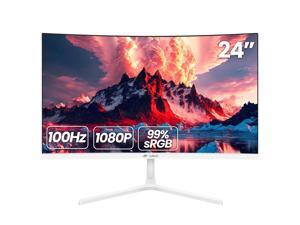

CRUA 24 Inch Curved Monitor, FHD(1920×1080p) 100HZ 99% sRGB Computer Monitors, LED ...
$119 .99
Free Shipping
- 1. Basic parameters: Screen size: 23.8 inches Backlight type:LED Display type: VA panel Brightness (typ.): 250 cd/m² Contrast Ratio (Typical): 3000:1 (Type) (TM) Resolution (Ma×. ): 1920×1080 Response time (typ.): 4 (type.) (Tr+Td) ms Viewing angle (horizontal/vertical): 89/89/89/89/89 (Type. ) (CR10) Color support: 16.7 million colors, 8-bit 2. Interface VGA:VGA×1 HDMI: HDMI 1.4 × 1 DP:none Type: DC 12V 2.5A Power adapter: 12V 2.5A 2.0mm 3. Design Plug and play: supported Frame design: 3 sides frameless 4. Packaging contents:
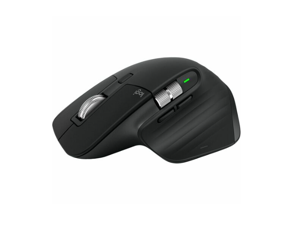
Logitech MX Master 3S Black 7 Buttons 2 x Wheels Bluetooth Bluetooth Wireless Darkfield high ...
Save: $10.00 (10%)
$89 .99
Free Shipping
- 7 Buttons 2 x Wheels
- Bluetooth Bluetooth Wireless
- Darkfield high precision
Save: $10.00 (10%)
$89 .99
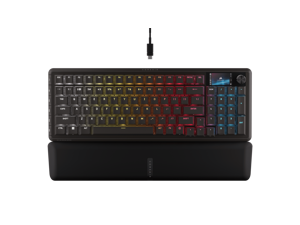

Corsair Vanguard 96 Wired Mechanical Gaming Keyboard – 96% Layout, MLX Plasma Linear ...
Save: $30.00 (17%)
$149 .99
Free Shipping
- 96% keyboard that keeps it 100: The optimized 96% layout means you'll have full keyboard with arrow keys, a tenkey pad, an LCD screen, rotary dial, and 6 programmable G-keys, but in a super-compact frame that's roughly the size of a TKL keyboard.
- Vibrant full-color LCD screen: The keyboard of the future is here! Personalize your keyboard on a whole new level with a luminous integrated 1.9 inch LCD screen you can use to display custom animations, images, system specs, and more.
- Maximize every millisecond: Utilize ultra-responsive 8,000Hz hyper-polling to eradicate input lag. Get the fastest response times for your in-game actions and stream commands.
- Elgato Virtual Stream Deck integration: Map Stream Deck functions directly to the VANGUARD 96's programmable G-keys and utilize Virtual Stream Deck to create clickable shortcuts. Unlock a world of new found productivity and enhanced in-game performance.
- FlashTap SOCD: With CORSAIR FlashTap SOCD handling, choose how the keyboard should resolve accidental SOCD inputs so you can Move Like You Mean It.
Save: $30.00 (17%)
$149 .99
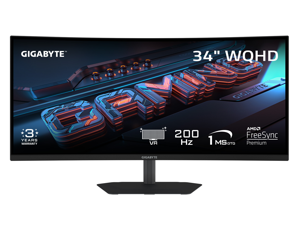

GIGABYTE 34 inch QHD 2K 1440P 200Hz AMD FreeSync Premium HDR400 Built-in Speakers ...
Save: $30.00 (11%)
$249 .99
Free Shipping
- NATIVE 1500R VA PANEL- The G34WQC2 features a stunning 34-inch curved VA display for a view closer to the human eye than a flat monitor, giving you a more immersive feel.
- COMPETITIVE EDGE WITH 200HZ REFRESH RATE AND 1MS RESPONSE TIME - Achieve a super-fast response time and smooth motion clarity with an 200Hz refresh rate and 1ms GTG response time.
- WIDE COLOR GAMUT - With 4000:1 contrast ratio, 95% DCI-P3 coverage, and 8-bit color depth, you can experience a fantastic color display and wide-gamut color coverage.
- SUPPORT VESA DISPLAY HDR 400 - With VESA DisplayHDR 400, the G34WQC2 ensures a more realistic and captivating gaming experience with accurate color and contrast reproduction.
- SUPPORT AMD FREESYNC PREMIUM - With AMD FreeSync Premium, the G34WQC2 provides an enhanced gaming experience by reducing screen tearing and stuttering.
- TACTICAL FEATURES TO ENHANCED GAMEPLAY - The G34WQC2 monitor elevates your gameplay with a suite of built-in, tactical assistance features designed to give you the edge in precision and control. Game Assist features, including Smart OD, timer, and crosshairs, help you on tracking the elapsed game time and focus on your in-game enemy.
- ERGONOMIC DESIGN - Get the perfect viewing angle (up to 178°) with an exclusive stand that's ergonomically designed to offer an extensive range of height adjustment (130mm), tilt (-5°~+21°), and swivel (+/-15°) adjustments.
Save: $30.00 (11%)
$249 .99
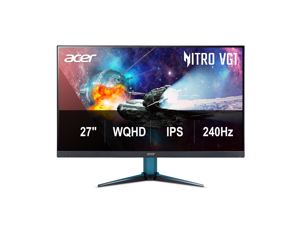

Acer Nitro 27 inch WQHD 2K 1440P 240HZ IPS 0.5ms with AMD FreeSync Premium HDR400 ...
Save: $130.00 (43%)
$169 .99
Free Shipping
- 27inch 2560x1440P IPS Gaming Display
- 240Hz refresh rate and 0.5ms response time
- VESA HDR400
- 99% sRGB Color Gamut
- AMD Freesync Premium Technology
- HDMIx2, DisplayPort, Speaker
Save: $130.00 (43%)
$169 .99
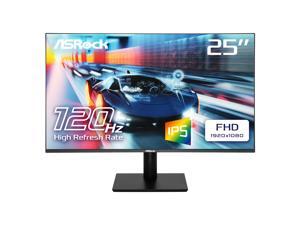

ASRock Phantom 24" (24.5" viewable) Full HD 120Hz IPS 1ms low blue light LCD Gaming ...
Save: $42.20 (37%)
$71 .79
- 25" (24.5" viewable) FHD (1920 x 1080) Flat IPS Display
- 120Hz High Refresh Rate
- 1ms (MPRT) Response Time
- 103% sRGB sRGB Color Space
- Wide 178-Degree Viewing Angles
- Flicker Free Technology
- ASRock Low Blue Light Technology
- 1 x HDMI 1.4; 1x VGA
- Tilt Adjustment -5°~+20°
- VESA Mount: 100 x 100 mm (4 screw holes), M4 x 12 mm
Save: $42.20 (37%)
$71 .79
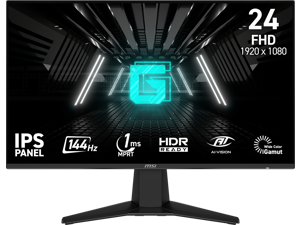
MSI 24 inch (23.8" viewable) Full HD 144Hz IPS AMD FreeSync 1ms HDR Ready Ai Vision Less ...
Save: $15.00 (15%)
$84 .99
Free Shipping
- 144Hz Ultra-Smooth Gameplay - Respond faster with a 144Hz refresh rate for fluid and competitive gaming performance.
- 1ms MPRT Response Time - Minimize motion blur and eliminate screen tearing for fast-paced titles.
- IPS Panel With Wide Color Gamut - Enjoy vivid colors, sharp visuals, and 178° viewing angles.
- Adaptive-Sync Technology - Prevents screen tearing and stuttering for ultra-smooth gameplay.
- Night Vision + Eye Care - Enhances dark scenes while Anti-Flicker and Less Blue Light features reduce eye strain.
- Frameless and Console-Friendly - Slim bezels for maximum immersion. Supports HDMI CEC, 120Hz console mode, and VRR for PS5 and Xbox.
Save: $15.00 (15%)
$84 .99
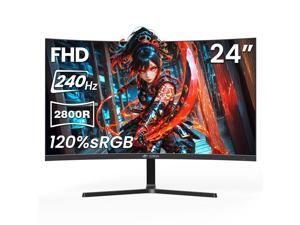
CRUA 24 240Hz Gaming Monitor, Curved FHD 1920 x 1080P, Support 120% sRGB, AMD ...
$129 .99
Free Shipping
- Ultra-Fast 240Hz Curved Gaming Monitor: Immerse yourself in smooth, ultra-responsive gaming with this 24-inch 2800R curved FHD 1920×1080 monitor. The 240Hz refresh rate ensures crisp visuals for FPS, esports, fast-paced PC games, and seamless office multitasking, delivering a competitive edge and incredible clarity. Vivid, Accurate Colors with 120% sRGB & AMD FreeSync: Experience lifelike colors with 120% sRGB color gamut, 250cd/m² brightness, 8-bit, 16.7 Million color gamut, 3000: 1 dynamic contrast, and AMD FreeSync technology. Say goodbye to screen tearing and stutter while enjoying gaming, video editing, content creation, and professional office work with brilliant, true-to-life visuals. Eye-Care & Low Motion Blur for Long Sessions: Designed with flicker-free technology and low blue light, this monitor reduces eye strain during extended use. Low motion blur keeps every detail sharp, ideal for gaming marathons, video streaming, office productivity, and creative projects. Versatile Connectivity & Space-Saving Design: Connect effortlessly with HDMI 2.0 and DP 1.4 ports, 3.5mm audio port(Connected to play audio, no built-in speakers), and wall mount support 75mm*75mm specification. The wall-mount compatible design frees up desk space, perfect for home office setups, laptops, professional workstations, gaming desks, or dual-monitor arrangements, blending high performance with flexible installation.
Loading Dynamic Data...
Computer Peripherals and Accessories Guide
Introduction
Computer peripherals are devices that are not a part of the computer, but instead complement it. Some peripherals such as monitors are essential, while others such as graphics tablets are specialized for specific tasks. Learn more about the many different types of computer peripherals and their uses below.
Computer Peripherals
Monitors
A monitor is an essential computer peripheral for many desktop systems, with some workstations having multiple for increased productivity. When shopping for a computer monitor, you should check compatibility with the computer’s video card. If the video card is unable to output the monitor’s native resolution, you may have to upgrade the video card or system.
Keyboards
Together with mice, keyboards are essential computer input peripherals. Even tablets and touchscreen computers can benefit from having keyboards, particularly for tasks such as word processing. Aside from comfortable ergonomics, some beneficial features that you may want to consider include backlighting, touch functionality, wireless connectivity, programmable keys, and more.
Mice
A computer mouse is another computer input peripheral that can be used for hours on end, so it needs to be ergonomic. Otherwise, users may experience strain-related injuries over a long period of time. Other considerations include wireless connectivity, smaller dimensions for portability, or a trackball design.
Printers
Though some organizations are migrating to paperless environments, there are industries and commercial sectors that continue to utilize printers daily. For instance, printing receipts and sales orders is sometimes required when working with clients and customers.
There are two main types of printers, laser and inkjet. The benefits of a laser printer include fast print speeds, high color accuracy, and high page yields for toner cartridges. However, an inkjet printer can have a lower initial purchase cost compared to a laser printer.
Scanners
Scanners are essential computer peripherals for users that need to save physical documents and images digitally for editing and archiving. There are two main types of scanners to choose from, flatbed and document-fed.
If your staff mostly scans paper media, document scanners are ideal. But for larger items such as books and magazines, you will need a flatbed scanner.
Power Management Devices
Power management devices are computer peripherals that regulate and split power delivery to electronic equipment. They allow your staff to safely power down their computers in case of blackouts and protect equipment from electrical surges and spikes.
Projectors
Unlike monitors, projectors are designed to display content for more than one user. When shopping for a projector, pay attention to important specifications such as brightness, resolution, and contrast ratio.
You should also consider what type of projector you need. There are three main projector technologies, LCD, DLP, and LCoS.
- LCD – LCD projectors have high color accuracy and brightness, but are not ideal for displaying content onto large surface areas.
- DLP – Compared to LCD, DLP projectors are capable of higher contrast ratios but have lower color accuracy.
- LCoS – Though LCoS projectors have high levels of brightness and color accuracy, they tend to cost more and have lower contrast ratios.
Microphones
Microphones can range from relatively basic desktop mics for conferencing to advanced condenser mics for studio-quality sound recording. To lower cost, choose one that is adequate for the task at hand rather than one with the most features.
Graphics Tablets
Like keyboards and mice, graphics tablets are a type of input device. However, they have a much more specialized purpose. They allow designers and artists to create digital images and designs free-hand, similar to using a pen or pencil.
Webcams
For teleconferencing and online meetings, video can be just as important as audio. Along with microphones, webcams can be used to facilitate more immersive and informative meetings. They are ideal computer peripherals for professionals that need to present sales information to clients, share design mockups with fellow team members, or interview potential employees.
